You are here:
Monitor Salesforce Logins with the Lightning Usage App
Use the Login Metrics tab in the Lightning Usage App to monitor logins in your org. See how many users are logging in with your org’s various identity services, including multi-factor authentication (MFA) and single sign-on (SSO).

MFA requirements are changing in June 2026.
- Salesforce enforces MFA for direct UI and SSO logins for all employee users across production and sandbox orgs. See Prepare for MFA Enforcement for All Employee Users.
- Salesforce requires phishing-resistant MFA for users with the System Administrator profile or certain permissions. See Prepare for Phishing-Resistant MFA Enforcement for Privileged Users including Admins.
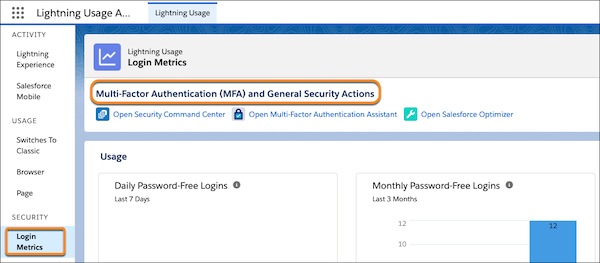
To access the Lightning Usage App, from the App Launcher ( ), find and open Lightning
Usage. From the app, click Login Metrics under SECURITY
on the left side of the page to view the associated data. The Login Metrics page shows login
data for password-free, single sign-on (SSO), and username and password login methods, with
and without MFA, for the last 7 days and the last 3 months. For more MFA and security
resources, click any of the links below Multi-Factor Authentication (MFA) and General Security
Actions.
), find and open Lightning
Usage. From the app, click Login Metrics under SECURITY
on the left side of the page to view the associated data. The Login Metrics page shows login
data for password-free, single sign-on (SSO), and username and password login methods, with
and without MFA, for the last 7 days and the last 3 months. For more MFA and security
resources, click any of the links below Multi-Factor Authentication (MFA) and General Security
Actions.
-
Password-free logins track certificate-based logins, Lightning logins, and passwordless logins.
-
Single sign-on logins track Salesforce and third-party logins done via federated SSO, including the SAML and OpenID Connect open standards.
-
Delegated Authentication logins are tracked under the Username and Password login metric.
-
Logins with MFA track direct logins to Salesforce only.