
You are here:
Frequently Asked Questions
Have questions? We’ve compiled answers to frequently asked questions about Essentials retirement and upgrade to Pro Suite.
Migration Timeline FAQs
Can I opt out of the Pro Suite upgrade and stay on Essentials until the end of my contract?
To ensure you have the best experience, we’re moving all Essentials orgs to Pro Suite. If you have concerns about this transition, please reach out to your Salesforce Account Executive.
What are the important dates to know?
For more information, see The Migration Timeline.
What will happen to my auto-renewal for Essentials?
Auto renewals will stop on August 18, 2026.
What happens if I don’t consent to the Pro Suite upgrade by the retirement date?
You will lose access to your Essentials org and you won't be able to login.
What if my contract end date extends beyond the Essentials retirement date and I don’t upgrade to Pro Suite?
You’ll be credited for the remaining contractual months.
Migration Guidance FAQs
Will my login to my org change?
No, you can use the same Essentials login information to access Pro Suite.
Will I lose any of my data in the migration?
No. Your existing data, customizations, reports, and configurations are preserved during the automated migration process. There is no expected data loss or downtime during the upgrade.
Will I lose any functionality in the migration?
Functionality is largely preserved in Pro Suite. In very limited instances we’ve replaced some older Essential tools with newer and improved Pro Suite tools.
| essentials feature | equivalent pro suite feature |
|---|---|
| Basic Sales Setup | Quick Setup |
| Basic Service Setup | Quick Setup |
| Essentials pocket guide | Guidance Center |
| Favorites (bookmark page) | Not in Pro Suite. You can use your web browser bookmark option to favorite a Pro Suite page. |
| Export reports to .XLS extension type | Export to .XLSX or .CSV only. |
Is it mandatory to turn on additional Pro Suite features as described in the Welcome to Pro Suite window?
Yes, you must turn on the additional Pro Suite features in order to keep your Pro Suite org up to date with future upgrades. You’ll see the Welcome to Pro Suite reminder at every log in until you do so.
What will my org look like post Pro Suite migration?
Your org will look and feel very much like Essentials, with some upgraded changes. A new vertical navigation menu appears on the left side of the home page, which you can use to easily access all of your most used apps, like Sales, Service, Contacts (new app), Accounts (new app), and so forth. You will also have access to a new Quick Settings (gear icon).
Tip: Check out the new Pro Suite version of Sales and Service apps. See next question for more details.
Why are there two versions of Sales and Service Apps in my Pro Suite org?
Once you transition to Pro Suite, you may notice two apps labeled “Sales” and two apps labeled “Service.” One version represents the app used in your Essentials org and the other represents the new app designed for the Pro Suite org. You can tell the apps apart by their icons. 1) Pro Suite apps have solid-colored icons 2) Essentials apps have outline-only icons.
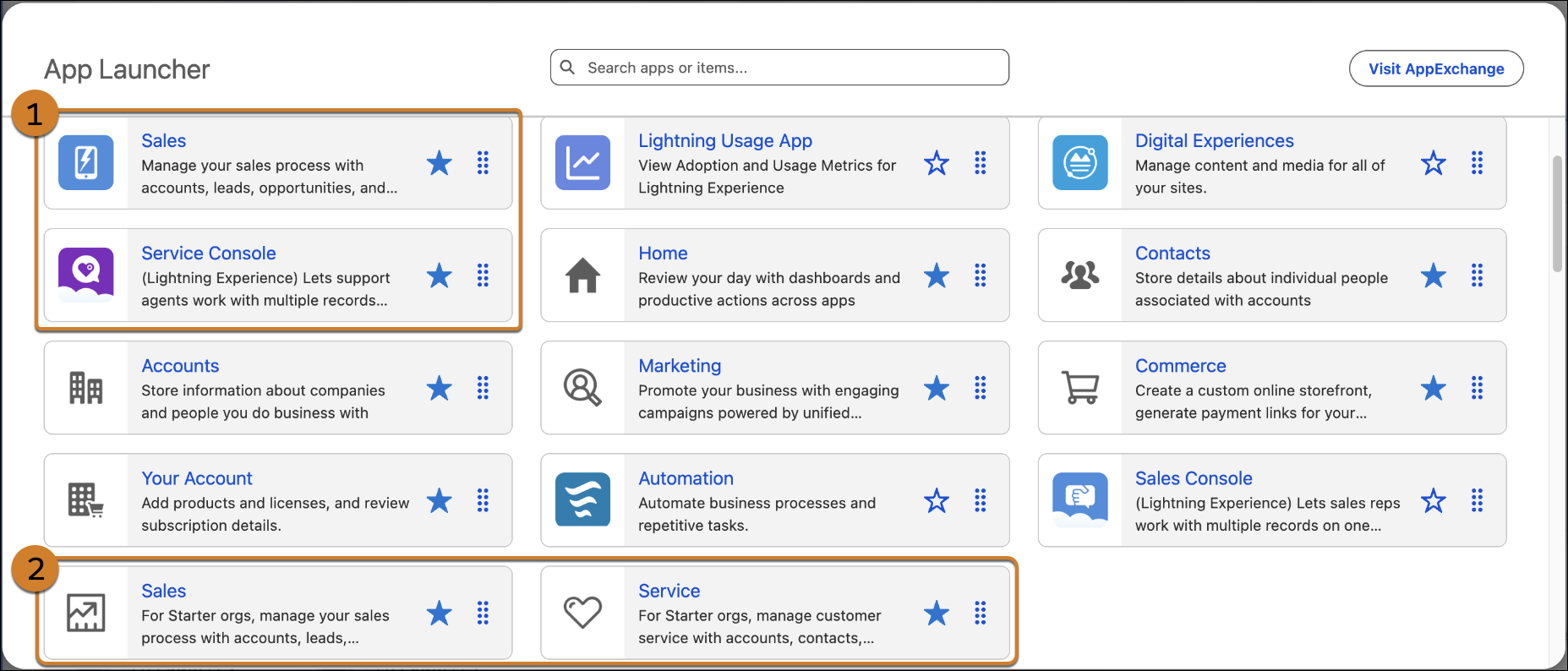
You see two versions of the apps if your admin assigns users permission to the Pro Suite Sales and Service apps. You can use either version of the app. The Essentials apps have all the preconfigured pages, layouts, and customizations you used in your previous org. The Pro Suite apps have updated pages, layouts, and relationships, optimized for advanced sales and service activities.
For more information about assigning users permissions to the Pro Suite apps, see Give Your Team Access to Pro Suite Apps.
Will the order of my apps on the home page change after upgrading to Pro Suite?
Once you upgrade to Pro Suite, the vertical navigation provides a default app order that is automatically applied. However, if a user manually customized their app order while in Essentials, that sequence is preserved and will take precedence over the new default order.
To change the order of your apps in Pro Suite, click the “...” (More) button at the bottom of the vertical navigation bar to drag and drop apps into your preferred sequence.
Will custom fields I’ve added in Essentials be visible on the Pro Suite version of the Sales and Service Apps?
Yes.
How do I enable the new Pro Suite email builder for my existing Essentials users?
Users that were created in Essentials use the original email composer (Contact List view > Send Email). After the upgrade to Pro Suite you can use the updated email builder by assigning users the Email Builder Lite permission set. For more information, see Give Your Team Access to Pro Suite Apps.
What is the max number of users supported in Pro Suite?
Customers can purchase an unlimited number of user licenses in Pro Suite.
For more information, see Pro Suite Pricing.
If I have the Digital Engagement add-on, what happens when I migrate to Pro Suite?
Salesforce recommends you set up and use Pro Suite’s Enhanced Chat functionality to minimize any functionality loss. For more information, see set up instructions in Getting Started with Messaging.
If I have the Salesforce Inbox add-on, what happens when I migrate to Pro Suite?
Pro Suite provides Salesforce Inbox as a standard feature. If you’ve been using this feature in Essentials, it's removed from your Salesforce contract once you upgrade to Pro Suite.
How do I manage dashboard subscriptions in Pro Suite?
In Pro Suite, set the dashboard view to “Me.” Once you make this change, the subscribe functionality appears.
Who do I contact if there's a problem with my upgrade?
Reach out to Salesforce help.
Pricing FAQs
How is Pro Suite priced?
For more information, see Pro Suite Pricing.
Are there any pricing protections for existing Salesforce subscribers?
Yes! For customers with an active Salesforce subscription, we're happy to honor your existing Essentials pricing—including any uplifts or discounts—for up to 10 users. From the 11th user onward, Pro Suite pricing applies.
Can I purchase additional users before I upgrade to Pro Suite?
Yes. You may purchase additional user seats either before or after upgrade. In both cases, Essentials pricing applies for up to 10 users. From the 11th user onward, Pro Suite pricing applies.
