
Understand Legacy Named Credentials
A legacy named credential specifies the URL of a callout endpoint and its required authentication parameters in one definition. Legacy named credentials are deprecated and are unsupported in future releases.
Required Editions
| Available in: both Salesforce Classic (not available in all orgs) and Lightning Experience |
| Available in: all editions |

To simplify the setup of authenticated callouts, specify a legacy named credential as the callout endpoint. If you instead specify a URL as the callout endpoint, you must register that URL in your org’s remote site settings and handle the authentication yourself. For example, for an Apex callout, your code handles authentication, which can be less secure and especially complicated for OAuth implementations.
Salesforce manages all authentication for callouts that specify a legacy named credential as the callout endpoint so that you don’t have to. You can also skip remote site settings, which are otherwise required for callouts to external sites, for the site defined in the legacy named credential.

Legacy named credentials are supported in these types of callout definitions:
- Apex callouts
- External data sources of these types:
- Salesforce Connect: OData 2.0
- Salesforce Connect: OData 4.0
- Salesforce Connect: Custom (developed with the Apex Connector Framework)
- Salesforce Connect: Amazon DynamoDB
- External Services
Legacy named credentials include an OutboundNetworkConnection field that you can use to route callouts through a private connection. By separating the endpoint URL and authentication from the callout definition, legacy named credentials make callouts easier to maintain. For example, if an endpoint URL changes, you update only the legacy named credential. All callouts that reference the legacy named credential simply continue to work.
If you have multiple orgs, you can create a legacy named credential with the same name but with a different endpoint URL in each org. You can then package and deploy—on all the orgs—one callout definition that references the shared name of those legacy named credentials. For example, the legacy named credential in each org can have a different endpoint URL to accommodate differences in development and production environments. If an Apex callout specifies the shared name of those legacy named credentials, the Apex class that defines the callout can be packaged and deployed on all those orgs without programmatically checking the environment.
Legacy named credential authentication protocols include basic password authentication, OAuth 2.0, JWT, JWT Token Exchange, and AWS Signature Version 4. You can set up each legacy named credential to use an org-wide named principal or per-user authentication. A named principal applies the same credential or authentication configuration for the entire org, while per-user authentication provides access control at the individual user level.
To reference a legacy named credential from a callout definition, use the legacy named
credential URL. A legacy named credential URL contains the scheme callout:, the name of the legacy named credential, and an optional path. For example:
callout:My_Named_Credential/some_path.
You can append a query string to a legacy named credential URL. Use a question mark (?) as the separator between the legacy named
credential URL and the query string. For example: callout:My_Named_Credential/some_path?format=json.
If transmitting sensitive information such as healthcare data or credit card data, authenticated legacy named credentials are required. We recommend that customers provide their own certificates for extra security of sensitive data transmissions.

HttpRequest req = new HttpRequest();
req.setEndpoint('callout:My_Named_Credential/some_path');
req.setMethod('GET');
Http http = new Http();
HTTPResponse res = http.send(req);
System.debug(res.getBody());
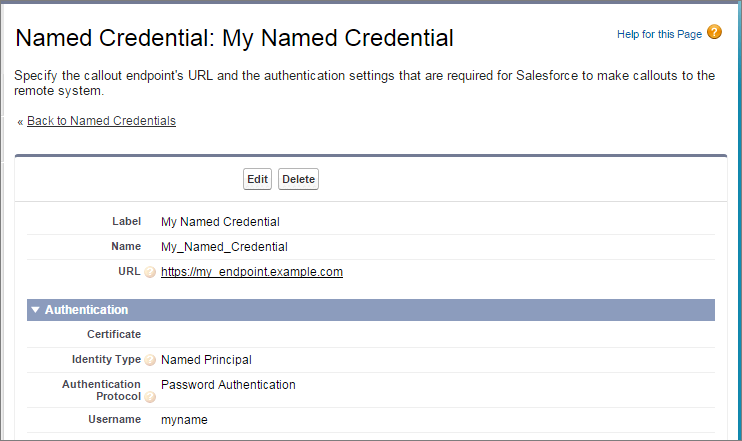
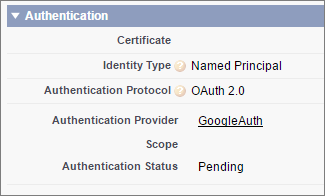
If you use OAuth instead of password authentication, the Apex code remains the same. The authentication settings differ in the legacy named credential, which references an authentication provider that’s defined in the org.
In contrast, let’s see what the Apex code looks like without a legacy named credential. Notice that the code becomes more complex to handle authentication, even if we stick with basic password authentication. Coding OAuth is even more complex and is an ideal use case for legacy named credentials.
HttpRequest req = new HttpRequest();
req.setEndpoint('https://my_endpoint.example.com/some_path');
req.setMethod('GET');

// Because we didn't set the endpoint as a legacy named credential,
// our code has to specify:
// - The required username and password to access the endpoint
// - The header and header information

String username = 'myname';
String password = 'mypwd';

Blob headerValue = Blob.valueOf(username + ':' + password);
String authorizationHeader = 'BASIC ' +
EncodingUtil.base64Encode(headerValue);
req.setHeader('Authorization', authorizationHeader);

// Create a new http object to send the request object
// A response object is generated as a result of the request

Http http = new Http();
HTTPResponse res = http.send(req);
System.debug(res.getBody());
- Define a Legacy Named Credential
Create a legacy named credential to specify the URL of a callout endpoint and its required authentication parameters in one definition. You can then specify the legacy named credential as a callout endpoint to let Salesforce handle all authentication. You can also skip remote site settings, which are otherwise required for callouts to external sites, for the site defined in the legacy named credential. - Grant Access to Authentication Settings for Legacy Named Credentials
For legacy named credentials that use per-user authentication, grant access to users through permission sets and profiles. Doing so lets users set up and manage their own authentication settings for accessing the external system.
