
Authentication Protocols for Named Credentials
Your connections between Salesforce and external systems use an authentication protocol to confirm secure communication between the two systems. Choose the authentication protocol that matches the configuration of the external system that you connect to. When you do, keep the strengths and considerations of each authentication protocol in mind.
Required Editions
| Available in: both Salesforce Classic (not available in all orgs) and Lightning Experience |
| Available in: all editions |

If you don’t want to specify an authentication protocol:
- Select the Custom protocol, and use custom headers for non-legacy named credentials.
- Select No Authentication if you’re creating a non-legacy or legacy named credential.
AWS Signature Version 4
A protocol to authenticate callouts to resources in Amazon Web Services over HTTP. The identity type must be Named Principal.
The AWS Signature Version 4 protocol supports these variants.
- Roles Anywhere
- Use this variant to request temporary, limited-privilege credentials controlled via IAM policies and roles using a certificate.
- IAM User
- Use this variant to request temporary, limited-privilege credentials for AWS IAM users.
- For an example of how to make a connection using named credentials, AWS Signature Version 4, and STS, see Define a Named Credential for Salesforce Connect Adapter for Amazon Athena.
Basic
A static username and password are used to directly authenticate into the external system. Basic authentication offers the functionality of the Password protocol with the increased security of permission set assignments. With these permission set assignments, you grant users explicit access to make callouts using a specified set of credentials. This protocol isn’t available for legacy named credentials.
With the Named Principal identity type, a Salesforce admin uses one username and password to authenticate into the external system on behalf of all users. With the Per User identity type, each user accessing the external system manages their own username and password.
Custom
A user-created authentication. Specify a permission set, sequence number, and authentication parameters. Each authentication parameter requires a name and value.
This authentication protocol isn’t available for legacy named credentials.
JWT
A JWT (rhymes with hot), or JSON Web Token, manages your authentication into the external system. The subject is a string when the identity type is Named Principal, and it’s a formula when the identity type is Per User.
Users don’t manage their credentials for the external system. With this protocol, when users view their authentication settings for external systems, they can’t see options.
Signing certificates aren’t included in packages. If you’re using JWT or JWT Bearer Flow as the authentication protocol for a packaged named credential, recreate the package’s referenced signing certificate in the subscriber org before installing the package.
OAuth 2.0
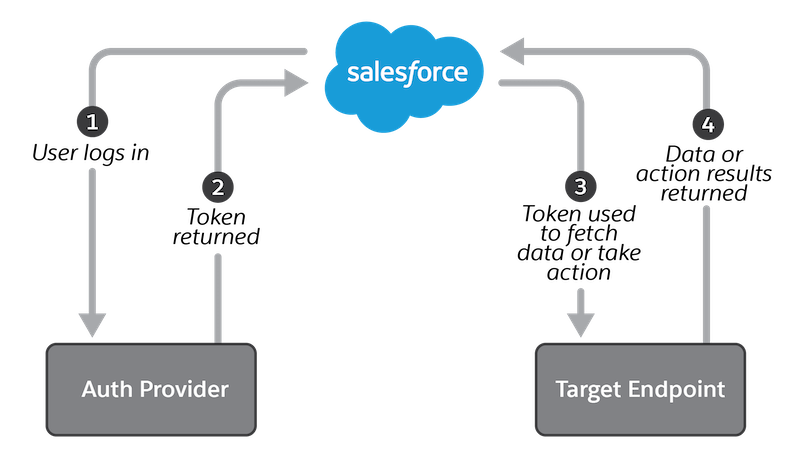
A user or the admin applies a credential for a specified OAuth 2.0 system that authenticates into the external system. If you’re using the Per User identity type, each user accessing the external system manages their own credential.
OAuth uses an authentication provider, which issues a token to Salesforce for calling a target endpoint, after the user logs in via a browser and allows access. To an end user, an authentication provider can appear distinct from the actual target endpoint. For example, a user logs into Google to give an application access to Google Photos or Nest smart home devices. The authentication provider gives Salesforce a “valet key” that it can use for limited access to the user’s resources. For more on OAuth authentication, see OAuth Authorization Flows.
The OAuth2.0 protocol supports these variants.
- Browser Flow
- One or more users logs into the remote system via a web browser, triggering a callback that includes tokens used to authenticate calls to the endpoint in the named credential. Browser Flow is sometimes referred to as Authorization Code Grant Flow.
- Client Credentials with Client Secret Flow
- The client app exchanges its client credentials defined in client identifier and client secret for an access token.
- Client Credentials with Client Secret Flow Managed by External Auth Identity Provider
- The client app exchanges its client credentials defined in a client identifier and client secret for an access token. The client identifier and client secret are configured in an external auth identity provider.
- Client Credentials with JWT Assertion
- The client app exchanges its client credentials defined client identifier and in JWT assertion for an access token.
- JWT Bearer Flow
- A JWT (JSON Web Token) is sent to an
authorization provider and receives a token in return that’s used to authenticate into
the external system.
Users don’t manage their credentials for the external system. With this protocol, when users view their authentication settings for external systems, they can’t edit options. But users can delete their JWT Bearer Flow settings to use a different named credential.
Signing certificates aren’t included in packages. If you’re using JWT or JWT Bearer Flow as the authentication protocol for a packaged named credential, recreate the package’s referenced signing certificate in the subscriber org before installing the package.
For legacy named credentials, JWT Bearer Flow is referred to as JWT Token Exchange.
Password
A static username and password are used to directly authenticate into the external system. If you’re using the Per User identity type, each user accessing the external system manages their own username and password.
This authentication protocol is available only for legacy named credentials. But if you’re using the Custom authentication protocol, you can configure a credential that supports the standard HTTP Basic authentication protocol. That protocol uses passwords.
