
Use Cases for Custom Headers with Named Credentials
Custom headers are most often used for security or authentication purposes. The HTTP standard includes a commonly used, dedicated Authorization header. However, many use cases require something else. Two common use cases are per-user callouts and API keys.
Required Editions
| Available in: both Salesforce Classic (not available in all org) and Lightning Experience |
| Available in: all editions |
Because named credentials operate in the HTTP world, parameter provision is implemented as an HTTP request accompanied by headers that act as additional inputs required by the service you’re calling. HTTP requests have a header and a body, and inputs can appear in both. It’s also common for inputs to appear in a URL as a query string. All three approaches have pros and cons. We discuss only headers here.
Per-User Callouts
Many systems respond to HTTP requests differently based on which user or role makes the request. For example, sometimes an integration to a company returns a personal phone number but only if the person whose phone number it is makes that callout request. However, a calling user in the company’s HR department can see any user’s salary, though the HR role must be specified.
Here’s an example of a per-user callout that uses a custom header to identify the user by their email address.
GET https://example.com/getInfo?personId=my_username%40example.com/HTTP/1.1
X-Calling-User:my_username@example.com
As another example, Microsoft offers an enterprise-wide search service and returns different
results based on the caller’s identity. Users don’t get results they’re not allowed to see.
Salesforce named credentials support this service because admins can define headers such as
X-Calling-User and substitute the value of the user
making the callout, for example, {!$User.email}. The
header is defined on an external credential.

$User in the formula.API Keys
API key refers to a programmatic password used in an HTTP request to identify a calling application attempting to access a given API. API keys have no strict standard, so anyone who builds an API can define their own headers, rules, and so on.
Here’s an example of a callout that uses an API key.
GET https://example.com/api/11a5aea0?count=20 HTTP/1.1
X-API-Key: abc123
X-API-Key is
arbitrary, and some vendors use headers such as Client-ID. This example, for retrieving a random photograph, uses a mixture of
Client-ID and the standard Authorization
header.
GET https://example.com/photos/random_HTTP/1.1
Authorization: Client-ID abc123
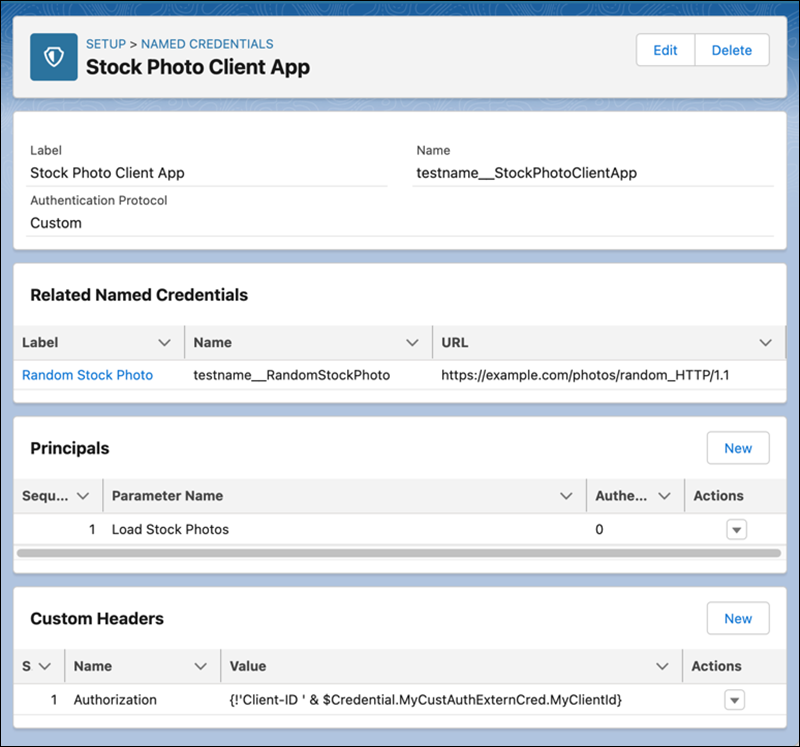
Here’s what an external credential that uses a custom header with an API key can look like.
- The credential uses a custom authorization protocol.
- It uses a
Load Stock Photosprincipal. - It’s linked to a
Random Stock Photonamed credential, which can have its own custom header. AccessKeyis defined in the principal.
Custom Headers in Named Credentials
Define custom headers at the level of a named credential if the headers are contextual to a single endpoint. An example of a header that works better on a named credential is a billing identifier. In all likelihood, this type of identifier has nothing to do with authentication or security, and it can be different for each endpoint.
GET https://example.com/method?abc=def HTTP/1.1
X-Billing-Code: costCenter123