
Named Credentials Schema
Named credentials and external credentials simplify and enable greater reuse of setup for secure and authenticated callouts.
Required Editions
| Available in: both Salesforce Classic and Lightning Experience |
| Available in: all editions |
Parts of the Named Credential Schema
Understand the different parts of the named credential schema.

- A named credential specifies a callout endpoint and an HTTP transport protocol.
- An external credential’s authentication protocol and user credentials authenticate the caller. More than one named credential can use the same external credential.
- External credential principals map to permission sets to authorize users to make callouts.
- User external credentials store encrypted tokens.
- External auth identity providers obtain OAuth tokens for outbound callouts.
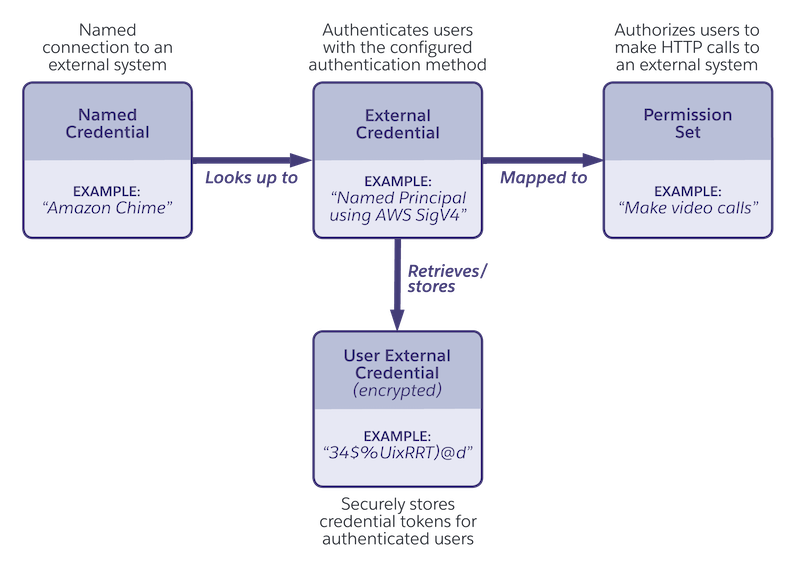
Named Credentials
A named credential is a logical entity that can be thought of as a named connection to an external system. With named credentials, there’s no need to embed a physical URL into Apex code and manage authentication tokens in unencrypted data stores. Instead, a variable in the code allows a Salesforce admin to provision the physical endpoint at deployment time and manage user credentials in the org’s encrypted credential store. The named credential URL is resolved at run time to the configured physical endpoint along with the credentials for the authorized user performing the callout.
You can customize a named credential. For example, you can define HTTP headers with Salesforce formula functions to tailor header values to the calling user context or substitute formula function variables in the request body.
There are different types of named credentials. Advanced use cases can benefit from storing custom parameters, which are also supported. A parameter is essentially a name-value pair to capture arbitrary metadata, and the parameter values are stored securely. A named credential can be one of these types.
- SecuredEndpoint
- The named credential includes an endpoint’s transport protocol as secured through transport layer security (TLS). This is the default named credential type.
- PrivateEndpoint
- The named credential sends traffic through a private connection, bypassing the public internet.
- Legacy
- A legacy named credential specifies the URL of a callout endpoint and its required authentication parameters in one definition.
External Credentials
Security policies often mandate that authentication details change on a rotating basis. An external credential encapsulates the details of how Salesforce authenticates to a remote system. By externalizing authentication information from the code, developers aren’t required to change these details to stay compliant with such policies.
Hyperscale cloud infrastructure providers often host many different systems, and a single set of credentials can be used to access multiple named systems. A named credential holds a reference to an external credential, and multiple named credentials can benefit from sharing a single external credential. For example, a Salesforce integration can access the APIs for Google Drive and Google Calendar with the same credentials.
Authentication protocols such as OAuth or AWS Signature v4 specify how to authenticate with an external system. For example, they can specify how access keys are exchanged or how to refresh expired access keys. The protocol specifies implementation details handled by the platform, such as how keys are exchanged and when they’re refreshed. Authentication parameters are captured as external credential name-value pairs. See the API documentation for authentication of protocol-specific parameters.
Permission Sets
The Salesforce platform supports the use of permission sets to control which users are authorized to make callouts. External credentials authenticate users, and permission sets authorize users. You link an external credential to permission sets or user profiles through external credential principals. At run time, the platform ensures that the user has the permission set before accessing the remote system.
Development teams can choose to package permission sets representing access to a specific remote system, though admins retain the option to associate the external credential with other permission sets of their choosing.

User External Credentials
Tokens for named credential callouts are encrypted and stored in a user external credential object. Any user performing an authenticated callout also needs profile- or permission set-based access to user external credentials. Most standard permission sets and profiles have access to the User External Credentials object by default. For the guest user profile, and for some custom permission sets and profiles, you must assign User External Credentials object permissions manually.
Though the runtime behavior of named credentials reads the tokens from the user external credential object, there’s no access to this object’s records from SOQL, Apex, or the APIs. The tokens can be deleted programmatically using a special method in Connect REST API.
External Auth Identity Provider
An external credential that uses OAuth 2.0 authentication can reference an external auth identity provider, which obtains the OAuth tokens necessary for outbound callouts to external systems. To customize requests to the identity provider’s token endpoint and specify the tenant to access in multi-tenant systems, you can attach account IDs or tenant IDs as custom request parameters.
Unlike Auth. Provider, which can also link to an external credential, you can create external auth identity providers via Connect REST API or Apex. Also, you can include them in second-generation managed packages (managed 2GP) and unlocked packages for distribution across many orgs or across one org’s development, test, and production environments.
