
You are here:
Access Omniscript Data JSON with Merge Fields
Enable Omniscript elements and element properties to access data JSON using merge fields. A merge field is a variable that references the value of a JSON node. For example, if a JSON node is "FirstName": "John", then the merge field %FirstName% returns John.
Merge fields access data JSON using syntax to indicate to an Omniscript Element that a merge field is present. The syntax requires you to wrap a full JSON path with a percent sign on both ends.

Only certain element properties support merge fields.
Text between two percent (%) signs in a Set Values formula or text field is treated as a merge
field. To represent literal percent (%) signs, use the $Vlocity.Percent
environment variable.
Common Use Cases for Accessing JSON with Merge Fields
Learn about common use cases for accessing Omniscript data JSON with merge fields.
- Setting Values to rename elements, access JSON nodes, run formulas, and populate elements. For more information, see Set Values in an Omniscript
- Access data stored in Omniscript elements in a formula or in a future step.
- Access data returned from an Action. For example, an HTTP Action or Omnistudio Data Mapper Action returns data from Salesforce or an external source. For more information on Actions, see Omniscript Action Elements.
- Access data passed in as a parameter from a page.
Access the Data JSON
Use existing data JSON in an element property by indicating the use of a merge field.
-
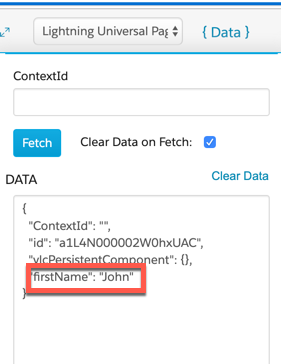
Locate the name of the JSON node in the Omniscript's data JSON.
-
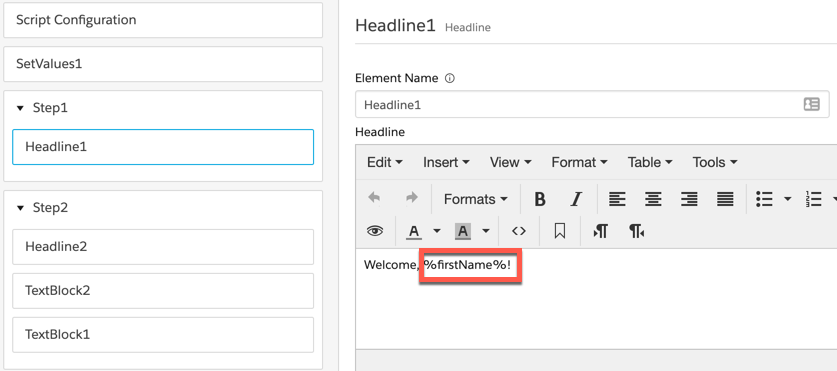
Enter the name of the JSON node and wrap the name in percentage signs to indicate it
is a merge field.
For example, a merge field accessing a JSON node named firstName must use the syntax %firstName%.
-
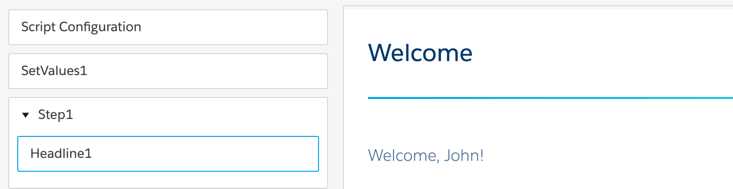
Preview the Omniscript to ensure the Merge field works correctly.
Additional Syntax
Check out additional syntax examples for nested JSON.
| JSON Node | Merge Field Syntax Example |
|---|---|
|
Use a colon symbol |
|
Use a colon symbol |
|
When a formula exists within a repeatable block, use |
