
You are here:
Run Multiple Actions in an Action Block
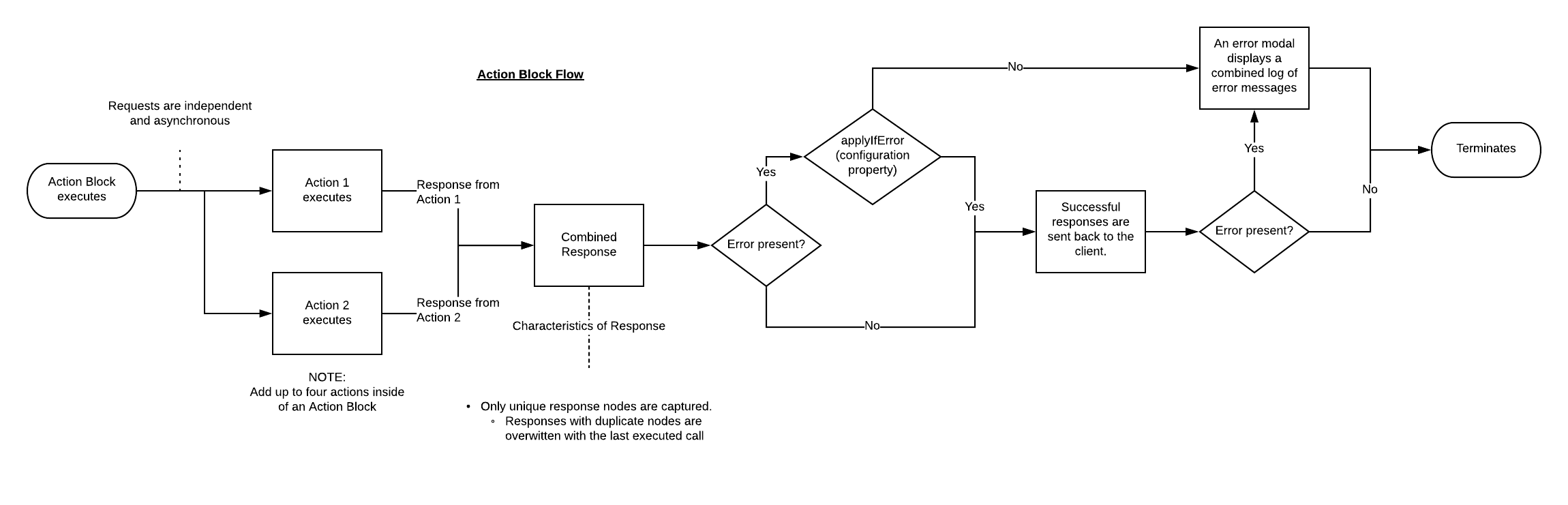
Run multiple Omniscript Actions asynchronously by grouping them in an Action Block. Actions within the Action Block run in parallel and inherit the Action Block's settings.
View the Action Block flow chart to understand how actions in the Action Block execute.
Action Block flow chart:
-
From the elements panel, drag the Action Block element to
the canvas.
Place the Action Block inside a step, before the first step, or between steps.
- Drag up to four action elements into the Action Block.
-
Select an Invoke Mode to control how actions inside the
Action Block run.
Default The Action blocks the UI with a loading spinner. Non-Blocking The Action runs asynchronously, and the response applies to the UI. Pre and Post Omnistudio Data Mapper transforms, and large attachments aren’t supported. Fire and Forget The Action runs asynchronously with no callback to the UI. Pre and Post Data Mapper transforms, and large attachments aren’t supported. A response still appears in the debug console but doesn’t apply to the Data JSON. When Invoke Mode is set to non-blocking, elements using default values don't receive the response because the element loads before the response returns. You must configure these properties to map the response to an element:Response JSON Node: VlocityNoRootNode
Response JSON Path: The name of the Omniscript Element receiving the value.
- If needed, select Apply if error to enable actions that run successfully to apply their responses to the Omniscript's data JSON even when other actions in the Action Block fail.
- When the Action Block is inside of a Step, set validation to Step to prevent the Action Block from running when errors exist in the Step.
- Preview the Omniscript to test the Action Block behavior.
Did this article solve your issue?
Let us know so we can improve!
