
You are here:
Build Tool with Salesforce DX (Managed Package)
For the managed package runtime, build Tool fits into an automated Salesforce build. Let’s look at a sample project.
 This information is for Omnistudio for Managed Packages. For Omnistudio on standard runtime, see Omnistudio Help.
This project includes data packs in the vlocity_components folder and a Salesforce DX project in the salesforce_sfdx folder.
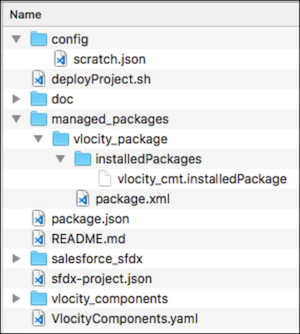
Here’s an example shell script with Salesforce CLI commands and Build Tool:
# Use JWT Authorization flow for Jenkins / Automation Server - Additional info below
sf org login jwt --username "$DP_BT_HUB" --jwt-key-file "$DP_BT_JWT" --client-id "$DP_DT_CONNECTED" --set-default-dev-hub

# Change how long the Scratch Org will last. Max: 30
DURATION_DAYS=1

# Create Scratch Org if no Username provided as first argument to script.
# Get Created Username using jq bash tool.
# Can also just set "--alias ${JOB_NAME}_${JOB_NUMBER}" and use Alias as username in subsequent calls

if [ -z "$1" ]; then
    SCRATCH_ORG=`sf org create scratch --definition-file config/scratch.json --duration-days $DURATION_DAYS --json`
    SF_USERNAME=`echo $SCRATCH_ORG | jq -r '. | .result.username'`
else
    SF_USERNAME=$1
fi

# Install or Update Managed Package
sf project deploy start --metadata-dir managed_packages/vlocity_package --wait -1 --target-org $SF_USERNAME

# Push Salesforce part of Project
sf project deploy start --target-org $SF_USERNAME

# Refresh Vlocity Base - Installs all the Vlocity Authored Vlocity Cards and Vlocity UI Templates
vlocity -sfdx.username $SF_USERNAME -job VlocityComponents.yaml refreshVlocityBase

# Deploy Vlocity folder
vlocity -sfdx.username $SF_USERNAME -job VlocityComponents.yaml packDeploy
The Vlocity managed package in the example is installed through the Metadata API with Salesforce DX. It’s stored at this path:
managed_packages/vlocity_package/installedPackages/vlocity_cmt.installedPackage
The version of the package installed can be updated in this file:
<InstalledPackage xmlns="http://soap.sforce.com/2006/04/metadata">
    <versionNumber>900.208.0</versionNumber>
</InstalledPackage>
Did this article solve your issue?
Let us know so we can improve!
