
You are here:
Calculation Matrices (Managed Package)
For the managed package runtime, calculation matrices are one of the key elements of a Vlocity rating engine. Vlocity uses calculation matrices to look up inputs, match them to outputs, and provide the outputs to calculation procedures.
 This information is for Omnistudio for Managed Packages. For Omnistudio on standard runtime, see Omnistudio Help.
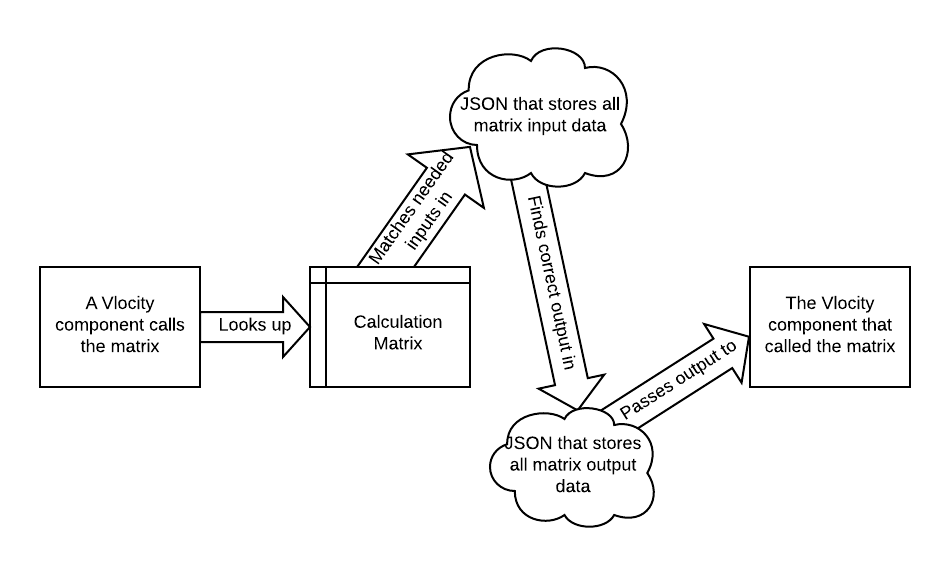
Vlocity offers three styles of calculation matrices you can use based on your business needs:
-
Standard Calculation Matrices (Managed Package) — Has characteristics common to all calculation matrices, including input columns, output columns, and versions.
-
Grouped Calculation Matrices (Managed Package) — Allows grouping of matrix rows by a key such as geographic region or age.
-
Row-Versioned Calculation Matrices (Managed Package) — Allows versions to apply to specific rows rather than the entire matrix.

You can't create calculation matrices that are both grouped and row-versioned.
It's more important than ever that you plan out your calculation matrix structure before you start creating your matrices in Vlocity. Once you choose the type of a calculation matrix, you can't change it.

You can let people modify calculation matrices based on user profiles. In your Vlocity sandbox and development orgs, it may be useful to let several user profile groups modify calculation matrices.
But modifying calculation matrices in a production environment can have severe consequences on the rates you get for insurance products. We recommend that you limit the number of people who can modify production calculation matrices to only essential administrators.
- Standard Calculation Matrices (Managed Package)
For the managed package runtime, all calculation matrices have the characteristics that standard calculation matrices have. Other types have characteristics that standard calculation matrices lack. All calculation matrices have input columns, output columns, and versions. - Grouped Calculation Matrices (Managed Package)
For the managed package runtime, you can create groups of calculation matrices, and subgroups within each group. - Row-Versioned Calculation Matrices (Managed Package)
For the managed package runtime, if you're wrangling large calculation matrices that can't be sectioned cleanly into groups and subgroups, you can create calculation matrices that are versioned by row. - Ways to Create a Standard Calculation Matrix (Managed Package)
For the managed package runtime, a standard calculation matrix isn't part of a group, and doesn't have row versioning. You can create a standard calculation matrix in three different ways. - Workflow for Creating a Grouped Calculation Matrix (Managed Package)
For the managed package runtime, you can create a calculation matrix that's part of a group of matrices. You create grouped calculation matrices so that a calculation procedure (or another calling process) can search all the matrices using only one SOQL query. This speeds up Vlocity processing and frees up SOQL queries for other purposes. - Workflow for Creating a Row Versioned Calculation Matrix (Managed Package)
For the managed package runtime, creating the first version of a row-versioned calculation matrix follows most of the same steps as creating a standard calculation matrix. Then, as you need to make changes to these matrices, you can upload new individual rows. This creates new versions of the replaced rows with new start dates and end dates. - Wildcards in Calculation Matrices (Managed Package)
For the managed package runtime, starting in Winter '20, you can make it possible for calculation procedures and other Vlocity features that call calculation matrices to use a wildcard in place of a value for one column. - Search in a Calculation Matrix (Managed Package)
For the managed package runtime, you can search for specific values in a calculation matrix that has many rows. - Download Calculation Matrix Data to a CSV File (Managed Package)
For the managed package runtime, you can download all or part of the data in a calculation matrix. - Edit and Delete Matrix Data (Managed Package)
For the managed package runtime, you can edit and delete the data in a calculation matrix if you haven't enabled it yet. - Edit Matrix Headers (Managed Package)
For the managed package runtime, you can change the names and data types of the column headers in a calculation matrix. - Disable a Calculation Matrix (Managed Package)
For the managed package runtime, to disable a calculation matrix, edit its End Date/Time. - Ranges in Calculation Matrices (Managed Package)
For the managed package runtime, a range takes a number or text value and assigns it to groups that you've defined. You can use data numeric ranges in calculation matrices and by collating by alphabetic ranges For example, if age is a component of your pricing, you can use a numeric range to map the applicant's age to the correct age group.
