
You are here:
Communicate from Omniscript to a Lightning Web Component (Managed Package)
For the managed package runtime, send data from Omniscript Actions and Steps to other Lightning web components using the Pub/Sub property.
 This information is for Omnistudio for Managed Packages. For Omnistudio on standard runtime, see Omnistudio Help.
Before you begin, review the documentation on using PubSub. See Communicate Between Components.
The Pub/Sub property enables action elements and step elements to send data in key-value pairs to other Lightning web components. Lightning web components must register the Omniscript component's event name and add code to handle the data sent from the event.
Beginning with Vlocity Insurance and Health Spring '20, the Step element supports the Pub/Sub property.
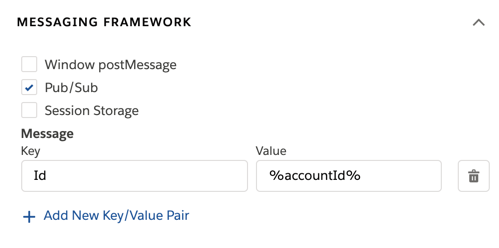
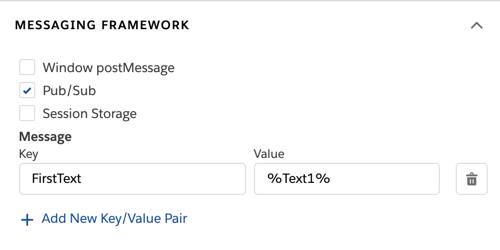
- In an Omniscript Action or Step, select the Messaging Framework and check Pub/Sub.
-
In the key and value fields, configure which data to pass to another Lightning web
component.
-
For Key, enter a name to store the value.
-
For Value, enter data to pass to the Lightning web component. The field accepts merge syntax.
Action Example
Step Example
Pass data from the action's response in the value field using merge syntax. For example, to pass the response node "accountId", enter %accountId% in the Value field.
Pass data from an element within the step using merge syntax. For example, to pass a Text element named Text1, enter %Text1% in the Value field.
-
- Activate the Omniscript.
-
In an Lightning web component that receives data from the action or step, import
the pubsub module. Using this example, replace
nswith the namespace of your Vlocity package.import pubsub from 'ns/pubsub'; -
In the Lightning web component, register the pubsub event using this code without
replacing anything. The even must register after the component renders.
Action pubsub Event
Step pubsub Event
pubsub.register('omniscript_action', {
    data: this.handleOmniAction.bind(this),
});
pubsub.register('omniscript_step', { data: this.handleOmniStepLoadData.bind(this), }); -
In the Lightning web component, create a pubsub event handler.
Action Event Handler Example
Step Event Handler Example
handleOmniAction(data) {
  // perform logic to handle the Action's response data
}
handleOmniStepLoadData(data) { // perform logic to handle the pubsub data from the Step } -
(Optional) If different actions or steps require different logic in the code, use
a switch statement to determine how to handle the event. For information on switch
statements, see switch.
Action Example
Step Example
Access the action's Element Name using
data.name.handleOmniAction(data) { switch(data.name) { case 'SomeNameForAction': this.handleSomeNameForAction(data); break; case 'SomeNameForAction2': this.handleSomeNameForAction2(data); break; default: // handle default case } } handleSomeNameForAction(data) { // perform some logic specific to SomeNameForAction action // that has element name = "SomeNameForAction" } handleSomeNameForAction2(data) { // perform some logic specific to SomeNameForAction2 action // that has element name = "SomeNameForAction2" }Access the step's Element Name using
data.name.handleOmniStepLoadData(data) { switch(data.name) { case 'FirstStep': this.handleOmniFirstStepLoadData(data); break; case 'SecondStep': this.handleOmniSecondStepLoadData(data); break; default: // handle default case } } handleOmniFirstStepLoadData(data) { // perform some logic specific when a Step element which name is // FirstStep is loaded } handleOmniSecondStepLoadData(data) { // perform some logic specific when a Step element which name is // SecondStep is loaded }Access the action's Element Type using
data.type.handleOmniAction(data) { switch(data.type) { case 'Integration Procedure Action': this.handleIPActionPubsubEvents(data); break; case 'Remote Action': this.handleRemoteActionPubsubEvents(data); break; default: // handle default case } } handleIPActionPubsubEvents(data) { // perform some logic specific to Integration Procedure Actions } handleRemoteActionPubsubEvents(data) { // perform some logic specific to Remote Actions }n/a
