
You are here:
Configuring a REST Data Source Using Named Credentials (Managed Package)
For the managed package runtime, configure a REST data source using Named Credentials to authenticate Apex callouts.
 This information is for Omnistudio for Managed Packages. For Omnistudio on standard runtime, see Omnistudio Help.
A named credential specifies the URL of a callout endpoint and its required authentication parameters in one definition. To create a named credential, see Named Credentials as Callout Endpoints.
To configure a REST data source:
- On the Vlocity Cards tab, click New to configure a data source for a new card component, or select an existing component to configure its data source.
-
In the Cards Designer, in the Layout or Cards pane, from the Data
Source picklist, select REST.
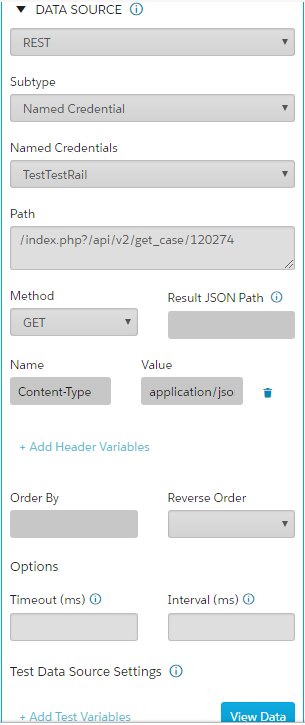
- From the Subtype picklist, select Named Credential.
- In the Path box, enter the REST endpoint URL.
-
Specify the REST method:
-
GET—Requests data specified by the parameters of the URL. -
POST—Sends JSON data specified in the Body text area.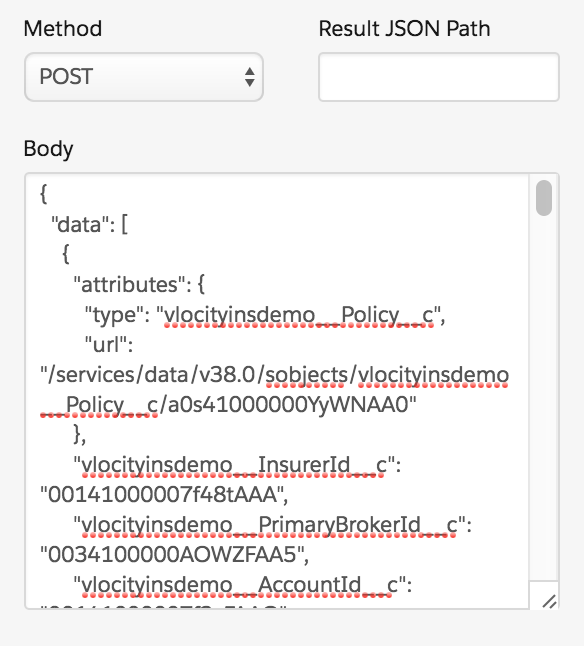
You can use Context Variables to pass inherited values with either method.
-
Did this article solve your issue?
Let us know so we can improve!
