
You are here:
Create Stateful LWC Omniscripts (Managed Package)
For the managed package runtime, beginning with Vlocity Insurance and Health Spring '20, enable LWC Omniscripts to store the state of an Omniscript in the URL.
 This information is for Omnistudio for Managed Packages. For Omnistudio on standard runtime, see Omnistudio Help.
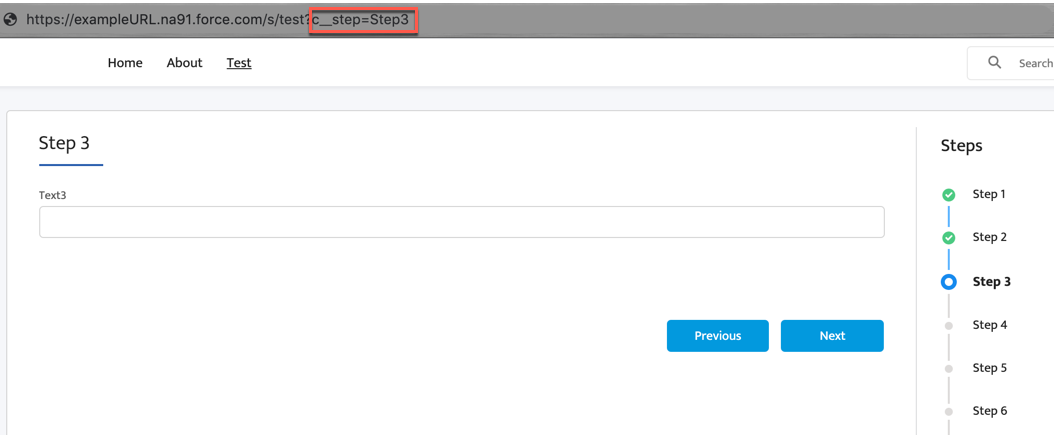
Omniscripts store the state of an Omniscript in the URL by setting the c__step parameter to the name of an active Step automatically. Direct users to a specific step in the Omniscript by setting the c__Step parameter in the URL to a Step name in the Omniscript. Refreshing the page does not cause the Omniscript to begin at the first step because the Step is stored in the c__step parameter. Include additional parameters to store the state of elements, insert data into the Omniscript's data JSON, prefill elements, or conditionally fire Omniscript Actions. Beginning with Vlocity Insurance and Health and Vlocity CME Summer '20, storing the state enables a user to navigate to previous or next steps using their browser's back and forward buttons.
-
In the Omniscript's Setup section, check Enable SEO. The
Omniscript automatically adds the c__step parameter to store the state of a Step.
-
(Optional) Store the state of elements in your Omniscript, prefill elements, or
pass data into the Omniscript's data JSON using Additional SEO URL Parameters.
-
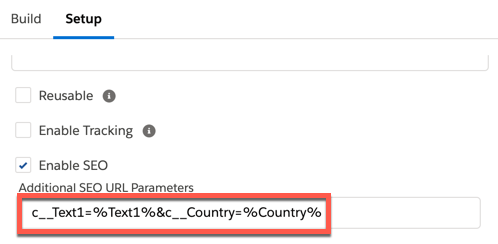
In the Additional SEO URL Parameters field, enter a parameter with the prefix c__. When storing an element's state or prefilling an element, use the name of the element as your parameter. For example, the parameter for an element named Text1 is c__Text1.
-
Set the parameter equal to an element in the Omniscript using merge field syntax or a static value. If there is more than one parameter present, separate the parameters with an & symbol. See Access Omniscript Data JSON with Merge Fields (Managed Package). For example, to store the state of the Text1 element, set the c__Text1 parameter equal to %Text1%.
-
- Activate the Omniscript, and add it to a Lightning or Community Page.
- (Optional) Beginning with Vlocity Insurance and Health and Vlocity CME Summer '20, test the Omniscript's forward and backward navigation using a browser's forward and back buttons.
