
You are here:
Customize SLDS Design Tokens in Omniscript (Managed Package)
For the managed package runtime, modify the appearance of an Omniscript by overriding Salesforce's SLDS Design tokens. Omniscript elements use SLDS Design Tokens for styling. Override tokens that have global access to modify the appearance of your Omniscript.
 This information is for Omnistudio for Managed Packages. For Omnistudio on standard runtime, see Omnistudio Help.
Design Tokens are not supported in Safari browsers, the classic Omniscript designer, and Community pages.
Required Versions |
|---|
Available beginning with Vlocity Insurance and Health Spring '20 and CME Fall '20. |
-
View the Design Tokens that have global access.
-
Preview and inspect an Omniscript in a developer console to view the current tokens present in the Omniscript.
-
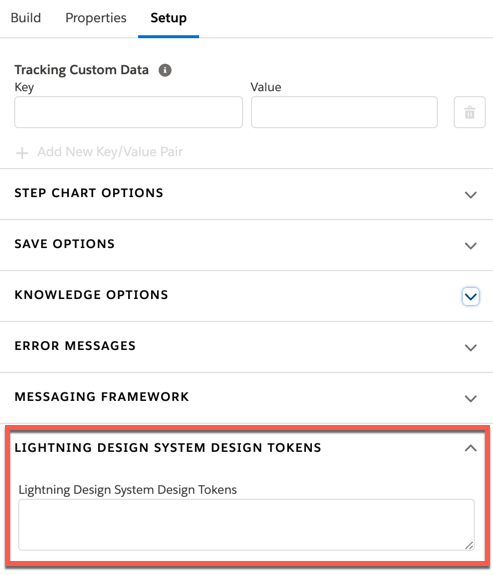
In your Omniscript's Setup panel, click the
Styling Options section or Lightning Design
System Design Tokens section.
-
In the Lightning Design System Design Tokens field, enter
tokens by applying these changes:
-
Remove the dashes and apply camelcase to the token. For example, the token
$spacing-xx-smallmust be$spacingXxSmall. -
Replace the token's $ symbol with --lwc-.
--lwc-spacingXxSmall -
Set the token's value, and end the line for each token using a ;.
--lwc-spacingXxSmall: 10rem;
--lwc-spacingSmall: 5rem;
--lwc-spacingMedium: 2rem;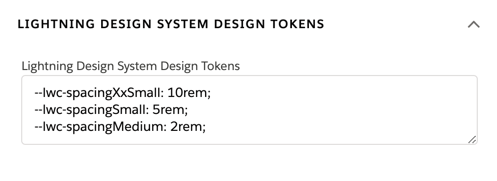
-
- Customizing SLDS Design Tokens in the Classic Omniscript Designer (Managed Package)
For the managed package runtime, to override a token in the classic Omniscript designer:
