
You are here:
Omnistudio Data Mapper Turbo Action (Managed Package)
For the managed package runtime, beginning with Vlocity Insurance and Health Spring '20, Invoke a Data Mapper Turbo Extract to retrieve data from a single Salesforce object. Unlike a standard Data Mapper Extract, a Data Mapper Turbo Extract doesn't support formulas or complex field mappings.
 This information is for Omnistudio for Managed Packages. For Omnistudio on standard runtime, see Omnistudio Help.
For a non-LWC Omniscript, you must create the Data Mapper Turbo Extract to be called before creating the Data Mapper Turbo Action. For an LWC Omniscript, if the Data Mapper Turbo Extract doesn't already exist, you can create it by clicking Create New Data Mapper immediately after dragging the Data Mapper Turbo Action into the Omniscript structure panel.
- Drag the Data Mapper Turbo Action into the Omniscript's structure panel.
- To select the Data Mapper Turbo Extract to be called, click in the Data Mapper Interface field and select from the list. You can type in the field to filter the list.
-
Provide any input parameters the Data Mapper Turbo Extract requires. Each
Data Source field must match a Data Mapper Turbo Extract
input parameter. Each Filter Value must match values in the
sObject field to which the input parameter refers.
 Note
NoteData Mapper Turbo Extracts return objects in a nested array format.
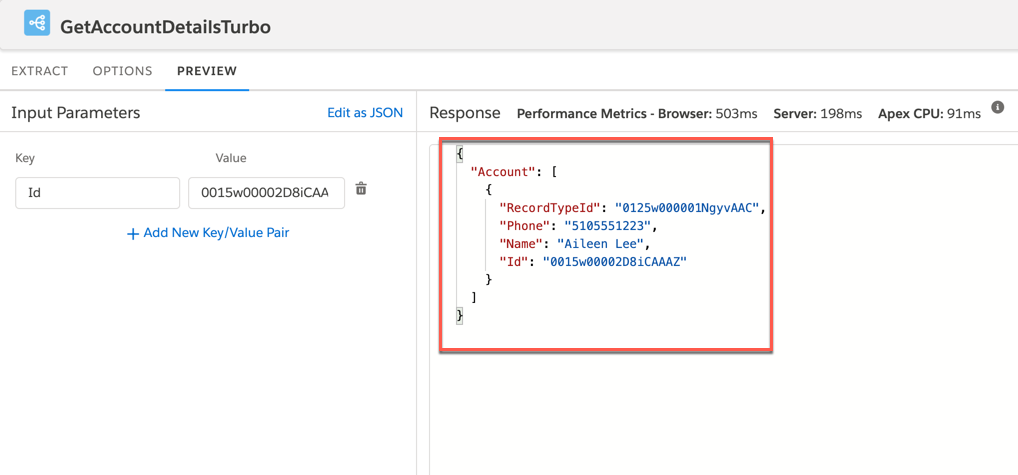
-
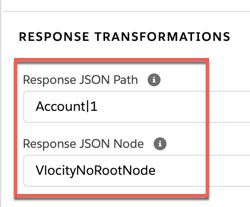
(Optional) In the Response JSON Path field, enter the name
of the object returned in the Action's response. Append a |
delimiter and a number to access the correct instance in the
nested array. This enables Omniscripts to prefill elements.
Data Mapper Turbo Extract JSON Example
Response JSON Path Example
{
  "Account": [
    {
      "RecordTypeId": "0125w000001NgyvAAC",
      "Phone": "5105551223",
      "Name": "Aileen Lee",
      "Id": "0015w00002D8iCAAAZ"
    }
  ]
}
Account|1
-
(Optional) In the Response JSON Node field, enter
VlocityNoRootNode. This ensures the object is not nested.
See Manipulate JSON with the Send/Response Transformations Properties (Managed Package).
- Preview the Omniscript to test the Data Mapper Turbo Action.
- Omnistudio Data Mapper Turbo Action Properties (Managed Package)
For the managed package runtime, this page contains information on Data Mapper Turbo Action Properties.
