
You are here:
Declarative Calculation Procedures (Managed Package)
For the managed package runtime, declarative calculation procedures are a key component of the ratings engine. Along with calculation matrices, calculation procedures are the key components of any or ratings engine. Calculation procedures take an input JSON and run through a series of matrix lookups (calling values from calculation matrices) and calculations to calculate ratings for policy products.
 This information is for Omnistudio for Managed Packages. For Omnistudio on standard runtime, see Omnistudio Help.
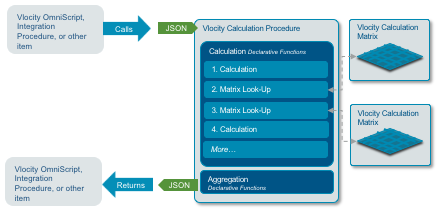
Calculation procedures can calculate coverage premiums, insured party premiums, insured item premiums, and insurance policy premiums. Calculation procedures can calculate attribute-based prices for products.

Beginning with the Summer '19 release, declarative calculation procedures support:
-
Grouped calculation matrices
-
Row-versioned calculation matrices
What's in a Calculation Procedure
A well-formed calculation procedure contains the following elements:
-
Constants
All the constants you need for each calculation step
-
Variables
Input variables, all the variables you need for each calculation step and the group key and subgroup key if you're calling a group of matrices all the variables in calculation matrices you call in matrix lookup steps
-
Calculation steps, including:
-
Calculations
Each calculation required to get to the correct result of the whole calculation procedure
-
Matrix lookups
Finds one or more variable values in calculation matrices, based on one or more variable inputs
-
-
Aggregation steps (optional)
If this calculation procedure will handle an array of inputs, aggregation steps will perform calculations over the output sets.
How Calculation Procedures Work in Context
Omniscripts, Integration Procedures, and other Vlocity processes can call a calculation procedure. The calculation procedure takes a JSON that gives the calculation procedure the ingredients it needs to complete its calculation.
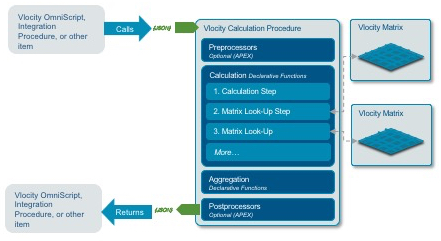
Calculation procedures can take a single input, a single set of inputs, or multiple arrays of inputs.
Here's an example of a single set of input values, as passed in by a JSON:
{
   "input": {
      "opMVRPoints": "0",
      "opAccidentPoints": "0",
      "driverGoodStudent": "N",
      "driverMaritalStatus": "M",
      "driverGender": "M",
      "driverYrsExp": "14",
      "driverMileage": "7500",
      "driverUse": "Business"
   }
}
The calculation procedure runs through all its steps once for a single input or single array of inputs. It returns a calculation or array of calculations. The output JSON for the calculation procedure that processed this input is:
{
   "output": [
      {
         "calculationResults": [
            {
               "driverCCD": 1.11,
               "driverCOLL": 0.92,
               "driverMED": 0.91,
               "driverUM": 0.92,
               "driverBIPD": 0.86,
               "autoSafeDriver__driverSafe": "Y",
               "ID": "input"
            }
         ],
         "aggregationResults": {}
      }
   ]
}
Because the calculation procedure did not have any aggregation steps, there are no aggregation results in the output JSON.
How Aggregation Works in Calculation Procedures
When you add aggregation steps to your calculation procedure, the calculation procedure puts together the results of each run through itself, performs operations on them, then outputs the results of the operations. Here's what that looks like:
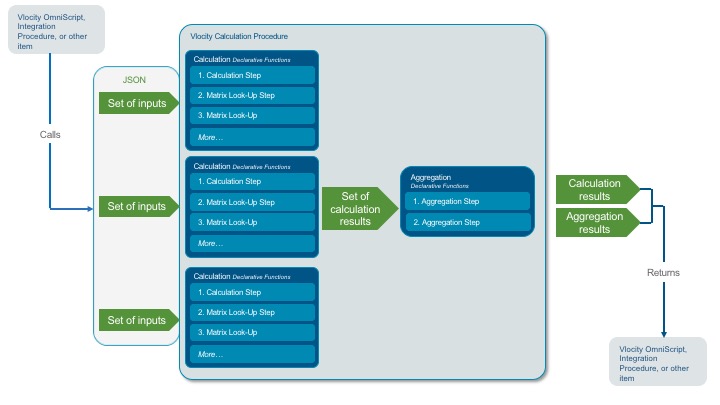
For example, in a simple case, the calculation procedure needs to calculate a group premium based on a census. Each census member has a set of input values that's passed to the calculation procedure. The calculation procedure runs all of its calculation steps for each member, resulting in an output (premium) for each member. So now it's got an array of outputs. To sum the premiums of all the members of the census, an aggregation step sums all the premium output variables.
The aggByKey functionality in the following
example is available in Vlocity Insuranceand Vlocity Health only.
In a more complex scenario, an auto insurance calculation procedure must calculate a premium per instance of car and driver. For example, a user needs to rate out a policy for two cars—a Toyota Prius and a Tesla Model S. The Prius is driven by Roger and Amy, and the Model S is driven by Amy and Steve. The calculation procedure needs to calculate and aggregate results separately for the Prius and for the Model S.
In this case:
-
instanceKey= car+driver -
aggByKey= carModel
To complete this calculation with aggregation, the calculation procedure uses aggByKeys. When the calculation procedure receives
aggByKeys as an input, it runs through the
aggregation steps once per aggByKey. Here's what
that looks like:
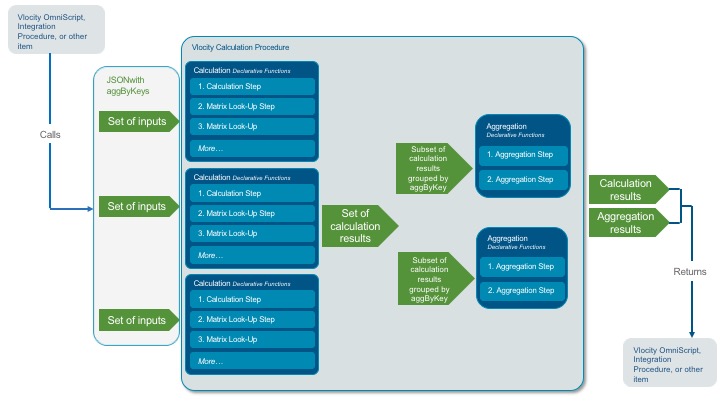
So for the example above, the calculation procedure groups the results of its four calculation step runs into two subsets: one for the instances for the Prius and another for the instances for the Model S. Then it runs the aggregation steps twice: once for the Prius and again for the Model S. The calculation procedure returns two aggregation results—one for each vehicle.
You don't need to add aggByKeys and instanceKeys to
your calculation procedure as variables. As long as the aggByKey option and includeInputKeys
option are set correctly in the services, the getRatedProduct and repriceProduct
services will pass the keys in automatically as part of the input JSON.
Preprocessor and Postprocessor Classes
These are Apex classes that you can use if you have to massage your input data or output data before and after it's processed by a calculation procedure. See Preprocessor Class Example (Managed Package).
If you think you need to use preprocessor classes or postprocessor classes, please contact your Vlocity representative to verify that your use case requires that you write these classes. (We have a lot of tools that are easier and more configurable now, and some of those might work better for you.)
- Workflow for Creating a Calculation Procedure (Managed Package)
For the managed package runtime, to create a calculation procedure, you set up the overall configuration, add variables and constants, add steps, and test. - Create a New Version of a Calculation Procedure (Managed Package)
For the managed package runtime, it's much quicker to create a new version of an existing calculation procedure than it is to create a new version from scratch. When you create a new version, all the details, variables, constants, calculations, matrix lookups, and aggregation steps are cloned from the previous version. - The Looping Feature in Calculation Procedures (Managed Package)
For the managed package runtime, looping calculations take a starting point, an endpoint, and an interval. At run time, the calculation procedure runs in a loop from start to end per interval. Each run uses the same input variables, plus anindexvariable that you can use in the calculation. - Configure a Calculation Procedure for Looping (Managed Package)
For the managed package runtime, make sure that your calculation procedure UI is set up for looping calculations, then configure looping variables. - Preprocessor Class Example (Managed Package)
For the managed package runtime, the following example shows the typical structure of a preprocessor Apex class for a declarative Calculation Procedure.
