You are here:
Define Execution Logic
Define conditional flow in Integration Procedures by using the Execution Conditional Formula field on an action or block, or by using a Conditional Block to compose a series of mutually exclusive conditions.
- Every action and block can have an Execution Conditional Formula
- Use a Conditional Block for more complex conditions
When you add a formula to the Execution Conditional Formula field on an action or block, the result of the formula determines whether the action or block is executed.
- If the formula returns TRUE, the action or block is executed.
- If the formula returns FALSE, the action or block isn't executed.
- If no formula is specified, the action or block is executed.
For example, to execute an action or block for records where the Contact First Name is
blank, you might use the formula %ContactInfo:FirstName% == “”.
When you define an Execution Conditional Formula on a block, it affects all the actions and blocks inside the block. Elements in the block can have their own formulas. Any such action or block executes only if its own formula and the formula for the enclosing block are both true.
If you need to group actions and blocks behind a formula without performing a loop or merging a list, you can use the simplest block type: the Conditional Block. The Conditional Block’s only job is to control the Integration Procedure flow.
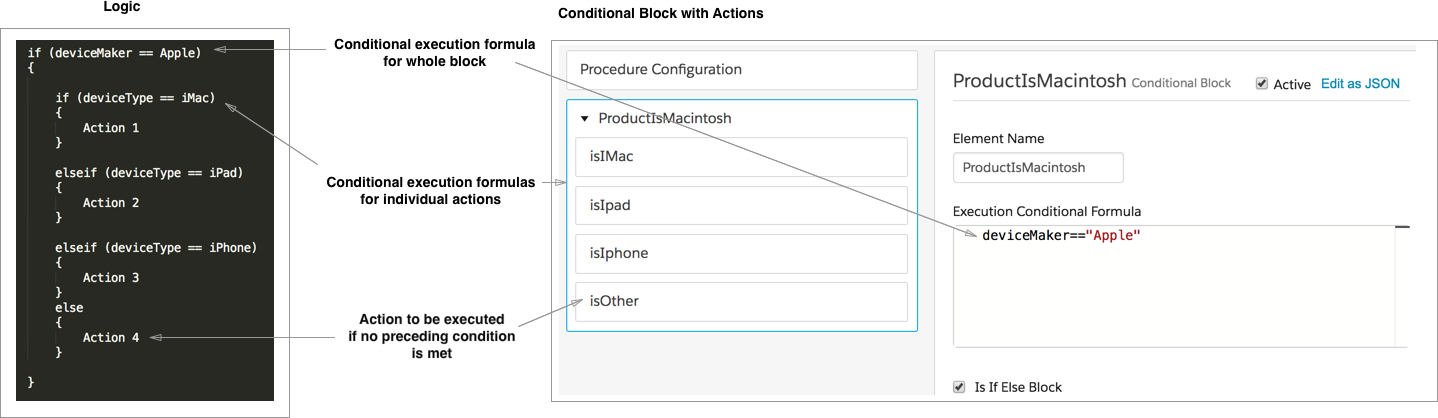
If you need to define a group of mutually exclusive conditions, use a Conditional Block and check the Is If Else field. When the Conditional Block executes, the first action or block whose formula evaluates to True executes. No other actions or blocks in the Conditional Block execute. The execution of the Integration Procedure jumps to the first element after the Conditional Block. To configure a step that is executed if none of the preceding steps execute, leave the Execution Conditional Formula of the last element in the Conditional Block blank. To execute multiple actions for a condition, you can nest Conditional Blocks.
This figure illustrates the use of this logic to perform a different action, depending on the type of device. The Conditional Block itself executes only when the device being processed comes from Apple, and the block contains actions that execute only for a specific type of device.