
You are here:
Embedding a Reusable Omniscript (Managed Package)
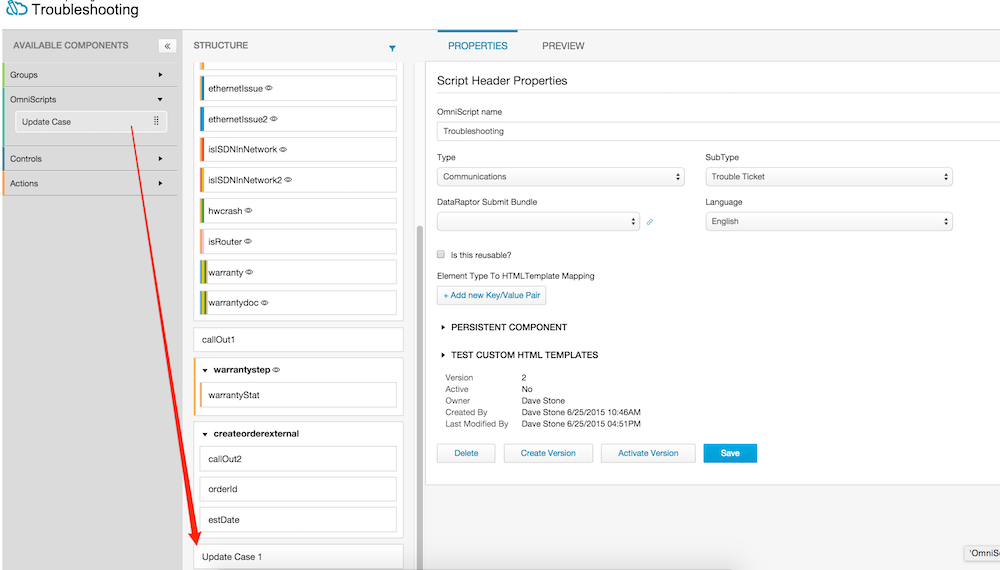
For the managed package runtime, you can embed active reusable Omniscripts in other Omniscripts. For example, if you have an Omniscript that updates a case, you might want to add that reusable script component at the end of an Omniscript form used for troubleshooting.
 This information is for Omnistudio for Managed Packages. For Omnistudio on standard runtime, see Omnistudio Help.
To embed a reusable Omniscript in another form:
- Expand the Omniscripts section of the Available Components.
-
Drag the reusable Omniscript onto the Structure pane.
 Note Starting with Summer '17, Reusable Omniscripts have a link, located under the element properties, that enables a user to view the Omniscript in a new tab while working in the Omniscript Designer.
If the Omniscript that you want to embed is not visible, make sure it's Active and marked as Reusable. For more information, see Embed an Omniscript in Another Omniscript (Managed Package) and Activate and Deactivate Embedded Omniscripts (Managed Package).
Did this article solve your issue?
Let us know so we can improve!
