
You are here:
External Objects in Integration Procedures
Integration Procedures support Salesforce External Objects. The external data can come from any source that can be accessed using a REST endpoint. The returned data can be rendered as JSON or XML.
Here's how it works:
-
In Salesforce, you perform an operation against the Vlocity external object, for example, in Apex code, in a report, or by issuing a SOQL query.
-
The Vlocity external object handler calls the Integration Procedure that implements the external object, passing in a JSON payload that contains details about the request.
-
Based on the contents of the JSON payload, the Integration Procedure accesses the external data using, for example, REST endpoints or Omnistudio Data Mapper calls, and returns JSON or XML results.
-
The Integration Procedure returns its results to the Vlocity external object handler in an intermediate format.
-
The Vlocity handler transforms the results into a JSON payload and returns them to the caller.
The following diagram illustrates the process.
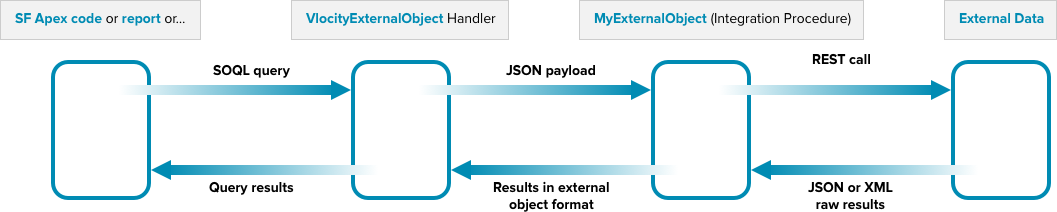
The advantage of this approach to accessing external data is that it is completely declarative, no code required. Note that, while the external object functions as a single object, your Integration Procedure can recruit data from multiple sources.
Query-Handling Logic in the Integration Procedure
To indicate the type of operation being requested of the Integration Procedure, the Vlocity handler sets a "Context" entry in the input JSON. To define the actions for handling each type of query in your Integration Procedure, set the actions' Execution Conditional Formula field (for example: Context = "QueryAll"). The following list describes the values passed in the Context node for each type of request, with SOQL examples and the corresponding JSON payload sent to the Integration Procedure.
QueryAll: SELECT returning all rows (no WHERE clause)
Example query: SELECT ExternalId FROM
myExternalObject;
Corresponding JSON input: {"Context":"QueryAll"}
Query: SELECT with WHERE clause
Example query: SELECT ExternalId FROM
vlocity_dev__ContactsList__x WHERE ExternalId = '59f0f91a51280e0012c90584';
Corresponding JSON input: {"Input":[{"ExternalId":"59f0f91a51280e0012c90584"}],"Context":"Query"}
Upsert: Update a row (if ExternalId is specified) or create a row (if ExternalId is omitted).
Example query (UPDATE): INSERT INTO myExternalObject (Name,
Mobile...) VALUES ("Davidov Spruth", "415-607-9865"...)
Corresponding JSON input: {"Input":[{"Name":"Davidov
Spruth","Mobile":"415-607-9865","CreateDate":"2017-10-25T20:50:34.188Z","Work":"415-232-6365","ExternalId":"59f0f91a51280e0012c90584","Email":"davs@gmail.com"}],"Context":"Upsert"}
Delete: Delete specified rows.
Example query: DELETE FROM myExternalObject WHERE ExternalId
= '"'59f0f91a51280e0012c90584'"';
Corresponding JSON input: {"Input":[{"ExternalId":"59f0f91a51280e0012c90584"}],"Context":"Query"}
To access the external data to handle the query, define HTTP actions that call the REST endpoints that perform the required operations. If the results returned from the endpoint require further processing, create and call Data Mapper Transforms that perform the required transformations.
Query Result Format
To return results from the Integration Procedure to the query, structure the output JSON as follows:
SELECT queries: Return an array of nodes with names that correspond to the table columns defined for the external object. For example:
[{
		"Work": "415-232-6365",
		"Mobile": "415-607-9865",
		"Email": "davs@gmail.com",
		"CreateDate": "2017-10-25T20:50:34.188Z",
		"Name": "Davidov Spruth",
		"ExternalId": "59f0f91a51280e0012c90584",
		"ExternalLookup": "59f0f91a51280e0012c90584",
		"AccountIndirectLookup": "123"
	},
	{
		"Email": "mw@gmail.com",
		"CreateDate": "2017-10-25T21:49:41.633Z",
		"Name": "Mike Wormwood",
		"ExternalId": "59f106f5e928870012f2b0a0",
		"ExternalLookup": "59f0f91a51280e0012c90584",
		"AccountIndirectLookup": "123"
	},
	{
		"Work": "33-555-1212",
		"Mobile": "33-879-0610",
		"CreateDate": "2017-10-25T20:59:18.657Z",
		"Name": "Tom Sor",
		"ExternalId": "59f0fb26e928870012f2b09e",
		"ExternalLookup": "59f0f91a51280e0012c90584",
		"AccountIndirectLookup": "123"
	}
]
UPDATE and DELETE queries: Return the external Id of the object affected in a node named "ExternalID"; for example:
{
	"ExternalId": "59efa135ba8e960012a3e8a5"
}
If the query does not succeed, return a node named "errorMessage" containing details about the problem that occurred.
- Implement an External Object in an Integration Procedure
To access external data, you can define an Integration Procedure that implements a Salesforce External Object.
