
You are here:
Integration Procedures (Managed Package)
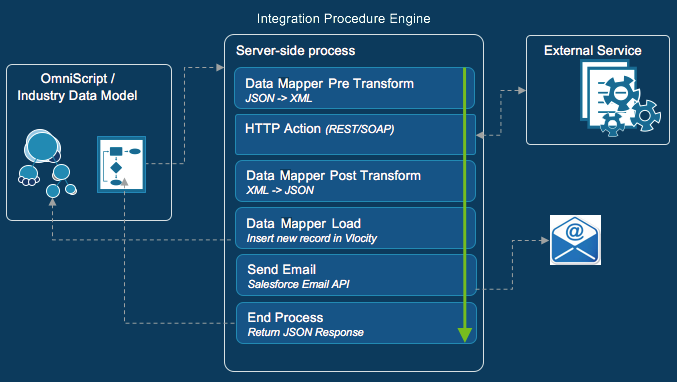
For the managed package runtime, the following diagram shows the relationship between an Omniscript and an Integration Procedure that it calls.
 This information is for Omnistudio for Managed Packages. For Omnistudio on standard runtime, see Omnistudio Help.
Vlocity Integration Procedures are declarative, server-side processes that execute multiple actions in a single server call. Integration procedures can read and write data from Salesforce and from external systems (using REST calls) and can call Apex code. An Integration Procedure can be called from an Omniscript, an API, or an Apex method, and can be a data source for a Card or Flexcard.
Integration Procedures are optimal when you need to access and transform data from third-party sources and no user interaction is required, and moving the workload from client to server is desirable.
Integration Procedures can do some things that Omniscripts can't, the most important of which is list processing with Loop Blocks and List Merge Actions. Integration Procedures can perform more data processing steps than Omnistudio Data Mappers can, and they're more flexible than Calculation Procedures.

You can watch a video that shows how to create an Integration Procedure.
- Set Integration Procedures to Use Managed Package Runtime and Objects (Managed Package)
For the managed package runtime, when the Managed Package Runtime setting and Omnistudio permission set licenses are enabled, Integration Procedures use processes on the Salesforce platform. To have them use the Apex processes in the managed package runtime and custom objects, set RollbackIPChanges to true. Each setting applies to all instances of the respective Data Mapper or Integration Procedure component. - Create an Integration Procedure (Managed Package)
For the managed package runtime, to create an Integration Procedure, you must name it, configure it, define its logic, and preview how it runs. You can also view debugging information and set options that apply only to previews. - Access Integration Procedure Data JSON with Merge Fields (Managed Package)
For the managed package runtime, enable Integration Procedure elements and element properties to access data JSON using merge fields. A merge field is a variable that references the value of a JSON node. For example, if a JSON node is"FirstName": "John", then the merge field%FirstName%returnsJohn. - Group Integration Procedure Steps Using Blocks (Managed Package)
For the managed package runtime, in an Integration Procedure, you can run a group of related steps as a unit inside a block to execute them conditionally, cache them, repeat them for each item in a list, or return an error if they fail. - Define Execution Logic Using Conditional Blocks (Managed Package)
For the managed package runtime, a Conditional Block executes in its entirety if an expression is true, executes one of a set of mutually exclusive conditions defined in the steps it contains, or both. - Enhance Performance Using Cache Blocks (Managed Package)
For the managed package runtime, using a cache to store frequently accessed, infrequently updated data saves round trips to the database and improves performance. Use Cache Blocks if some parts of the Integration Procedure update data, or if you need different cached data to expire at different times. For example, current weather data changes more frequently than user session data. - Process Arrays Using Loop Blocks (Managed Package)
For the managed package runtime, a Loop Block iterates over the items in a data array, enabling the Actions within it to repeat for each item. For example, in Salesforce Industries Communications, Media, and Energy, without a Loop Block, adding four products to a cart would require running four separate Remote Actions. But one Remote Action within a Loop Block can add all four products. - Handle Errors Using Try-Catch Blocks (Managed Package)
For the managed package runtime, a Try-Catch Block lets you "try" running the steps inside it and then "catch" the error if a step fails. - Integration Procedure Actions (Managed Package)
For the managed package runtime, to compose an Integration Procedure, you add actions that run sequentially. These actions can set data values, perform functions, call Omnistudio Data Mappers, invoke Apex classes, send emails, invoke REST endpoints, run other Integration Procedures, and more. - Integration Procedure Best Practices (Managed Package)
For the managed package runtime, to maximize the benefits of Integration Procedures, follow the best practices whenever possible. - Cache for Omnistudio Integration Procedures (Managed Package)
For the managed package runtime, Omnistudio offers multiple caching options to improve performance and minimize unnecessary data processing in Integration Procedures. The two primary user-configurable caching types are Org Cache and Session Cache, which are available in Integration Procedure designer. These caching mechanisms are part of the Salesforce Platform Cache and are implemented through Vlocity Cache in Omnistudio with managed package runtime. Each serves a distinct purpose and comes with specific configuration considerations. - Error Handling in Integration Procedures (Managed Package)
For the managed package runtime, you can configure the conditions for success or failure of an Integration Procedure action or group of actions. You can also configure error logging. - Environment Variables in Omnistudio Data Mappers and Integration Procedures (Managed Package)
For the managed package runtime, you can use environment variables to define Default Values and Filter Values, and in Formulas. - External Objects in Integration Procedures (Managed Package)
For the managed package runtime, Integration Procedures support Salesforce External Objects. The external data can come from any source that can be accessed using a REST endpoint. The returned data can be rendered as JSON or XML. - Test Procedures: Integration Procedures for Unit Testing (Managed Package)
For the managed package runtime, an Integration Procedure that performs a unit test is a Test Procedure. You can use a Test Procedure to unit test almost anything an Integration Procedure can invoke, such as an Omnistudio Data Mapper, a Calculation Matrix, an Apex class, or another Integration Procedure. - Integration Procedure Invocation (Managed Package)
For the managed package runtime, you can invoke Integration Procedures from other Omnistudio tools such as Omniscripts and Cards. You can also invoke Integration Procedures from Apex classes, batch jobs, REST APIs, or Salesforce flows. - Settings for Long-Running Integration Procedures (Managed Package)
For the managed package runtime, you can use chainable and queueable chainable settings to avoid hitting Salesforce governor limits when invoking long-running Integration Procedures. You can also chain on one or more specific long-running steps. - Continuation in Long-Running Calls (Managed Package)
For the managed package runtime, to support long-running calls, Salesforce provides Apex Continuations. If your Omniscript calls a long-running Integration Procedure or Apex class, you can enable continuation. If your Flexcard calls a long-running Integration Procedure that has an HTTP action or a Remote Action, you can enable continuation. - Security for Omnistudio Data Mappers and Integration Procedures (Managed Package)
For the managed package runtime, you can control access to Data Mappers and Integration Procedures using settings that reference Sharing Settings and Sharing Sets or Profiles and Permission Sets. - Add Integration Procedure Components to an Upgraded Org (Managed Package)
For the managed package runtime, to use new components after upgrading an org, add Integration Procedure components to the Omniscript Element Type picklist. This article describes the process of adding components and provides a list of the added components by release. - New Integration Procedure Components by Release (Managed Package)
For the managed package runtime, new Integration Procedure components are listed by the release in which they were introduced, with links to the Release Notes.
