
You are here:
List Merge Action for Integration Procedures (Managed Package)
For the managed package runtime, the List Merge Action merges multiple lists by matching values of specified list item JSON nodes. A basic merge matches node names exactly. An advanced merge matches nodes that have different names and/or reside at different levels in the incoming lists.
 This information is for Omnistudio for Managed Packages. For Omnistudio on standard runtime, see Omnistudio Help.

The inputs to a List Merge Action must each be in list format even if the list contains only one item. Omnistudio Data Mapper Extracts that return a list with one item often convert it to a single object. To convert a single object back into a list, you can use the first example in Omnistudio Data Mapper Transform Examples (Managed Package).
For more list processing options, see List Input for Omnistudio Data Mappers (Managed Package) and the AVG, FILTER, IF, LIST, LISTMERGE, LISTMERGEPRIMARY, LISTSIZE, MAX, MIN, SORTBY, and SUM functions in the Function Reference (Managed Package).
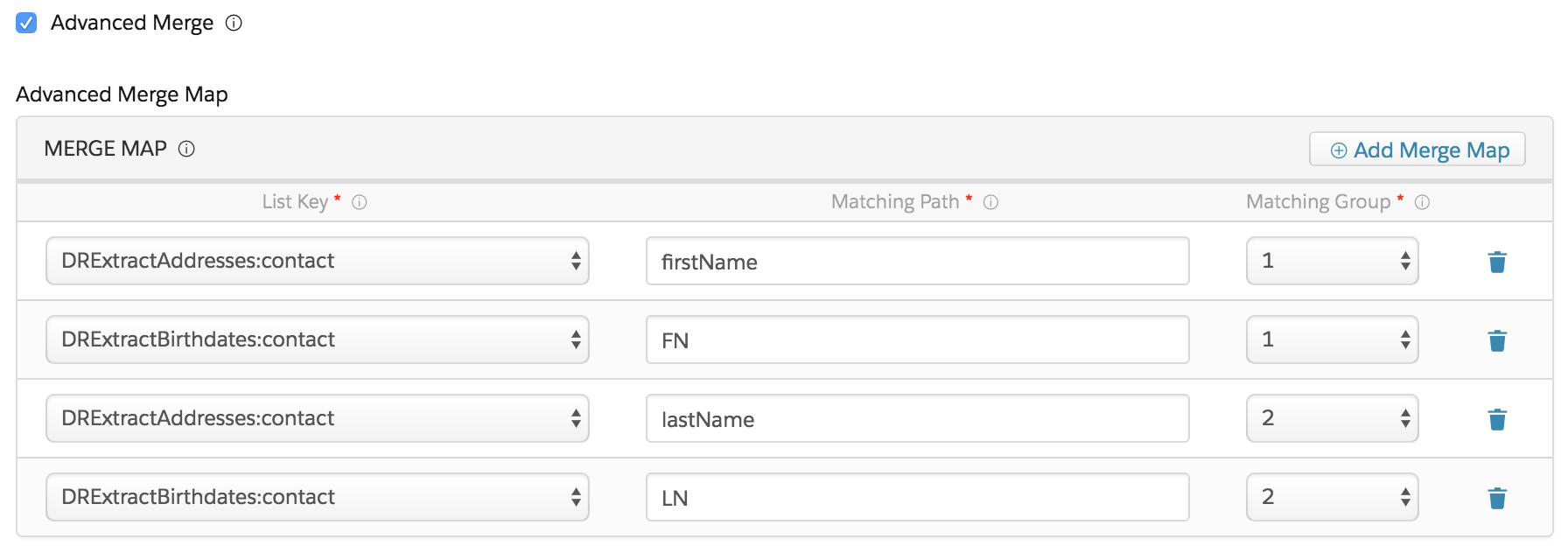
To match nodes that have different names and/or reside at different levels in the incoming lists, click Advanced Merge and specify settings for the nodes to be matched, as follows:
-
List Key: Enter the name of the JSON list node where the node to be matched resides.
-
Matching Path: Enter the path within the list to the node to be matched.
-
Matching Group: Specify the same number for all nodes you want to match.

Older versions have a Normalize Key setting instead of a Matching Group setting, and you must specify the same key for each matching node. This key is only for matching and doesn't appear in the output.
For example, the following figure shows how to match first and last names from two incoming lists in which the nodes have different names.
- List Merge Action Properties for Integration Procedures (Managed Package)
For the managed package runtime, these properties are unique to or function in a unique manner in List Merge Actions. The List Merge Action merges multiple lists by matching values of specified list item JSON nodes. - Workflow for List Merge Action Examples (Managed Package)
For the managed package runtime, three Integration Procedures with List Merge Actions demonstrate a basic list merge, an advanced list merge, and a list merge with dynamic output fields. Each example builds on the previous example.
