
You are here:
Using OmniAnalytics to Track User Engagement in Omniscripts and Flexcards
Use OmniAnalytics to track user interactions to answer questions such as which advertisements get the most responses and how many users who begin a purchasing process complete it. OmniAnalytics can track user interactions with Omniscripts and Flexcards with or without a third-party system such as Google Analytics.
Omnistudio OmniAnalytics is supported with the Omnistudio standard runtime and standard objects.
OmniAnalytics is available in Spring '24 and later releases and integrates with Google analytics 4.
Data Flows
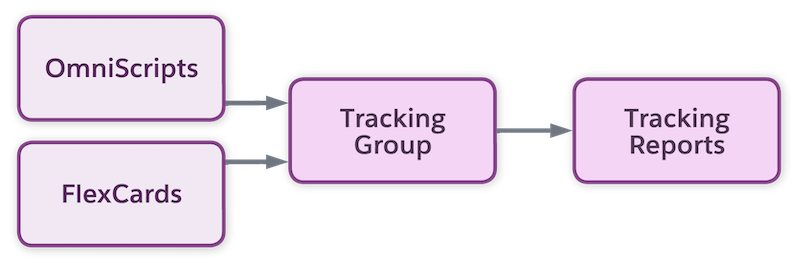
In OmniAnalytics, user interaction data flows from Omniscripts and Flexcards, through tracking components, and into OmniAnalytics dashboards.
User interaction data from OmniAnalytics can also flow from Omniscripts and Flexcards, through tracking components, and into a third-party system such as Google Analytics.
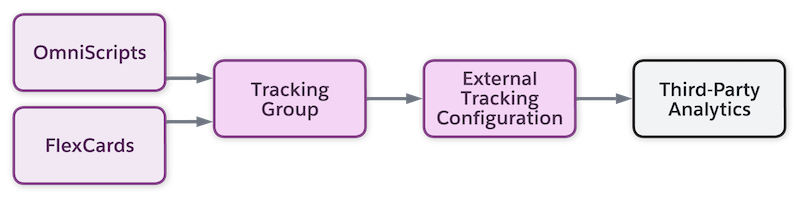
You can send the same data to OmniAnalytics dashboards, a third-party system, or both.
You can use OmniAnalytics to control the data that you send, how it’s structured, and where it goes without editing templates or writing a script.

Types of Data Collected
OmniAnalytics collects data that helps answer questions.
-
Which items are users most interested in?
-
Where are we losing users in the flow?
-
Are some steps too slow to load or too hard to understand?
Specifically, OmniAnalytics collects data about user activity:
-
Clicks per product, offer, or promotion impression
-
Clicks per UI action impression
-
Percent of Omniscripts completed
-
Percent of Omniscript steps completed
-
Load time for Flexcards, Omniscripts, and Omniscript steps
-
Viewing time for Flexcards, Omniscripts, and Omniscript steps
Next Steps
To use OmniAnalytics, enable it and decide how to store tracked data. After enabling OmniAnalystics, configure it to track without a third-party analytics provider or with Google Analytics.
- Enable OmniAnalytics and Store Tracking Data
To enable OmniAnalytics, configure settings that determine whether OmniAnalytics is enabled and whether OmniAnalytics data is stored in OmniTrackingEvent platform events, Decision Explainer Service stores, or both. - Configure Internal OmniAnalytics
OmniAnalytics can track user interactions with Omniscripts and Flexcards without the use of a third-party analytics provider. - Configure OmniAnalytics with Google Analytics
OmniAnalytics tracks user interactions with Omniscripts and Flexcards by integrating with Google Analytics 4 (GA4) and Google Tag Manager. - Create Google Analytics Trusted URLs
For OmniAnalytics and Google Analytics to communicate, your Salesforce org must trust the Google Analytics websites. - Adding Ecommerce Data to the Example Omniscript for OmniAnalytics
Google Tag Manager Ecommerce requires specific kinds of data. You must add this data to the Messaging Framework Omniscript properties. When the Omniscript runs, it sends this data to Google Analytics. - Setting Up Third-Party Tracking and Event Types
An External Tracking Definition specifies a third-party analytics account and tag manager that the OmniAnalytics tracking data is sent to. External Tracking Event Types specify data formats for specific events.
