
You are here:
Omnistudio Integration Procedures
Use Omnistudio Integration Procedures to declaratively automate data interactions between Salesforce and external third-party applications. Integration Procedures handle complex data transformations, API calls, and event-driven automation, and they can execute multiple actions in a single server call.
Use Integration Procedures when no user is interaction required during the execution, and you want to:
- Retrieve, transform, and send data between Salesforce and external systems
- Offload processing to the server to improve performance and scalability
- Bundle multiple operations in a single server transaction
- Enable data caching for frequently accessed information
A single Integration Procedure can retrieve data from multiple sources, transform the data, and return a single payload with the transformed data. For improved performance, you can cache frequently accessed data, including the response data for an entire Integration Procedure or for individual Integration Procedure steps.
Integration Procedures can read and write data from Salesforce and from external systems, make REST API calls, and call Apex code. You can call an Integration Procedure from an Omniscript, a Flexcard, other Integration Procedures, a REST API, a Flow, or an Apex method.
The most important building blocks of Integration Procedures are actions and blocks.
- Actions perform tasks like reading data, making HTTP requests, or sending email.
- Blocks group actions so you can configure their behavior together.
This diagram shows the relationship between an Omniscript and an Integration Procedure that it calls.
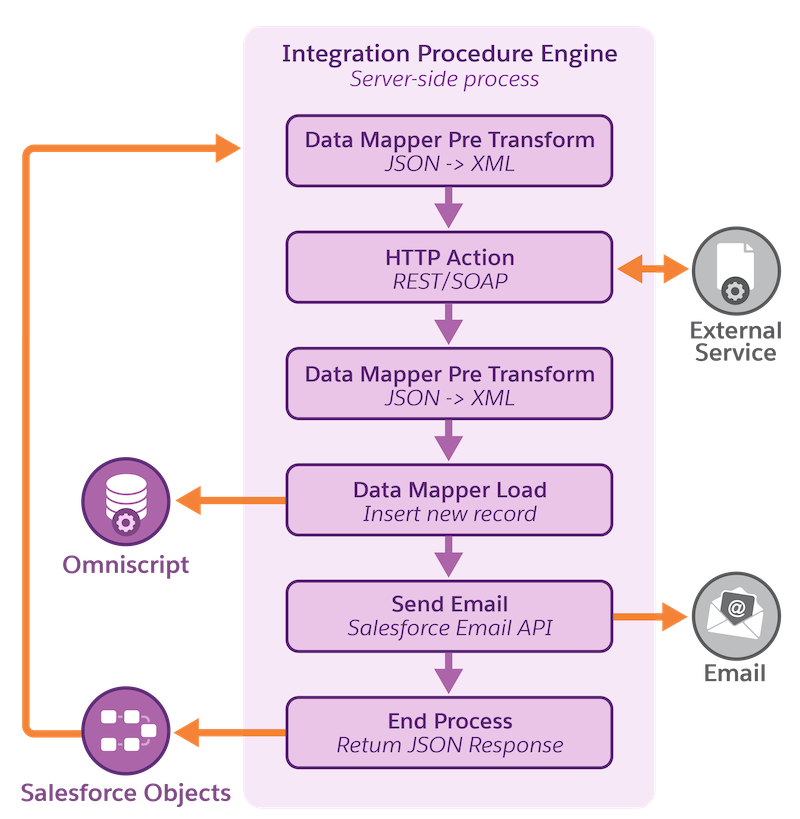
An Integration Procedure can also use variables to store and manipulate data within itself, and Data Mappers to translate data between different systems or formats.
- Work with Integration Procedures
Use the Integration Procedure Designer to build and configure server-side processes that automate data operations between Salesforce and external systems. Integration Procedures support actions like API calls, data transformations, conditional logic, and chaining in a single server call. The Designer also includes tools for debugging and performance optimization, making it ideal for use with Omniscripts, Flexcards, and external integrations. - Build an Integration Procedure
To build an Integration Procedure, define its steps and logic by using a combination of Blocks and Actions. - Integration Procedures on Agentforce
Integration Procedures in Omnistudio are powerful tools used to automate data integration and transfer between systems. They enable the creation of complex workflows, data transformations, and business logic execution, all within a single, unified environment. Agentforce is Salesforce’s agent-focused workspace, designed to streamline customer service operations by providing a centralized platform for case management, customer interaction, and system integration. - Invoke an Integration Procedure
You can invoke Integration Procedures from other Omnistudio tools such as Omniscripts and Cards. You can also invoke Integration Procedures from Apex classes, batch jobs, REST APIs, or Salesforce flows. - Long-Running Integration Procedures
When invoking long-running Integration Procedures you can avoid hitting Salesforce governor limits by using chainable and queueable chainable settings or Apex Continuations, or by chaining on one or more specific long-running steps. - Security for Omnistudio Data Mappers and Integration Procedures
You can control access to Data Mappers and Integration Procedures using settings that reference Sharing Settings and Sharing Sets or Profiles and Permission Sets. - Test Procedures: Integration Procedures for Unit Testing
An Integration Procedure that performs a unit test is a Test Procedure. You can use a Test Procedure to unit test almost anything an Integration Procedure can invoke, such as an Omnistudio Data Mapper, a Calculation Matrix, an Apex class, or another Integration Procedure. - Integration Procedure Actions
To compose an Integration Procedure, you add actions that run sequentially. These actions can set data values, perform functions, call Omnistudio Data Mappers, invoke Apex classes, send emails, invoke REST endpoints, run other Integration Procedures, and more. - Integration Procedure Blocks
In an Omnistudio Integration Procedure, you can run a group of related steps as a unit inside a block to execute them conditionally, cache them, repeat them for each item in a list, or return an error if they fail.
