
You are here:
Populating Dependent Picklist Values in Omniscript Inputs with Apex
You can populate Select, Multi-select, and Radio elements from a Callable implementation. The values for the element are obtained during the Omniscript's activation.
When populating a Dependent Picklist through Apex, the returned Picklist Options are a Map<String, List<Map<String, String>>. The keys to the initial Map are the Language Independent ('name') options from the Controlling field. The List<Map> Options are 'Name' the Language Independent Option and 'Value' the UI Display value. For information on populating a picklist with no dependencies, see Populating Picklist Values in Omniscript Inputs from Apex.
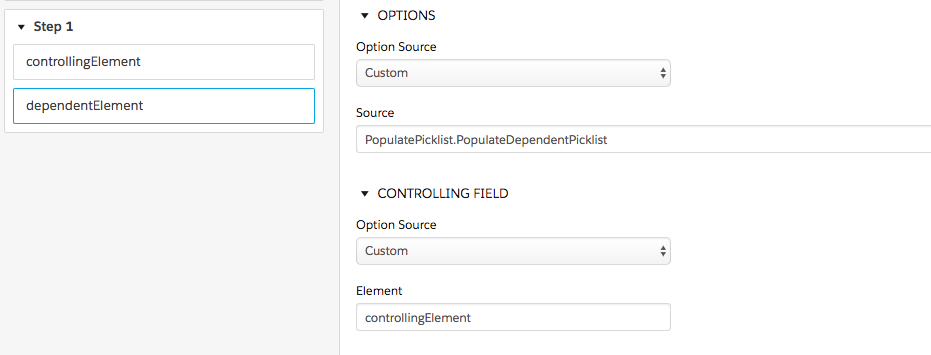
The order of values from the Omniscript is the order of the output picklist.

Omniscript does not check to see if the dependent picklist value is valid when passed. Invalid values are discarded when the controlling picklist is changed.
Sample Apex Code:
global class PicklistPopulationExample implements Callable {
    public Object call(String action, Map<String, Object> args) {
        Map<String, Object> input = (Map<String, Object>)args.get('input');
        Map<String, Object> output = (Map<String, Object>)args.get('output');
        Map<String, Object> options = (Map<String, Object>)args.get('options');
        return invokeMethod(action, input, output, options);
    }
    public Boolean invokeMethod(String methodName, Map < String, Object > input, Map < String, Object > outMap, Map < String, Object > options) {
        if (methodName.equals('PopulateDependentPicklist')) {
            PopulateDependentPicklist(input, outMap, options);
        }
        else if (methodName.equals('PopulatePicklist')) {
            PopulatePicklist(input, outMap, options);
        }
        return true;
    }

    // add the map under options to populate the picklist
    public void PopulatePicklist(Map<String, Object> input, Map<String, Object> outMap, Map<String, Object> options)
    {
        // hard coded list, these options could be results from a remote call/3rd party api
        List<Map<String,String>> picklist = new List<Map<String, String>>();

        Map<String, String> picklistOption = new Map<String, String>();
        picklistOption.put('name', 'Licensing & Permitting');
        picklistOption.put('value','Licensing & Permitting');
        picklist.add(picklistOption);

        picklistOption = new Map<String, String>();
        picklistOption.put('name', 'Contract');
        picklistOption.put('value','Contract');
        picklist.add(picklistOption);

        outMap.put('options', picklist);
    }

    // add the map of all possible picklists that will be chosen given the "controllingElement"
    // note that the "controllingElement" is an element name that gets passed in from omniscript
    public void PopulateDependentPicklist(Map<String, Object> input, Map<String, Object> outMap, Map<String, Object> options)
    {
        // Map of List where the Key is the Potential Values in the Other Picklist
        Map<String, List<Map<String, String>>> dependency = new Map<String, List<Map<String, String>>>();

        List<String> controlValList = new List<String>();
        // note that these are listed (above)
        controlValList.add('Licensing & Permitting');
        controlValList.add('Contract');

        // generating arbitrary entries for each of the above keys
        for(Integer i=0; i<2; i++)
        {
            List<Map<String, String>> optionList = new List<Map<String, String>>();

            for(Integer j=0; j<2; j++) {
                Map<String, String> tempMap = new Map<String, String>();
                tempMap.put('name', controlValList[i] + ' Child');
                tempMap.put('value', controlValList[i] + ' ChildV');

                optionList.add(tempMap);
            }
            dependency.put(controlValList[i], optionList);
        }

        outMap.put('dependency',dependency);
   }


}