
You are here:
Calling Apex from Omniscripts with the Remote Action
Call Apex classes from Omniscript using the Remote element, and use the Omniscript's JSON as input.
Before you begin, create an Apex class in Salesforce to call from Omniscript. Include the ID in the SOQL query. That field is required because the Apex class retains the queries and serializes data according to what’s actually executed.
-
Add a Remote element before a Step, in a Step, or after a Step
to load data or send data in the Omniscript.
The Omniscript's data JSON is sent as the input.
- In the Remote Class field, enter the name of the Apex class that the action calls.
-
In the Remote Method field, enter a method of the class that
the action calls. For example—
validateAddress. - If required, enable the subordinate Integration Procedure that calls long-running actions to use Apex continuations.
- In the Pre- and Post-Transform Omnistudio Data Mapper Interface—optionally select a Data Mapper Transform interface to run before or after the Remote Action.
-
Change the amount of time before the action times out using the Remote Timeout
property. In the element, click Edit Properties as JSON, and
in the
remoteTimeoutproperty, set a time in milliseconds.The default timeout is30,000, or 30 seconds. The maximum is120,000, or 120 seconds. - Configure additional properties in the Remote Action.
-
Select the response behavior of the action by selecting an Invoke
Mode.
-
Default — Blocks the UI with a loading spinner.
-
Non-Blocking — Runs asynchronously, and the response is applied to the UI. Pre and Post Omnistudio Data Mapper transforms and large attachments aren’t supported. When Invoke Mode is set to non-blocking, elements using default values won’t receive the response because the element loads before the response returns. To map the response to an element, you must set Response JSON Node to VlocityNoRootNode and Response JSON Path to the name of the element.
-
Fire and Forget — Runs asynchronously with no callback to the UI. Pre and Post Data Mapper transforms and large attachments aren’t supported. A response will still appear in the debug console but won’t be applied to the Data JSON.
-
-
When Invoke Mode is set to non-blocking, elements using default values will not
receive the response because the element loads before the response returns. You must
configure these properties to map the response to an element:
-
Response JSON Node: VlocityNoRootNode
-
Response JSON Path: The name of the Omniscript Element receiving the value.
-

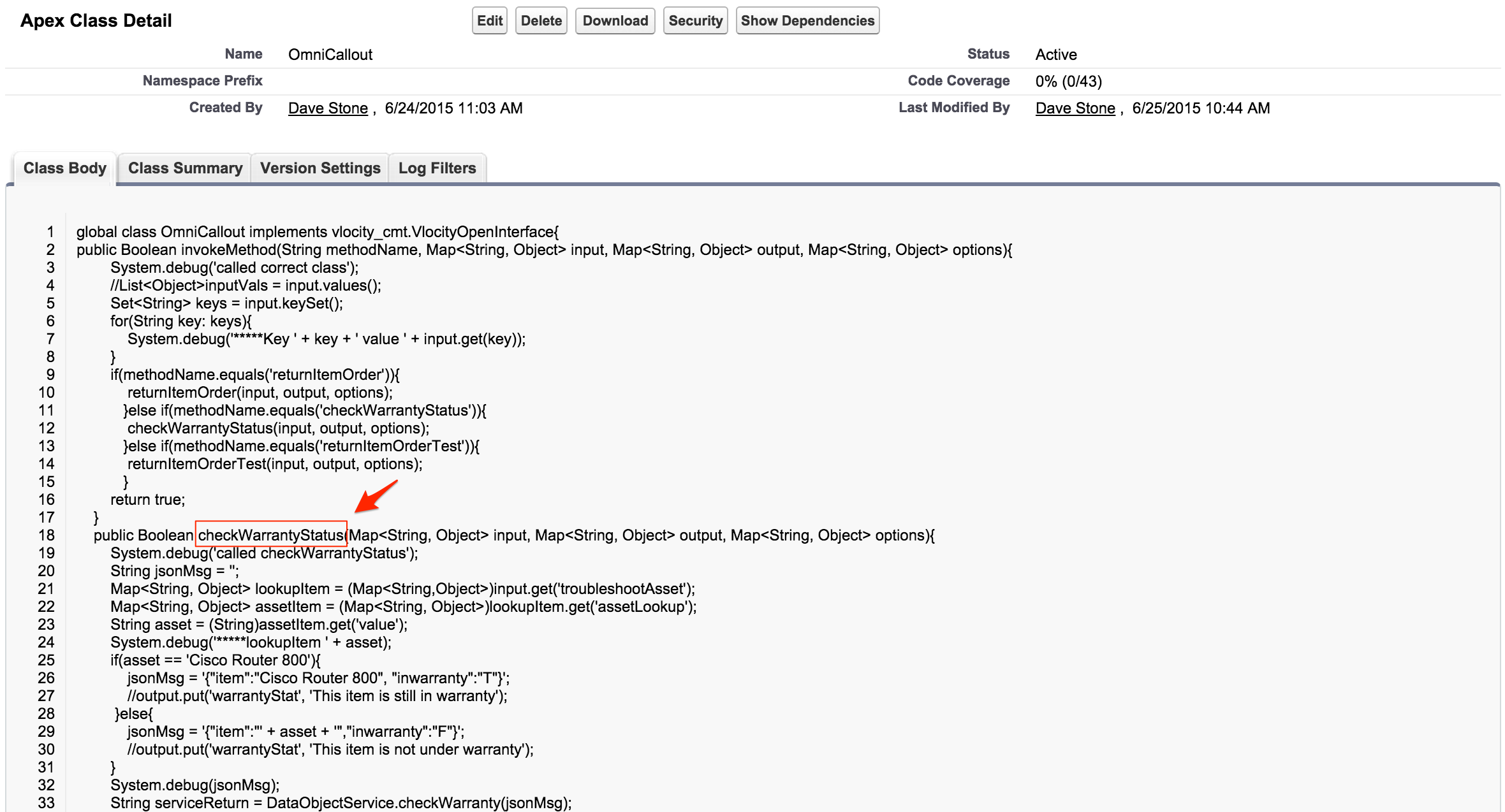
In the Troubleshooting Omniscript, the callOut1 Remote Action element calls an external system to
check if the asset is still under warranty. This example references the Troubleshooting
Omniscript and the OmniCallout and DataObjectService Apex classes.
It implements the Remote OmniCallout class and the remote checkWarrantyStatus method. Since this is a sample
Omniscript, the method contains a hard-coded response:
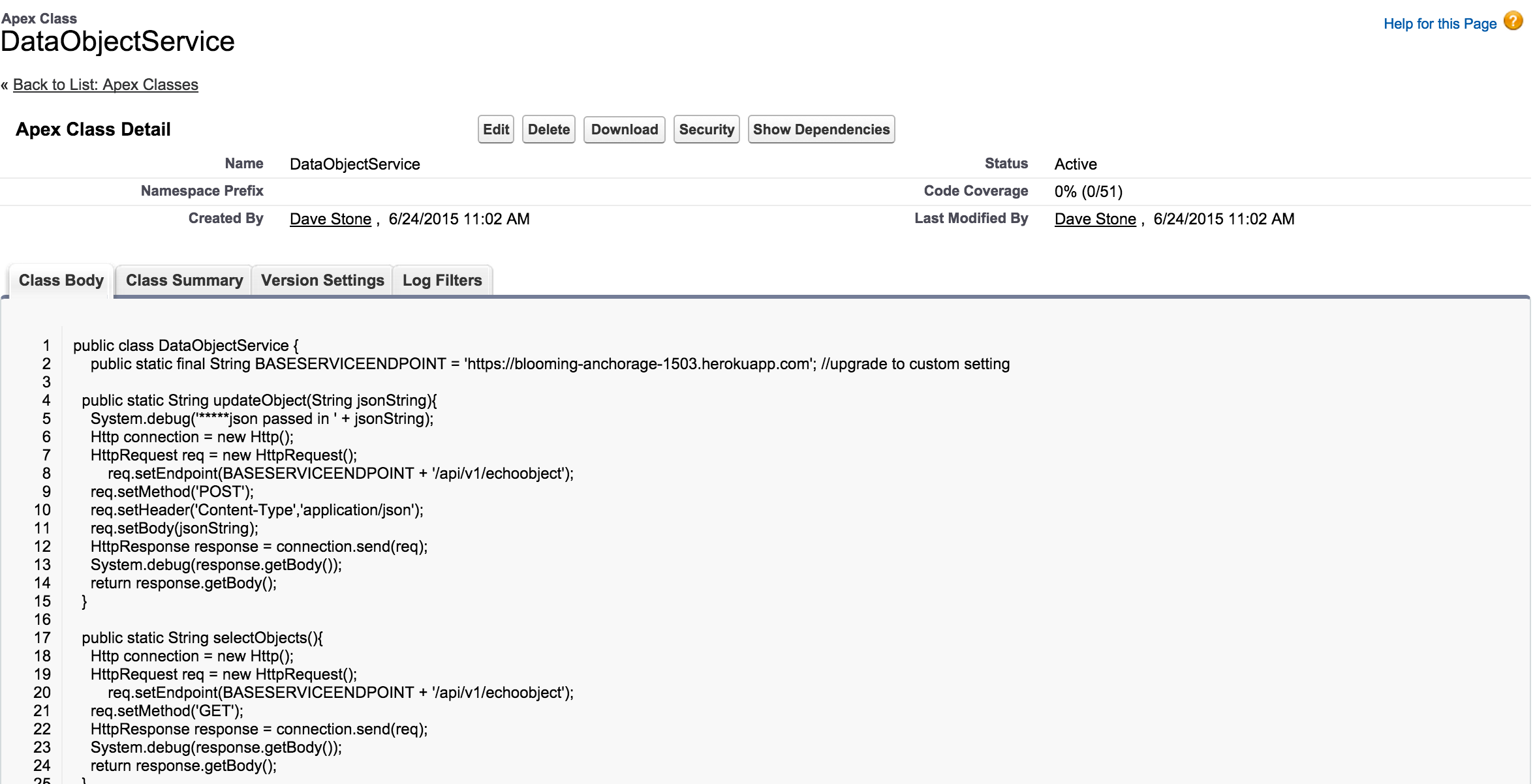
The callOut2 Remote Action calls the
returnItemOrder method, which in turn calls the
DataObjectService class that calls out to a
Heroku instance to return an order number:
The following class structure can be used to call out to an external system:
global with sharing class CustomClassName implements NS.VlocityOpenInterface
   {

    global CustomClassName() {}

    global Boolean invokeMethod(String methodName, Map<String,Object> inputMap, Map<String,Object> outMap, Map<String,Object> options) {

              Boolean result = true;

      try{

             if(methodName.equals('customMethodName')){

             // your implementation, use outMap to send response back to OmniScript

            }

            }

	else if(methodName.equals('customMethodName2')){

            // your implementation, use outMap to send response back to OmniScript

         }

      } catch(Exception e){

         result = false;

      }

             return result;

   }

}
