
You are here:
Vlocity Cards Framework Basics (Managed Package)
For the managed package runtime, the Vlocity Cards Framework provides tools for building customer-centric, industry-specific UI components and applications on the Salesforce platform. Cards are rich in information and actions relevant to the customer's context. Create your cards in a declarative design tool and add them to your Lightning or Community pages.
 This information is for Omnistudio for Managed Packages. For Omnistudio on standard runtime, see Omnistudio Help.
Customer Context
Each customer is linked to multiple aspects of your company's products and services. Customers have accounts, preferred methods to receive bills, preferred means of contact, and a history of the products they have purchased as well as their interactions with the company. When agents must use different systems to gather contextual information about the customer, it affects customer service. Use the Vlocity Cards Framework to streamline customer engagement.

Beginning with Vlocity Health and Insurance Summer '19, Vlocity supports Salesforce's Lightning Web Components programming model with Vlocity Lightning Web Components. Vlocity Lightning Web Components include components, functionalities, and templates exclusive to LWC Cards. LWC Cards enables you to use standard JavaScript and HTML to modify and extend Vlocity products.
Designer
The framework features a card designer, a declarative tool to create UI components.
With the Classic Card Designer, build Angular cards and LWC enabled cards with templates and cards embedded in card layouts, with minimal code.
Build dynamic customer-centric UIs without code from a drag interface with WYSIWYG editing.
Cards
A card is a block that contains a combination of pertinent information and links to processes within a specific context. For example, an account card can include unique account information, such as:
-
Status
-
Priority or service level agreement
-
Creation date
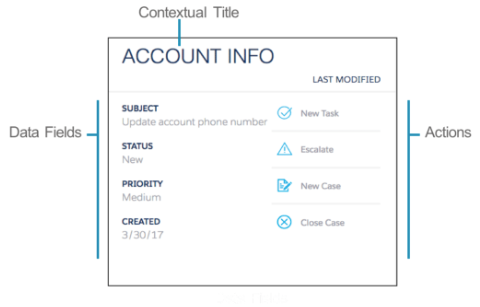
Actions on an account card might include:
-
Closing a case
-
Opening a new case
-
Creating a new task
Each action in the Classic Card Designer can launch an Omniscript to begin a guided process, or perform other actions such as opening an external link.
In the Flexcard Designer, you can create an action that launches or updates an Omniscript, navigates to a web page or application, displays a flyout, fires an event, update field values, and more.
Design and Layout
In the Classic Card Designer, each card and card layout is associated with a template to which you can modify or add HTML, CSS/SCSS, and JavaScript. Templates control the style and appearance of the card and the card layout, and they can be changed using the Template Designer.
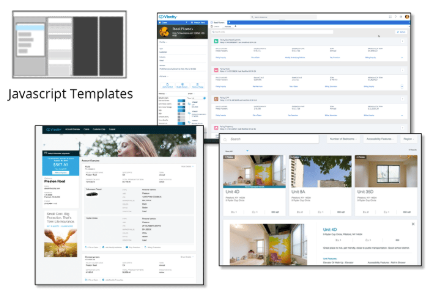
Style individual elements or add custom CSS directly on an element within the Flexcard Designer. You can also make elements responsive.
