
You are here:
Privacy Policy Tips and Best Practices
Keep these tips and guidelines in mind while implementing Data Management or Right to Be Forgotten policies.
Required Editions
| Available in: Developer, Enterprise, Performance, and Unlimited Editions. Requires the Privacy Center license. |
Develop policies in a sandbox
To avoid unintentionally modifying or deleting data in your production org, create and test privacy policies in a sandbox. If a policy includes data retention, view the retained records in your sandbox data store and verify that the field values were copied as expected. This way, your production org data is preserved in case there are configuration errors or unexpected processing issues.
For convenient testing and deployment, Privacy Center allows you to export policies directly between your sandbox and production orgs. See Export Policies Between Sandbox and Production.
Manage record deletion settings at the policy or object level
These record deletion settings are available both at the policy level and the object level.
- Delete records from related history object
- Delete records from Field Audit Trail
- Permanently delete records
If a setting is enabled at the policy level, it’s applied to all objects on the policy, and you can no longer edit the setting at the object level. If you want to apply a setting only to certain objects, don’t select it at the policy level. For more information, see Mask or Delete Records on an Object.
Know the risks of permanently deleting records
If you select the option to permanently delete records, you can’t recover those records from the Recycle Bin. We recommend backing up your records before permanently deleting them. That way, you have the option to restore them.
Understand data deletion and the Recycle Bin
Deleted data moves to the Recycle Bin and is temporarily stored for 15 days. When the data expires, it’s permanently deleted and can't be recovered. The Recycle Bin has a limited capacity based on your org's storage allocation. If this capacity is exceeded, older items can be permanently deleted before the 15-day window expires.
When a parent record is moved to the Recycle Bin, its child record is soft-deleted but not visible in the Recycle Bin. If the parent record is restored from the Recycle Bin, the child record is also restored.
Avoid policy job delays
Because multiple privacy jobs can’t run concurrently, sometimes jobs begin later than their scheduled time. To avoid having jobs backed up in the queue, we recommend staggering the scheduled run times for your policies.
Work around data processing restrictions between parent and child objects
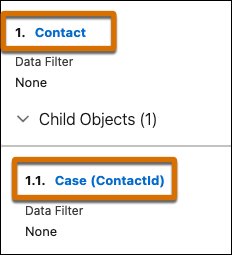
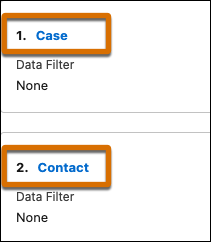
Field restrictions or dependencies sometimes exist between parent and child objects that you add to a policy. These restrictions can cause problems with deleting data on the parent object. If you experience job errors or failures while deleting data on a parent object, delete the child object’s data first. To set up this workaround, remove the child object from the policy and reconfigure it as a top-level object positioned before the parent object.

| Problem | Solution |
|---|---|
| The Case object is positioned as a child of the Contact object. Case records prevent the associated Contact records from being deleted. | Configure the Case object as a top-level object, and position it before the Contact object. Case records no longer prevent Contact records from being deleted. |
|
|
Republish policies after editing them
When you edit a policy’s name, description, run schedule, or policy-level deletion settings, the changes take effect only after you republish the policy. Whenever you finish updating a policy, click Publish on the policy details page.
Be careful when canceling in-progress jobs
If you cancel a job that’s already in progress, any processed records remain in their updated state. Some records may be modified or unrecoverable from the Recycle Bin, depending on your policy configuration and the amount of data that was processed.
Considerations for deleting policies
You can delete active policies from the Privacy Policies page, so be careful not to delete policies that are scheduled to run. You can’t delete RTBF policies that have RTBF requests associated with them.
