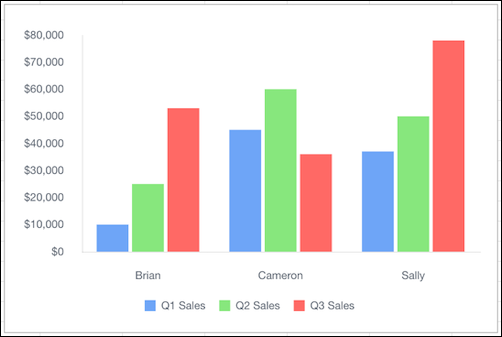
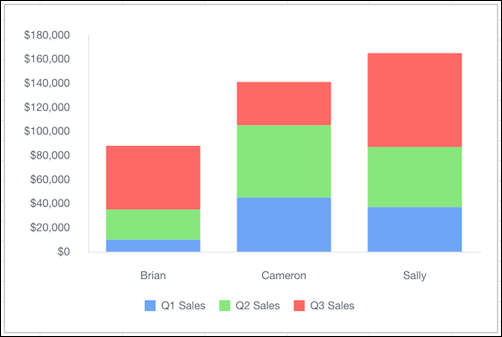
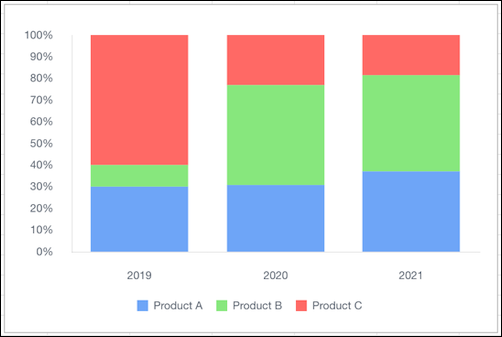
Quip provides these types of column charts: column, stacked column, and column stacked to
100 percent. Use a column chart to compare related values. Use a stacked column chart to compare
parts of a whole and show values across one or more categories. Use a column chart stacked to
100 percent to compare the proportions between values in one or more categories.
Required Editions
Available in: Quip desktop app, Quip iOS mobile app, and Quip
on web
Data Options for Column Charts
To customize data in column charts, open the Chart Editor, and click the
Customize tab.
Stacking: Choose whether to stack data series in the column chart.
Style: Change the position of the chart legend, or hide it entirely. Select the colors
for the chart’s background and border.
Series: Apply data labels to show values directly in the chart, and set the labels’
position and color.
Horizontal Axis: Give the axis a title, adjust its scale, set the number of tick marks
shown, and change the number formatting.
Vertical Axis: Give the axis a title, adjust its scale, change the number formatting,
and reverse the axis order.
Sample Data for Column Charts and Stacked Column Charts
Rep
Q1 Sales
Q2 Sales
Q3 Sales
Brian
$10,000
$25,000
$53,000
Cameron
$45,000
$60,000
$36,000
Sally
$37,000
$50,000
$78,000
Sample Data for Column Charts Stacked to 100 Percent
Product Market Share
Product A
Product B
Product C
2019
30%
10%
60%
2020
20%
30%
15%
2021
50%
60%
25%
Did this article solve your issue?
Let us know so we can improve!
Loading
Salesforce Help | Article
Cookie Consent Manager
General Information
Required Cookies
Functional Cookies
Advertising Cookies
General Information
We use three kinds of cookies on our websites: required, functional, and advertising. You can choose whether functional and advertising cookies apply. Click on the different cookie categories to find out more about each category and to change the default settings.
Privacy Statement
Required Cookies
Always Active
Required cookies are necessary for basic website functionality. Some examples include: session cookies needed to transmit the website, authentication cookies, and security cookies.
Functional Cookies
Functional cookies enhance functions, performance, and services on the website. Some examples include: cookies used to analyze site traffic, cookies used for market research, and cookies used to display advertising that is not directed to a particular individual.
Advertising Cookies
Advertising cookies track activity across websites in order to understand a viewer’s interests, and direct them specific marketing. Some examples include: cookies used for remarketing, or interest-based advertising.