
You are here:
Quip Glossary for Salesforce
Search for terms and brush up on your Quip knowledge.
Quip Advanced (previously Salesforce Anywhere Advanced)
- Collaboration Document Metrics
- Represents metrics for a document. Includes Quip site ID, document URL, document title, source template, last updated date, update count, and viewer, editor, and commenter counts. Available in API version 50.0 and later.
- Collaboration Document Metric Records
- Represents an association between a Collaboration Document Metric and a Salesforce record. It tracks which Salesforce record, such as an Account or Contact, is associated with the document engagement metric. Available in API version 50.0 and later.
- Collaboration Template Metrics
- Represents metrics for a template. Includes Quip site ID, template ID, template URL, template title, number of documents created from a template, and last updated date. Available in API version 50.0 and later.
- Collaboration Template Metric Records
- Represents an association between a Collaboration Template Metric and a Salesforce record. It tracks which Salesforce record, such as an Account or Contact, is associated with the template engagement metric. Available in API version 50.0 and later.
- Collaboration User Engagement Metrics
- Represents the user engagement metrics for a Quip thread in a template or document. Includes Salesforce user ID, Quip user ID, Quip thread ID, title, and type, Quip site ID, source template ID, metric date, and viewer, editor, and commenter counts. Available in API version 50.0 and later.
- Collaboration User Engagement Records
- Represents an association between a Collaboration User Engagement Metric and a Salesforce record. It tracks which Salesforce record, such as an Account or Contact, is associated with the user engagement metric. Available in API version 50.0 and later.
- Comment Access
-
- Level of access to a document or spreadsheet. Users with this level of access can view and comment.
- Synced Sharing setting for documents linked to a record. Users who can view a Salesforce record can view and comment on documents linked to it.
- Comment Count
- Quip per-user engagement metric that records the number of comments by the user for the specified Metric Date.
- Commenter Count
- Quip engagement metric that records the daily number of unique document comments.
- Company Gallery
- Template gallery in Quip that contains custom galleries that are shared across your company. Admins can publish company-wide templates to the Template Library’s company galleries from the Quip Admin Console. Company galleries make it easier to streamline and share your processes across your business.
- Default Salesforce Org
- Quip site setting that redirects users to a specific Salesforce login page when they log in to their Quip site. Salesforce Single Sign-On (SSO) users can automatically connect the default Salesforce org to Quip. Choosing a default org also recommends that org to users when they connect an org to use Salesforce integrations in Quip. Available in the Quip Admin Console.
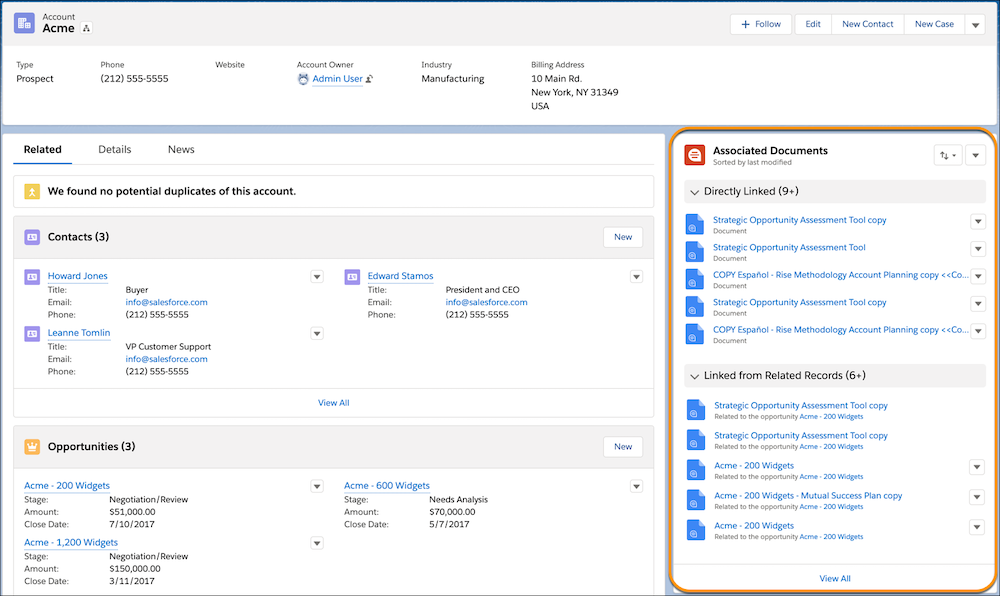
- Directly Linked
- Documents that are manually linked to a Salesforce record through the Quip Associated Documents component or that are created from an embedded template.
- Document ID
- Quip engagement metric that records the ID of the document.
- Document Range
- Headings in a template that define the template’s structure. Use document ranges to automate your template flows based on a template section.
- Document Title
- Quip engagement metric that records the title of the document.
- Document URL
- Quip engagement metric that records the URL of the document.
- Edit Access
-
- Level of access to a document or spreadsheet. Users with this level of access can view, comment, and edit.
- Synced Sharing setting for documents linked to a record. Users who can view a Salesforce record can view, comment on, and edit documents linked to it.
- Edit Count
- Quip per-user engagement metric that records the number of edits by the user for the specified Metric Date.
- Editor Count
- Quip engagement metric that records the number of unique document edits.
- Einstein Analytics Live App
- Salesforce live app that lets users add Einstein Analytics dashboards to their documents.
- Example Gallery
- Template gallery in Quip that contains sample templates from quip.com/templates. Sample templates aren’t customizable by admins. Documents, spreadsheets, and slides added to your site by Quip Support are also shown in the Example Templates gallery.
- Full Access
-
- Level of access to a document or spreadsheet. Users with this level of access can view, comment, edit, and share.
- Synced Sharing setting for documents linked to a record. Users who can view a Salesforce record can view, comment on, edit, and share documents linked to it.
- Gallery
- Grouping of templates in the Template Library similar to a folder. Template Library galleries include private galleries, the Example Templates gallery, and company galleries.
- Health Check
- Automated tests that check the connection between your Quip Advanced site and Salesforce org. When Health Check identifies a problem, get on-the-spot results and solution recommendations.
- Last Updated Date
- Quip engagement metric that records the date that the document was last updated.
- Linked Document
- An association between a document and a Salesforce record. Link a document to a record to easily find documents, like an Account Plan, that are related to Salesforce. You can link a document to a record from the document, or from the Quip Associated Documents component on the record.
- Linked from Related Records
- Documents that are linked to a related record and are shown in the Quip Associated Documents component. For example, see documents linked to an opportunity from the Account record.
- Live App
- Interactive first-party or third-party application that continuously updates with the latest data and is embedded in a document. The Salesforce Record and Salesforce List live apps pull live data from Salesforce and support saving local changes to Salesforce. Other live apps include Einstein Analytics, Relationship Map, Kanban boards, polls, process bars, and more.
- Lock Document Edits
- Marks a document as complete and stops users from making edits. You can lock edits to a document in Process Builder and Flow Builder, and from a document. Only users with full access to a document can lock or unlock edits.
- Lock Section Edits
- Locks edits to a template section to prevent accidental edits. You can lock edits to a section in Process Builder and Flow Builder, and from a template. Only users with full access to a template can lock or unlock edits.
- Mail Merge Syntax
- Merge fields in a template that dynamically populate with Salesforce data. Templates embedded in a Salesforce record using the Quip Document component use mail merge syntax to auto-populate text and live apps based on the record. A Salesforce object’s merge fields are shown in the Object Manager.
- Mirrored Salesforce Permissions
- Access management setting that gives users access to only the Salesforce data in Quip that they can access in Salesforce.
- Metric Date
- Quip engagement metric that records the date of the gathered metric.
- Multi-Org Allowlist
- Allowlist that determines which Salesforce orgs users can pull data from in Quip. Add preapproved orgs to your allowlist or disallow orgs that you don’t want your users to pull data from. Allowlists ensure that company-critical data stays secure and users access only the Salesforce data in Quip that you approve. Available in the Quip Admin Console.
- No Access
- Synced Sharing setting for documents linked to a record. Users who can view a Salesforce record can’t view documents linked to it.
- None
- Level of access to a document or spreadsheet that removes a user’s access to it. Users who previously had access to a document can no longer view, comment on, edit, or share it.
- Object Type
- Quip engagement metric that records the object type of the Salesforce record, such as Account or Contact.
- Owner
- The user a Salesforce app’s data is based on. The owner depends on how the
Salesforce app was added to the document:
- The owner of a list view added manually to a document is the user who added it.
- The owner of a list view added by copying a template is the user who copied it.
- The owner of a list view added using Process or Flow Builder is the first user to open the document.
- The owner of a record is the user who added it, the last user to refresh it, or the last user to add or remove a field.
- The owner of a report added manually to a document is the user who added it, or the last user to edit it.
- The owner of a report added by copying a template is the user who copied it.
- Parent Record ID
- Quip engagement metric that records the ID of the Salesforce record.
- Preferred Org
- Integration setting available to all users that lets you mark your go-to Salesforce org as preferred. Salesforce live apps and integrations automatically pull data from your preferred org.
- Private Gallery
- Template gallery in Quip that contains the Created by Me and Shared with Me galleries. Available via the Template Library.
- Quip Associated Documents Component
- Lightning component that lets you link documents to a Salesforce record. The
component also surfaces documents linked to related records.
- Quip Document Component
- Lightning component that lets you embed a template in a Salesforce record. Users can also create documents or link existing ones from the component.
- QuipDocumentURL
- Custom field on a Salesforce object that the Quip Document component uses to store the URL of the embedded document. Only required if you want to use different documents for your Salesforce records.
- Quip Document Metric
- Quip engagement metric that records the ID of the Collaboration Document Metric.
- Quip Engagement Metrics
- Measures which users are interacting with documents associated with Salesforce records. Available in Lightning.
- Quip Notifications Component
- Lightning component that lets you see your Quip notifications in Salesforce.
- Quip Setup Starter
- A managed package that sets up your Salesforce org with popular Quip Advanced features like embedded templates, Flow Builderactions, and more.
- Quip Template Metric
- Quip engagement metric that records the ID of the Collaboration Template Metric.
- QuipTemplateURL
- Custom field on a Salesforce object that the Quip Document component uses to store a template URL. Only required if you want to use different templates for different Salesforce records.
- Quip Thread
- Quip per-user engagement metric that records the Quip thread ID.
- Quip Thread Title
- Quip per-user engagement metric that records the title of the document or sheet.
- Quip Thread Type
- Quip per-user engagement metric that records the type of Quip thread. The possible values are chat, document, sheet, or template.
- Quip User
- Quip per-user engagement metric that records the ID of the Quip user.
- Read Only
- Level of access to a document or spreadsheet. Users with this level of access can view.
- Refresh
- Button that pulls the latest Salesforce data for your Salesforce live apps, data mentions, and reports. When the Salesforce live apps and data mentions refresh, they use the data that the app owner has access to.
- Relationship Map Live App
- Lightweight org charts and relationship maps in Quip. Create custom maps or create maps based on Salesforce data. See Relationship Map Glossary
- Restrict Synced Sharing Access
- Access management setting that stops users that are granted access to a document via Synced Sharing from becoming permanent document members. When a user’s Synced Sharing access level changes, so does their document access.
- Salesforce Actions Cloud
- Button that lets you take Salesforce actions from a document. You can link a document to a Salesforce record, add a Salesforce data, or log activity back to Salesforce.
- Salesforce Activities
- Options available via the Salesforce Actions cloud. Activities include Log a Call, New Task, and New Event.
- Salesforce Data Mention
- Inline Salesforce fields and records. Supports saving local changes to Salesforce for easy updates to your records and record fields.
- Salesforce List Live App
- Live Salesforce list views in Quip. The Salesforce List live app supports bidirectional syncing with Salesforce for easy updates to your list views and related lists. You can add the Salesforce List live app to a document with the @key or by adding it to a template with Process or Flow Builder.
- Salesforce Record Live App
- Live Salesforce records in Quip. The Salesforce Record live app updates with the latest Salesforce data and supports bidirectional syncing with Salesforce. For example, add the Salesforce Record live app to a Case Swarm document. Service reps can collaborate in-context, update the case status, and even add fields directly in Quip.
- Salesforce Record Access
- Synced Sharing setting for documents linked to a record. Users who can access a Salesforce record have the same level of access to documents linked to it.
- Salesforce Related List
- Live Salesforce related list views in Quip. Use the Salesforce List live app to add record-specific related lists to a document. Stay on top of deals and cases with in-line editing, comments, and bi-directional syncing to Salesforce.
- Salesforce Report
- Live Salesforce reports in Quip. Salesforce reports update automatically with the latest Salesforce data. You can apply your report’s custom filters to tailor your report view in Quip.
- Salesforce User ID
- Quip engagement metric that records the ID of a Salesforce user.
- Site
- Quip engagement metric that records the ID of the Quip site.
- Source Template
- Quip engagement metric that records the ID of the source template.
- Source Template URL
- Quip engagement metric that records the URL of the source template.
- Staged Edits
- Edits to Salesforce live apps that are saved locally. Don’t save changes made in Quip to Salesforce. Staged edits are supported in the Salesforce List and Salesforce Record live apps.
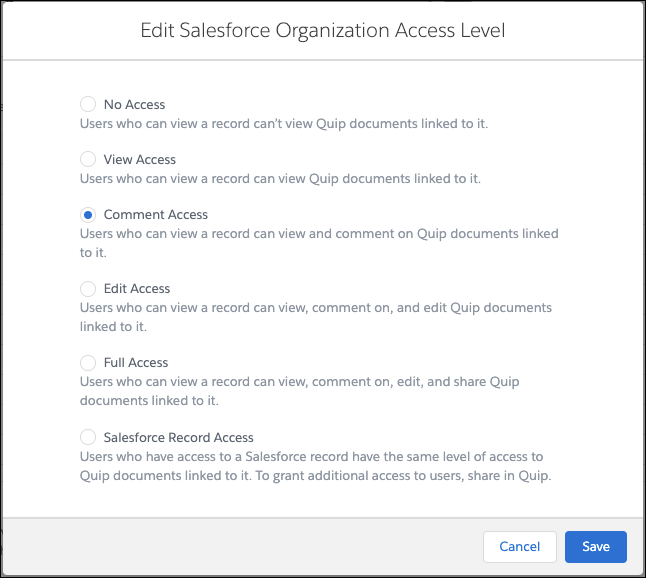
- Synced Sharing
- Org-level document sharing setting that uses a user’s access to a Salesforce record
to grant access to documents linked to a record. After Synced Sharing is enabled, only
users with access to a Salesforce record are able to view, comment on, edit, or share
its embedded documents. Available in the Quip Admin Console.
- Syncing
-
Lets you save changes made to the Salesforce List live app, Salesforce Record live app, Relationship Map live app, and Salesforce Data Mentions in Salesforce.
- Any user can edit and comment on records and fields in Quip. Only users with edit access to the fields in Salesforce can sync edits to Salesforce.
- List view and record owners can choose to discard or save changes made in Quip by non-owners.
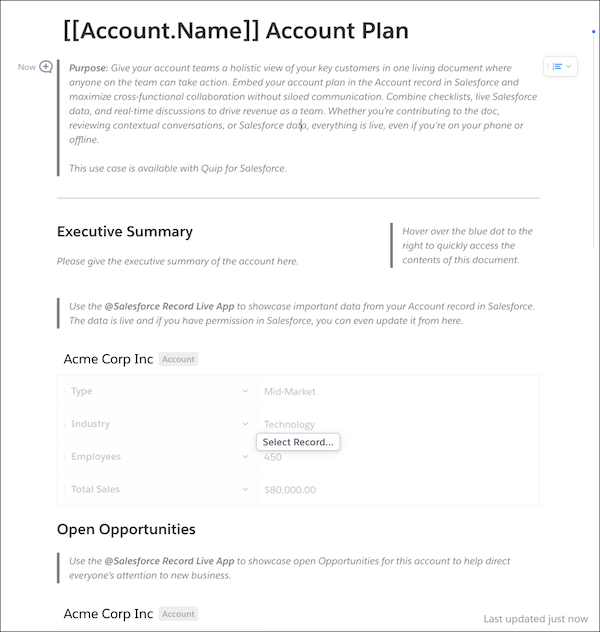
- Template
- Document configured to scale and streamline business processes like Account Plans.
Include mail merge syntax to create dynamic fields that autofill based on a Salesforce
record and add it to the Quip Document component. Documents can be marked as templates
or created from scratch using the template format.
- Template ID
- Quip engagement metric that records the ID of the template.
- Template Library
- Lets you easily find and create templates in Quip. With the Template Library, users can create and share templates in private galleries, like the Created by Me and Shared with Me galleries, access company templates, or get started with example templates.
- Template URL
- Quip engagement metric that records the URL of the template.
- Templated Live Apps and Data Mentions
- Salesforce live apps and Salesforce Data Mentions added to an embedded template that dynamically populate based on the record’s data.
- Total Document Count
- Quip engagement metric that records the number of documents created from a template.
- Update Count
- Quip engagement metric that records the daily number of document edits.
- User Engagement Metric ID
- Quip per-user engagement metric that records the ID of the Collaboration User Engagement Metric record.
- View Access
- Synced Sharing setting for documents linked to a record. Users who can view a Salesforce record can view documents linked to it.
- View Count
- Quip per-user engagement metric that records the number of views by the user for the specified Metric Date.
- Viewer Count
- Quip engagement metric that records the daily number of unique document views.
- @Mention
- Use the @ key to add people, documents, Salesforce live apps, images, Kanban boards, and more to your documents.
Did this article solve your issue?
Let us know so we can improve!
