
You are here:
Event Log File Browser
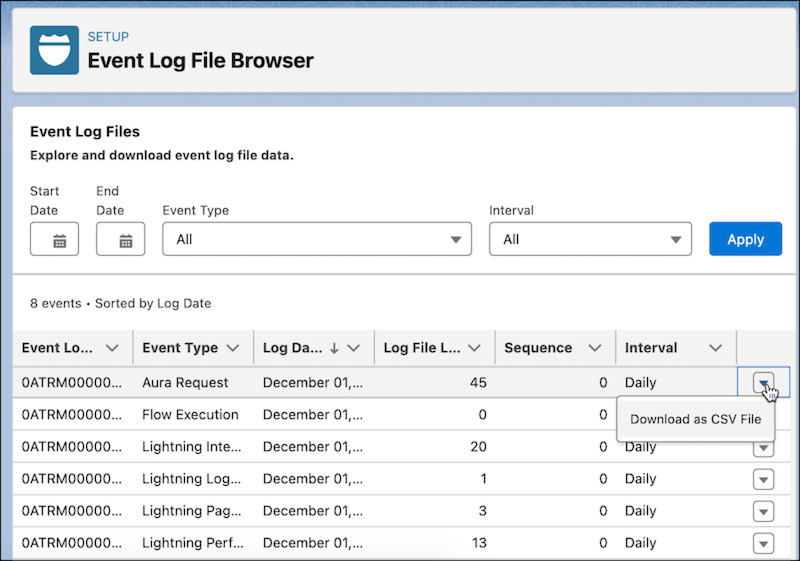
Event Log File (ELF) Browser in Setup gives you quick access to event log files so you can explore and download all of your event log file data.
| Available in: Lightning Experience |
| Available in: Enterprise, Performance, and Unlimited Edition |
| User Permissions Needed | |
To view event log files: |
View Event Log Files |
| To view Setup: | View Setup |
Discover Event Log Files
With ELF browser, you can sort and explore Event Log Files by type, log date, log file length, and more. Easily filter by date and event type to find the data you need. You can access ELF Browser directly from Setup.
Download Event Log Files directly from ELF Browser
Download Event Log File data by selecting a date range, clicking the dropdown button to the right of the event log file, and selecting Download as CSV File.
Alternatively, use
the File Download servlet by adding /servlet/servlet.FileDownload?file=<ELF_ID_NUMBER> after your org URL. For
example, https://mycompany.my.salesforce.com/servlet/servlet.FileDownload?file=0ATRM000000dcbH0A0.
The file download begins automatically.
For more information on Event Log Files, see Using Event Monitoring.
