
Release Updates
Salesforce periodically releases updates that improve the performance, security, logic, and usability of your Salesforce org, but that can affect your existing customizations. When these updates become available, Salesforce shows them in the Release Updates node in Setup.
Required Editions
| Available in: both Salesforce Classic (not available in all orgs) and Lightning Experience |
| Available in: all editions |
Release updates offer a more detailed view of information previously found in the Critical Updates console. The page also contains information previously found in the Security Alerts node.
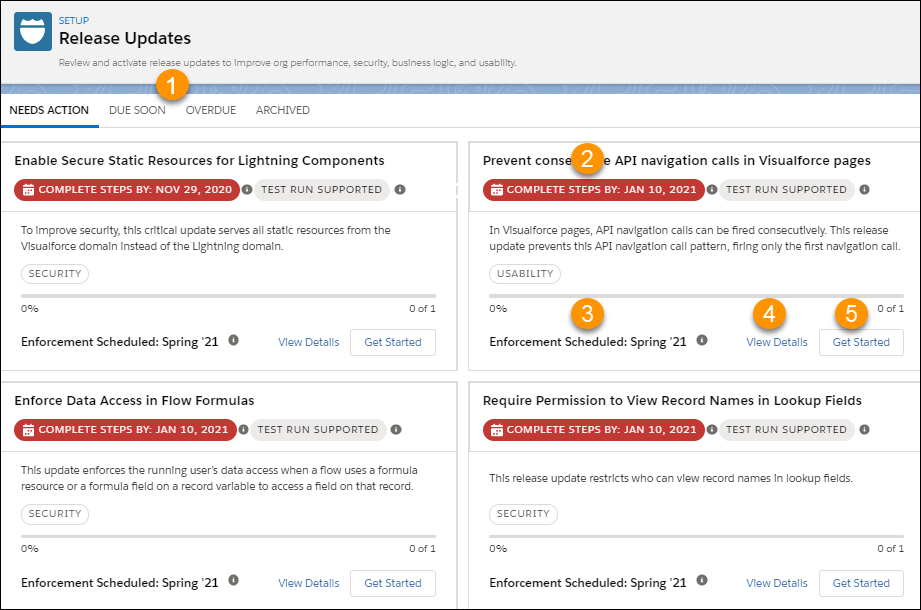
- Use tabs to view release updates for a specific category.
- Needs Action: Update hasn't reached the Complete Steps By date and steps aren’t done.
- Due Soon: Complete Steps By date is approaching.
- Overdue: Update is past the Complete Steps By date and steps aren’t done.
- Archived: Update is completed.

 Note In Beta, the text Due Soon appeared at the top of the detail page for updates with upcoming enforcement dates. This text no longer appears on the detail page.
 - Check the Complete Steps By date. The test run button is a toggle that you can enable and disable before this date (sandbox org test periods may end earlier). When you enable a test run, the update becomes immediately enabled in your org. The test run allows you to evaluate the impact of the update before the update is enforced.
- Use the Enforcement Scheduled or Enforced In information to check the release in
which Salesforce enforces the update. In the Beta release, we indicated the
enforcement information with Automatically enforced in. To find out where to get the
major release upgrade date for your instance, hover over the tooltip.Note Some release updates contain specific dates. In these cases, use the date information in the update as guidance for when to expect enforcement.
- Get quick information about an update without leaving the home page by clicking View Details.
- Start or stop a test run, complete update steps, and view step update history by clicking Get Started.
When you act on an update, a series of detailed steps helps you to evaluate the impact on your org. You can adopt the update early or, depending on your org, use the recommended test run option.
- Manage Release Updates
Act on release updates to keep your Salesforce org functioning at its best. Release updates replace the Critical Updates console and include more detailed information about upcoming changes. - Security Alerts
Release updates have replaced security alerts. Information about previously released security alerts can be found in the Release Updates node.
Did this article solve your issue?
Let us know so we can improve!
