
You are here:
Enable and Configure Mobile App Security Policies
Use the convenient Setup UI to enable, configure, and enforce mobile security policies.
Required Editions
| User Permissions Needed | |
|---|---|
| To create and modify Enhanced Mobile App Security settings: | Manage Enhanced Mobile App Security AND Modify Metadata |

To configure your policies:
- From Setup, in the Quick Find box, enter Mobile Security, and then select Mobile Security.
-
Select Edit Security Policies for iOS or
Android.
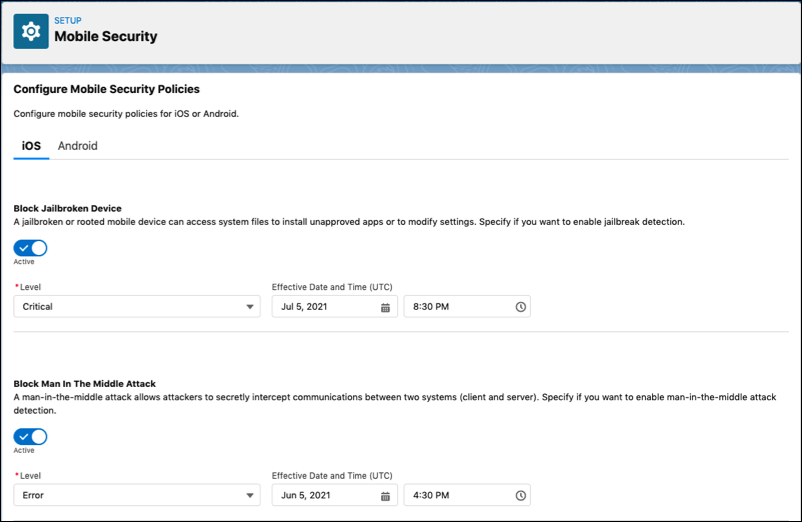
Each severity level represents the actions enforced in the event of a violation.
| Severity Level | Actions Enforced |
|---|---|
critical |
Wipes app data and logs user out |
error |
Blocks access to the app until the issue is resolved, but doesn’t log user out |
warn |
Notifies the user of the violation and recommends how to resolve, but user is able to continue using the app |
info |
Blocks prohibited action or logs user action and informs user |
At cold starts and when a user’s access token has expired, Enhanced Mobile App Security checks policies and enforces actions. Users can also manually recheck their policies.

Mobile security policies take effect when users force quit the Salesforce mobile app or when they log in to a new session. To ensure that new or modified settings take effect for all users, we recommend that you revoke access to the Salesforce mobile app so everyone is required to log in again.
We also recommend that you warn users about the changes that you intend to make, especially if you restrict previously available activities.
| Policy Name | Description | Severity Level | Operating System |
|---|---|---|---|
| Allowed Device List | A device allowlist is a list of devices that a user can use. Specify allowed devices as a semicolon separated list. | Severity:
Examples:
|
iOS and Android |
| Authentication Server Certificate Pinning | Certificate pinning for the authentication server URLs where the user provides credentials to log in. For more info, see Configure Authentication Server Certificate Pin. |
Severity: |
iOS and Android |
| Block 3D Touch | 3D touch or long press is when a user presses and holds an app icon to perform tasks without having to open the app first. Note This policy is only supported on iPhones equipped with 3D Touch, up to
the iPhone XS. |
Severity: |
iOS only |
| Block Calendar | Block calendar access on a user’s device. | Severity: |
iOS and Android |
| Block Camera | Block camera access on a user’s device. | Severity: |
iOS only |
| Block Contacts | Block access to contacts on a user's device. | Severity: |
iOS and Android |
| Block Custom Keyboard | A custom keyboard replaces the built-in keyboard on a mobile device with a third-party alternative. Specify if you want to block custom keyboards. | Severity: |
iOS only |
| Block File Backups | A file backup, such as iCloud, syncs files and photos from a user’s mobile device onto cloud storage. The policy blocks files saved within the Salesforce mobile app from syncing to a file backup. |
Severity: |
iOS only |
| Block Jailbroken Device | A jailbroken or rooted mobile device can access system files to install unapproved apps or to modify settings. | Severity:
|
iOS and Android |
| Block Man In The Middle Attack | A man-in-the-middle attack allows attackers to secretly intercept communications between two systems, client and server. This policy relies on network connectivity. If a user’s device has low connectivity or the device is in airplane mode without an internet connection, the policy can get triggered. |
Severity:
|
iOS and Android |
| Block Microphone | Block microphone access on a user’s device. | Severity: |
iOS only |
| Block OS Share Actions | A user can perform specific tasks such as copying a link or saving an image with operating system (OS) share actions. Note To ensure your data remains secure, the app will now automatically use a
protected file viewer whenever "Block OS Sharing" is enabled. This secure viewer prevents
unauthorized sharing and keeps your information within the app. |
Severity: |
iOS only |
| Block Screenshot | A screenshot captures what’s displayed on a user’s mobile device. Specify if you want to block screenshots. | Severity: |
iOS and Android |
| Blocked Device List | A device blocklist is a list of devices that a user is blocked from using. Specify blocked devices as a semicolon separated list. | Severity:
Examples:
|
iOS and Android |
| Check Biometric Login Data | Validate biometric login data every time a user opens the app. The Check Biometric Login Data and Require Device Passcode policies can’t be enabled at the same time. | Severity:
|
iOS and Android |
| Disable URL Caching | URL cache saves some information from visited websites. Specify if you want to disable URL caching. | Severity: |
iOS only |
| Enable Strict Data Leak Protection Controls | Enabling strict data leak protection blocks access to the context menu in iOS that allows a user to copy, web search, and look-up on selected text. Note: In the mobile app, some pages are native and some are hybrid. This policy works only on native and non-editable hybrid pages.  Warning The Salesforce App currently allows Android users to paste text when
an external keyboard is connected and the keyboard's predictive text or clipboard
functionality is active. |
Severity: |
iOS and Android |
| Log Email | Log the event when a user emails a contact from the app. | Severity: |
iOS and Android |
| Log Phone Call | Log the event when a user makes a phone call from the app. | Severity: |
iOS and Android |
| Log Screenshot | A screenshot captures what’s displayed on a user’s mobile device. An event is logged when a user takes a screenshot. The event is sent to the org’s event stream and can be viewed any even streaming integration, such as Splunk or Fairwarning. The event doesn’t log the screenshot image itself. It only logs the event of a user taking a screenshot. |
Severity: |
iOS only |
| Log Security Policy Evaluation Result | A security policy evaluation assesses whether users are meeting security requirements. Log the results of a security policy evaluation. | Severity: |
iOS and Android |
| Log SMS | Log the event when a user sends a text message from the app. | Severity: |
iOS and Android |
| Log Out User After Changing Biometric Login Data | Biometric login uses facial or fingerprint recognition to unlock devices and apps. | Severity: |
iOS only |
| Log Out User After Device Restart | Specify if you want to log out a user after a device restart. | Severity: |
iOS and Android |
| Maximum Application Version | Specify the maximum app version that can be installed on your user’s mobile device. | Severity:
Example: |
iOS and Android |
| Maximum Days Offline Without Policy Refresh | We perform a security policy refresh when a user opens the app. Specify the maximum number of days a user can go without a security policy refresh. | Severity:
Example: |
iOS and Android |
| Maximum OS Version | Specify the maximum operating system (OS) version your user's mobile device can’t exceed. | Severity:
Example: |
iOS and Android |
| Minimum Application Version | Specify the minimum app version that must be installed on your user’s mobile device. | Severity:
Example: |
iOS and Android |
| Minimum OS Version | Specify the minimum operating system (OS) version your user’s mobile device must meet. | The number of the minimum OS version. Severity:
Example: |
iOS and Android |
| Minimum Security Patch Version | A security patch helps protect a user’s mobile device from vulnerabilities. Specify the required minimum security patch version. | The date of the minimum security patch version. Severity:
Example: |
Android only |
| Mobile Browser URI Scheme | Specify the mobile browser URI scheme for opening links on a user’s device. | Severity: Example for Chrome on iOS: |
iOS and Android |
| Phone Call Application Handler | Specify an app to use for making a phone call on a user’s device. | Severity: The value must be configured as a |
iOS and Android |
| Require Device Passcode | A device passcode adds a layer of security for your user’s mobile device. Specify if you want to require a device passcode. The Require Device Passcode and Check Biometric Login Data policies can’t be enabled at the same time. | Severity:
|
iOS and Android |
| Resource Certificate Pinning | Certificate pinning for the resource URLs used by the app to fetch data for the user. | Severity: info
|
iOS and Android |
- Configure Authentication Server Certificate Pin
Provide domain name and certificate fingerprint to configure authentication server certificate pin.
