
You are here:
Connect and Sync Your Data to Data Pipelines
Salesforce Data Pipelines connectors give you an easy way to connect data inside and outside of Salesforce. Salesforce Data Pipelines provides a prebuilt connector for data in your local org and a range of configurable connectors for remote data in external Salesforce orgs, apps, data warehouses, and database services.
After you connect to a data source, configure data sync to extract the needed source data into connected objects. You can then prepare the data in these connected objects using a recipe to create your final dataset.
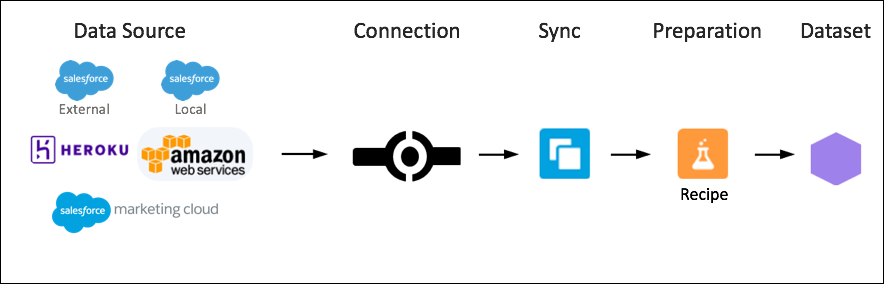
- Connect to a Data Source or Target
Use the Salesforce Data Pipelines connectors to connect data inside and outside of Salesforce. You can access data in your local Salesforce org, external orgs, and other sources, such as apps, data warehouses, and database services. - Connect to Local Salesforce Data
Use the prebuilt Salesforce Connector to manage the data synced between your local Salesforce org and Data Pipeline. Filter data synced to Data Pipelines, create more connections using the Salesforce Local connector, manage objects between connections, and add or remove objects and fields from sync. Use the Salesforce External connector to sync data from a remote Salesforce org. - Connect to Data Outside of Salesforce
Create a remote connection to sync external cloud data with Salesforce Data Pipelines. - Output Connectors
Use output connectors to push data from Salesforce Data Pipelines to the remote system. Output connectors can push as part of a data prep output node, and some can also push out unprepared data using sync. - Private Connectors
Use private connectors to push and pull data between Salesforce Data Pipelines and external services AWS using a Virtual Private Connection (VPC). Supported services include Snowflake and Amazon S3. To use private input and output connectors you must configure a network connection, external credential, and named credential. These credentials provide the security and privacy required for the private connection. - Pre-Pull Data for Recipes with Data Sync
Use data sync to decouple the extract of data from your recipes and sync this data to Salesforce Data Pipelines on a separate schedule. By scheduling sync from Salesforce and remote systems ahead of time, your recipes have less to do and run faster. To lighten the load even more, Salesforce Data Pipelines can sync supported local Salesforce data incrementally by default, meaning that only data that’s changed gets synced. - Stage CSV Data in Datasets
Because CSV files can’t be used as sources in a recipe, you can upload the CSV file and write it to a dataset. And then you can use the dataset as a source for the recipe. When you upload the file, it’s temporarily stored for processing only. After the dataset is created, the file is purged. If you want to use the file again later, keep a copy.
Did this article solve your issue?
Let us know so we can improve!
