
Loading
Salesforce now sends email only from verified domains. Read More
Salesforce Data Pipelines
Table of Contents
Select Filters

          No results
          No results
          Here are some search tips

          Check the spelling of your keywords.
          Use more general search terms.
          Select fewer filters to broaden your search.

          Search all of Salesforce Help
          Modify and Enrich Data with Recipes

          Modify and Enrich Data with Recipes

          Use recipes to prepare large amounts of Salesforce and external data at scale before loading it into Salesforce objects. For example, you can define data preparation logic that combines data from two data sources and cleans up inconsistent date formats. Add nodes and transformations to a recipe to perform calculations, and to combine, transform, enrich, and clean your data. Use smart transformations to predict missing values, detect text sentiment, and forecast key metrics.
          Required Editions

          Available in: Lightning Experience
          Available with Salesforce Data Pipelines, which is available for an extra cost in Enterprise, Performance, and Unlimited Editions

          To set up access to source data, create an input connection. When you create a connection, select the objects and columns to pull data from. You can add a filter to the connection to extract a subset of all rows. In the connection properties, you also specify a user account that determines what data the connection can access. For example, to access data in Amazon S3, specify an Amazon S3 user account. If the user account doesn’t have access to an object, the connection can’t pull data from that object.

          After you create a connection, run the associated data sync job to extract the data from each selected object in the data source. To speed up the process of getting data, a data sync pulls data from the data source in advance and stores it in connected objects. After you run a data sync for the first time, a recipe can use the connected objects as sources.

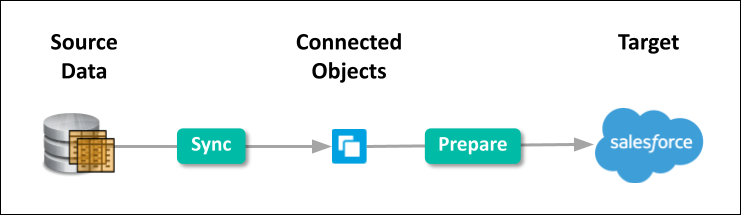
          Source data is synced to connected objects, and then prepared and written to Salesforce.

          To create a recipe, select the input data (connected objects or datasets), add data preparation logic to prepare that data, and specify the target to load the results into. For example, you can use a recipe to combine data from different sources, clean the data to make it consistent, and then load the results into a Salesforce object.

          Run the recipes to prepare the data and load it into the targets. To continually refresh the data, schedule the sync and recipe jobs to run regularly. To ensure that your recipes use the latest data, ensure that the data sync jobs complete before dependent recipes run.

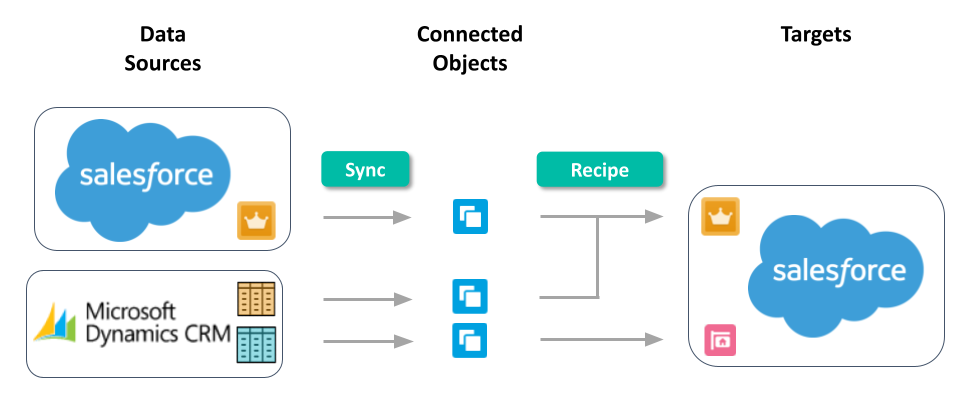
          This diagram shows a sample process for syncing Salesforce and external data into connected objects, and then using a recipe to prepare the synced data and load it into Salesforce objects.

          Sync pulls data from Salesforce and Microsoft Dynamics CRM. The recipe transforms the data and writes the results to Salesforce.
          • Connect and Sync Your Data to Data Pipelines
            Salesforce Data Pipelines connectors give you an easy way to connect data inside and outside of Salesforce. Salesforce Data Pipelines provides a prebuilt connector for data in your local org and a range of configurable connectors for remote data in external Salesforce orgs, apps, data warehouses, and database services.
          • Clean, Transform, and Load Data with Data Prep
            Data Prep provides an intuitive, visual interface in Salesforce Data Pipelines that allows you to easily point-and-click your way to build recipes that prepare data and load it into a target. Use the graph of a recipe to see at a glance where data comes from and how it flows through the recipe to the target. To validate the recipe as you build, preview how raw data is transformed at every step of the way.
          • Run Jobs to Create and Refresh Datasets
            Whether you use local Salesforce data or pull data from an external source, you must set up Salesforce Data Pipelines to load the data, make it available to Salesforce Data Pipelines, and keep it up to date.
          • Get Started Faster with Data Templates
            Salesforce Data Pipelines use purpose built data templates for common use case data tasks to accelerate your ROI. These data templates generate the necessary data connectors, data prep recipes, and queries for apps that can be scheduled to run regularly.
          • View Data Sources and Targets
            Use Data Manager’s Data tab to access data available for recipes. You can view datasets created by recipes that can be used as sources in other recipes. You can also view all connected objects.
          • View Data Pipeline Usage
            Use Data Manager’s Limits tab to monitor usage and to ensure you don’t hit the limits. The limits vary based on your licenses. If needed, contact Salesforce to increase your org’s limits.
           
          Loading
          Salesforce Help | Article