
Loading
Salesforce now sends email only from verified domains. Read More
Help Agent Performance DegradationRead More
Salesforce Data Pipelines
Table of Contents
Select Filters

          No results
          No results
          Here are some search tips

          Check the spelling of your keywords.
          Use more general search terms.
          Select fewer filters to broaden your search.

          Search all of Salesforce Help
          Enable Data Pipelines and Output Connectors

          Enable Data Pipelines and Output Connectors

          To use Data Pipelines, you must enable it first.

          1. From Setup, in the Quick Find box, enter Data Pipelines, and then select Getting Started.

            To see this option, you must be assigned the Data Pipelines Base User permission set license or the Data Pipelines Add On permission set.

          2. Enable Data Pipelines.
          3. To let users write data to targets, select the output connectors.
            For example, select Salesforce to write data to Salesforce. If you don’t enable output connectors, users can only write data to datasets.
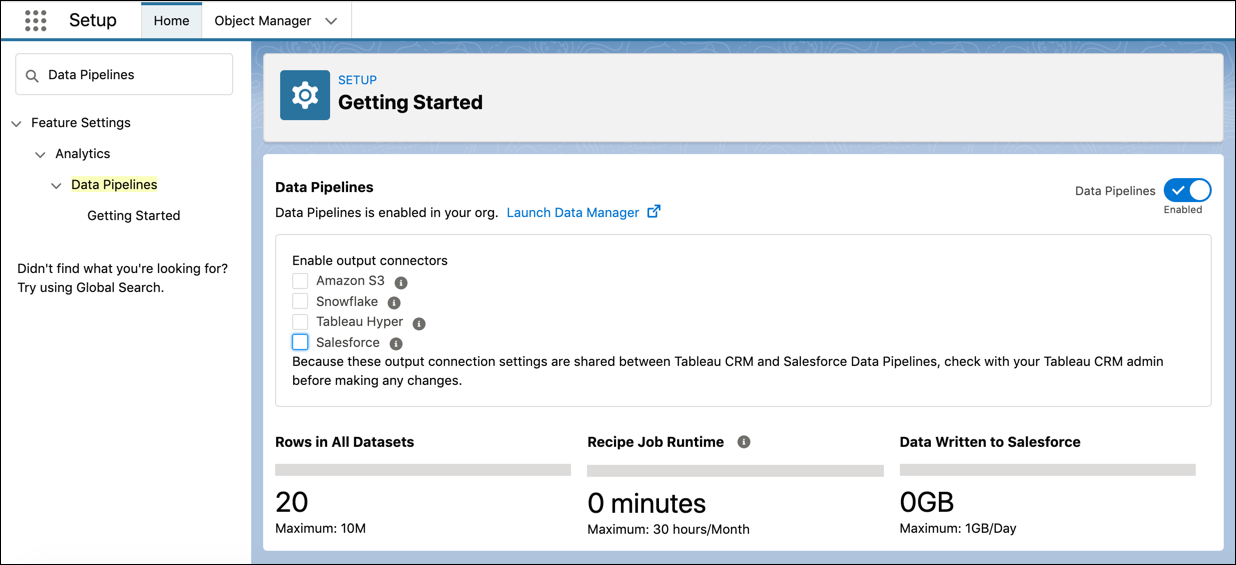
            The Getting Started page after Data Pipelines has been enabled showing options to enable the output connectors and details of product use and limits.
           
          Loading
          Salesforce Help | Article