
You are here:
What Can I Do with Data Pipelines?
Before Data Pipelines, companies often resorted to exporting data, enriching it in external systems, and then writing the results back into Salesforce. This approach was often time consuming and expensive. But now with Data Pipelines, you can do it all natively, securely, and more quickly in Salesforce. Data Pipelines simplifies the process of consolidating, aggregating, and calculating results based on CRM data and external data. It ensures rapid updates that give your CRM users the latest and most complete picture of customer activity.
With Data Pipelines, you can:
- Transform and aggregate Salesforce data quickly and at scale. Use clicks, not code, to perform simple-to-complex calculations on your data. Calculate totals and create aggregations to help your employees understand customer activity across millions of records.
- Enrich your Salesforce data with external data to complete the picture of customer activity. Data Pipelines provides numerous connectors that make it easy to access the data held in external systems. Use the connectors to connect and regularly sync external data from these systems, and then prepare the external data to fit into Salesforce objects.
- Complete data projects faster, without implementing complex external infrastructure for common data sync and clean-up needs. Using Data Pipelines, you can configure typical data preparation tasks quickly and without purchasing or integrating multiple external tools.
- Improve your data quality. Use the machine learning and clean-up tools available in Data Pipelines.
To illustrate the power of Data Pipelines, let’s check out a sample use case. Your organization wants to provide premium service to larger accounts. To enable sales and customer support reps to identify your largest customers, you want to display the lifetime spend for each account on Salesforce’s Account details page. You also want to display how happy your customers are with your business, based on a Google Analytics survey that you previously sent out. With lots of customers, you’re hoping there’s an easy way to determine customer sentiment from among 20,000 comments. Well, you’re in luck! To calculate total lifetime spend, you can use Data Pipelines to build a recipe that aggregates all opportunity amounts for each account. The recipe pulls this data from two Salesforce objects: Opportunity and Opportunity Line Item. You also pull in customer survey comments from Google Analytics. The recipe uses machine learning to automatically detect the general sentiment of each customer’s comments and attaches a sentiment to each account. The recipe writes the results to a custom Salesforce object.
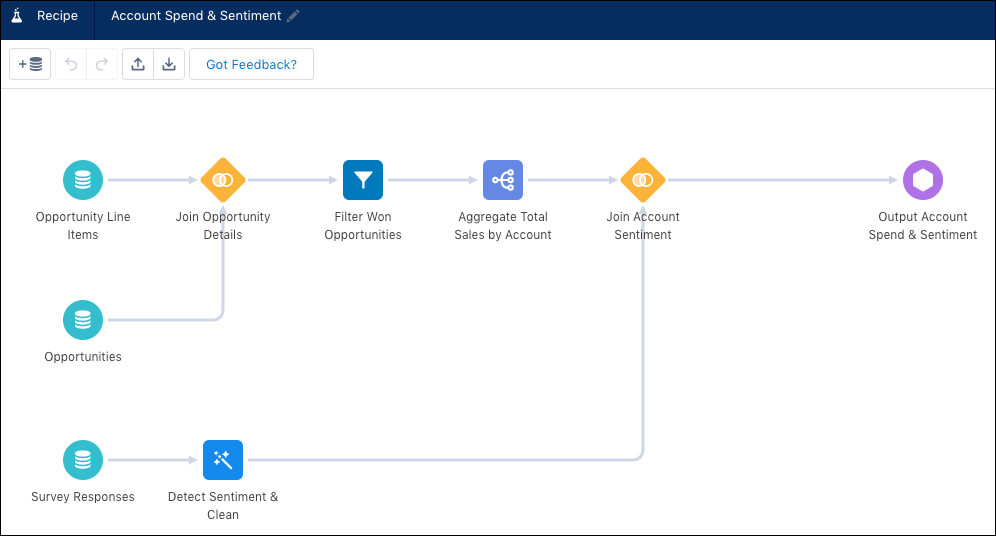
To display the total lifetime spend and sentiment for each account, you then build a Lightning widget in the Account details page.
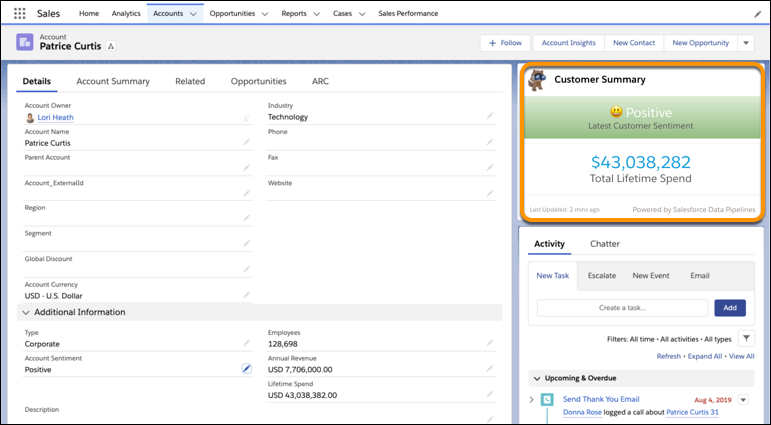
Did you notice that there was no mention of code? That’s right, Salesforce Data Pipelines provides an intuitive user interface that allows you to make simple clicks to tackle complex tasks.
