Create custom alerts to immediately learn about changes made to security settings that
you care about. Alerts notify you by email or in the Salesforce app when a setting in your
Security Center tenant exceeds a threshold that you set. Create as many alerts as you want so
that you can stay informed of your tenant’s security posture.
Required Editions
Available in: Lightning Experience
Available in: Enterprise, Performance, and Unlimited
Editions with the Security Center add-on license.
Available for free in: Developer Edition
User Permissions
Needed
To view Security Center pages:
View Security Center
To create and edit Security Alerts:
Manage Security Center
Note This content relates to Security Center. Read
about Security Insights, Data Classification, and Who Sees What Explorer in Own from Salesforce.
Note You can automate processes for Security Center alerts with Salesforce Flow
without having to select an alert type.
Customize your alerts to learn about
changes to how your users log in, which permissions are assigned, and how many apps and
managed package are installed. To create an alert:
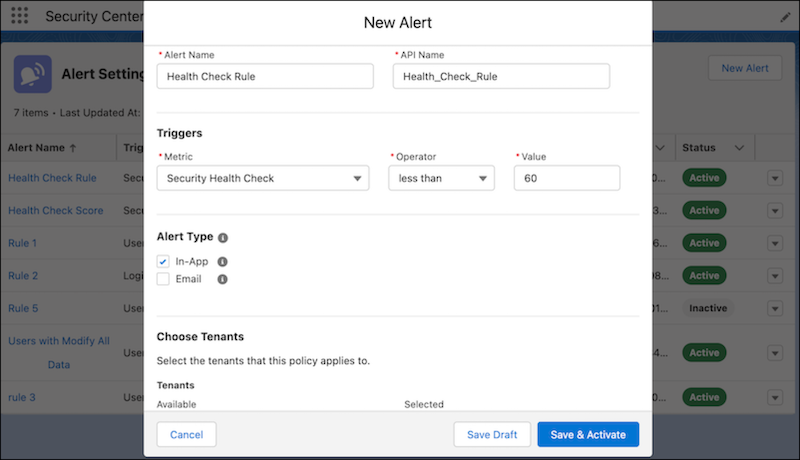
From the Security Center dashboard, click the Alert Settings tab.
Click the New Alert button, then complete the fields. You can
choose to receive one or both of the alert types.
When every field is complete, save the alert as a draft, or save and activate.
Example
You track multiple connected tenants. Monitoring how many users have the Modify All
Data permission is more difficult as your org grows. Instead of periodically checking the
assigned permissions for each tenant, you can create an alert. Then you receive an email and
an in-app notification so that you know when the total users with the Modify All Data
permission exceeds your specified threshold or increases. With this information, you can
reevaluate your tenant’s security posture. You can also trigger a flow on the
TenantSecurityNotification object for this alert to incorporate a custom business process.
For more examples, see Use
Cases for Alerts.
From the Alert Settings page, use the dropdown menu to activate, deactivate, or edit
each alert. Click the name of an alert to see a history of when it was
triggered.
Use Cases for Alerts This page contains examples of custom alerts that you can create to monitor your tenant’s security.
We use three kinds of cookies on our websites: required, functional, and advertising. You can choose whether functional and advertising cookies apply. Click on the different cookie categories to find out more about each category and to change the default settings.
Privacy Statement
Required Cookies
Always Active
Required cookies are necessary for basic website functionality. Some examples include: session cookies needed to transmit the website, authentication cookies, and security cookies.
Functional Cookies
Functional cookies enhance functions, performance, and services on the website. Some examples include: cookies used to analyze site traffic, cookies used for market research, and cookies used to display advertising that is not directed to a particular individual.
Advertising Cookies
Advertising cookies track activity across websites in order to understand a viewer’s interests, and direct them specific marketing. Some examples include: cookies used for remarketing, or interest-based advertising.