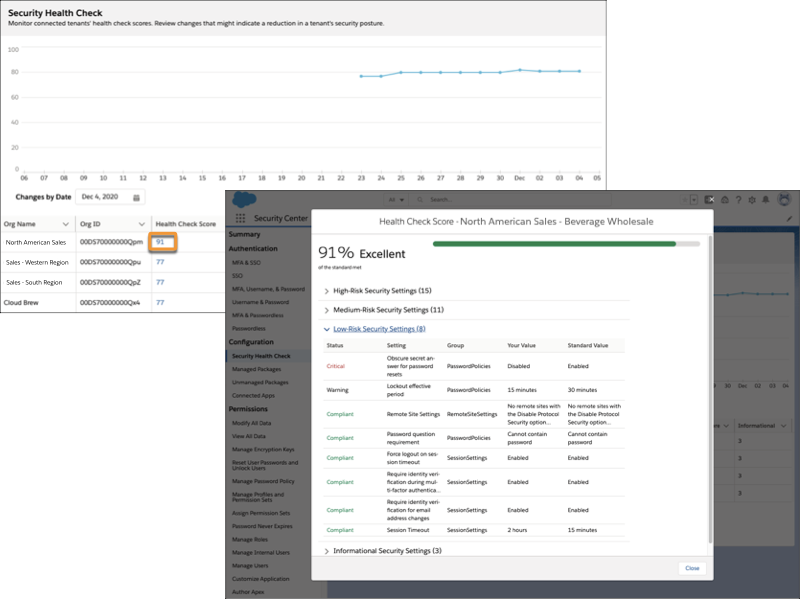
The Health Check detail page in Security Center saves you time by aggregating multiple
Health Check scores and settings in one place. From a parent tenant, you can see the average
Health Check score for all connected tenants and individual tenant Health Check scores. Security
Center stores Health Check settings for 6 months.
Required Editions
Available in: Lightning Experience
Available in: Enterprise, Performance, and Unlimited
Editions with the Security Center add-on license.
Available for free in: Developer Edition
User
Permissions Needed
To view Security Center pages:
View Security Center
Note This content relates to Security Center. Read
about Security Insights, Data Classification, and Who Sees What Explorer in Own from Salesforce.
On the Summary page in the Security Center app, select the Configuration Metrics tile or
Configuration in the navigation bar.
The Configuration Metrics dashboard opens.
Click Average Health Check Score
The Security Health Check detail page opens. The time series chart shows the average
Health Check score for all connected tenants for the last 30 days.
To see the Health Check scores that contributed to a day’s average, enter a date in the
Changes by Date field.
A list view shows all Health Check scores for all connected tenants on that day.
View risk scores by category, informational security setting counts, and per-tenant Health
Check scores for all connected tenants. The Score Change Since Last Synced column shows whether
a tenant’s Health Check score rose, fell, or remained the same since the last app
update.
To see what settings contributed to a specific tenant’s Health Check score, select the
value in that tenant’s Health Check Score column.
A window opens showing all of that tenant’s High-Risk, Medium-Risk, Low-Risk, and
Informational Security Settings for that day.
Example Your organization has four tenants, and you want to see how your latest round of policy
changes affects each tenant’s Health Check score. Instead of signing in to each tenant, you log
in to your Security Center parent tenant and scan the Health Check page. You see that a few of
your tenants’ Health Check scores fell by more than 10% since yesterday. It's possible that
recent user or data access settings changes reduced those tenants’ security postures. In this
situation, you click those tenants Health Check Score values and review their settings. Now that
you know which settings contribute to lower scores, you take this information to your security
team and discuss adjusting your new policies.
Did this article solve your issue?
Let us know so we can improve!
Loading
Salesforce Help | Article
Cookie Consent Manager
General Information
Required Cookies
Functional Cookies
Advertising Cookies
General Information
We use three kinds of cookies on our websites: required, functional, and advertising. You can choose whether functional and advertising cookies apply. Click on the different cookie categories to find out more about each category and to change the default settings.
Privacy Statement
Required Cookies
Always Active
Required cookies are necessary for basic website functionality. Some examples include: session cookies needed to transmit the website, authentication cookies, and security cookies.
Functional Cookies
Functional cookies enhance functions, performance, and services on the website. Some examples include: cookies used to analyze site traffic, cookies used for market research, and cookies used to display advertising that is not directed to a particular individual.
Advertising Cookies
Advertising cookies track activity across websites in order to understand a viewer’s interests, and direct them specific marketing. Some examples include: cookies used for remarketing, or interest-based advertising.