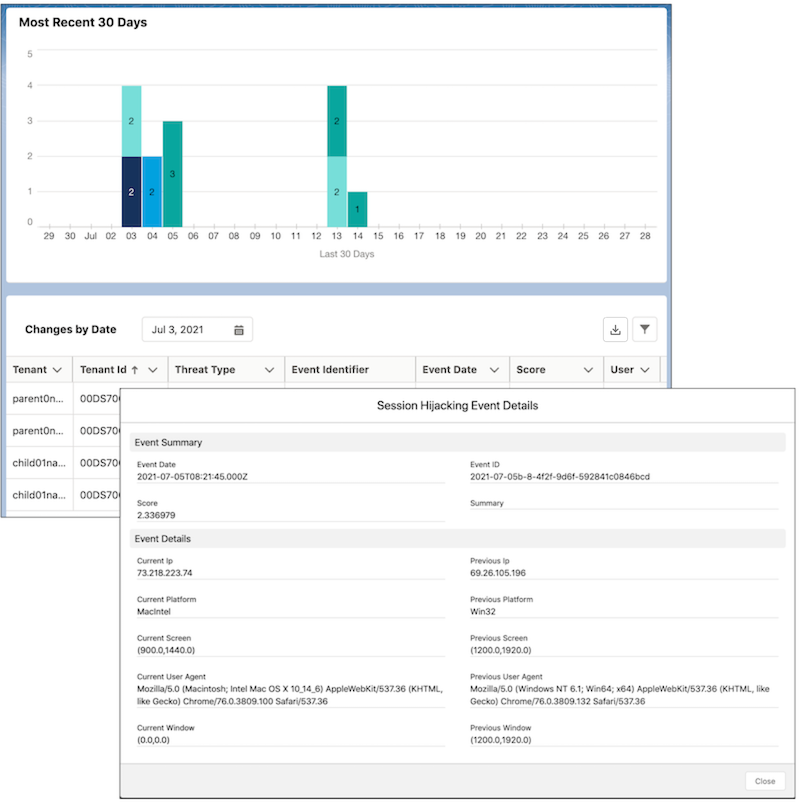
The Threat Detection app in Security Center saves you time by aggregating information on
detected threats to all your tenants in one place. From a parent tenant, see information on four
types of detected events throughout your org in real time. Threat Detection uses statistical and
machine learning methods powered by Event Monitoring to detect threats to your tenants. Security
Center stores Threat Detection event information for 6 months
Required Editions
Available in: Lightning Experience
Available in: Enterprise, Performance, and Unlimited
Editions with the Security Center add-on license.
Available for free in: Developer Edition
User Permissions Needed
To view Security Center pages:
View Security Center
Note This content relates to Security Center. Read
about Security Insights, Data Classification, and Who Sees What Explorer in Own from Salesforce.
The Threat Detection app monitors your org for Credential Stuffing, API Anomaly, Session
Hijacking, and Report Anomaly threat events. You can create an alert for any increases to the
Threat Detection event count. For more information, see Create Alerts for Security Changes. For more information
on threat events, see Threat Detection.
Note A delay of up to 1 day can occur between the time a threat event is observed by the Threat
Detection app and the actual time of the threat event.
To review Threat Detection events, first enable streaming for these Threat Detection events
from Event Manager in Setup.
API Anomaly Event
Credential Stuffing Event
Report Anomaly Event
Session Hijacking Event
Guest User Anomaly Event
Login Anomaly Event
On the Summary page in the Security Center app, select the Threat Detection tile. Or under
the Monitoring category in the navigation bar, click Threat
Detection.
To see the detected events for a certain day, select a date in the Changes by Date
field.
Click the Event Identifier value of an event.
See information on when and where the event occurred, a summary of the event, and
more.
Example You have multiple tenants and want to see if they’ve been targeted by malicious activity.
Instead of signing in to each tenant, you log in to your Security Center parent tenant and scan
the Threat Detection page. You see that a few Credential Stuffing events occurred on a certain
day. It’s possible that a user’s login credentials were stolen and used to gain unauthorized
access. In this situation, you click the Event Identifier values and review the event
information. Use this information to educate your users on how they can create and manage strong
passwords.
We use three kinds of cookies on our websites: required, functional, and advertising. You can choose whether functional and advertising cookies apply. Click on the different cookie categories to find out more about each category and to change the default settings.
Privacy Statement
Required Cookies
Always Active
Required cookies are necessary for basic website functionality. Some examples include: session cookies needed to transmit the website, authentication cookies, and security cookies.
Functional Cookies
Functional cookies enhance functions, performance, and services on the website. Some examples include: cookies used to analyze site traffic, cookies used for market research, and cookies used to display advertising that is not directed to a particular individual.
Advertising Cookies
Advertising cookies track activity across websites in order to understand a viewer’s interests, and direct them specific marketing. Some examples include: cookies used for remarketing, or interest-based advertising.