Check the Verification Status of an Email-Sending Domain
Salesforce requires both domain-level and user-level verification to send email. View
the verification status of a domain that you own on the Deliverability Setup page.
From Setup, in the Quick Find box, enter Deliverability, and
then select Deliverability.
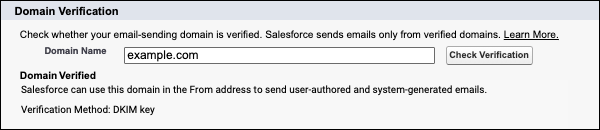
In the Domain Verification section, for Email-sending domain, enter your domain, such
as example.com or sub-domain.example.com.
Click Check Verification.
The results are shown below the domain name.
Your domain’s status is one of these values.
Domain Verified: Salesforce can send user-authored and system-generated emails from this
domain. The results show the specific verification method.
Domain Not Verified: Email delivery fails for user-authored and system-generated emails
with this domain in the From address, regardless of whether the email address is
verified.
To send email from this domain, add an active DKIM key or a verified
authorized email domain.
Domain Temporarily Exempted: Salesforce added this domain to a temporary allowlist of
email-sending domains used in this org between January 7, 2026, and February 25, 2026. To
know when that allowlist expires in your org, see Mandatory Sending-Email Domain Verification Timeline.
To
continue sending email from this domain, add an active DKIM key or a verified authorized
email domain.
Domain Exempted: Salesforce can use this domain in the From address to send
user-authored and system-generated emails. Because this is a Salesforce-owned or public
email service domain, it doesn't require an active DKIM key or a verified authorized email
domain.
We use three kinds of cookies on our websites: required, functional, and advertising. You can choose whether functional and advertising cookies apply. Click on the different cookie categories to find out more about each category and to change the default settings.
Privacy Statement
Required Cookies
Always Active
Required cookies are necessary for basic website functionality. Some examples include: session cookies needed to transmit the website, authentication cookies, and security cookies.
Functional Cookies
Functional cookies enhance functions, performance, and services on the website. Some examples include: cookies used to analyze site traffic, cookies used for market research, and cookies used to display advertising that is not directed to a particular individual.
Advertising Cookies
Advertising cookies track activity across websites in order to understand a viewer’s interests, and direct them specific marketing. Some examples include: cookies used for remarketing, or interest-based advertising.