
Loading
Salesforce Feedback Management
Table of Contents
Select Filters

          No results
          No results
          Here are some search tips

          Check the spelling of your keywords.
          Use more general search terms.
          Select fewer filters to broaden your search.

          Search all of Salesforce Help
          Create Standard Surveys With Generative AI

          Create Standard Surveys With Generative AI

          Generate surveys effortlessly using generative AI to gather feedback and insights from customers, employees, or other individuals.

          Available in: Lightning Experience
          Available in: Enterprise, Unlimited, and Developer Editions with the Einstein for Service add-on
          Available with the Feedback Management - Starter and Feedback Management - Growth licenses

          To use generative AI to create surveys, first turn on Einstein Generative AI.
          Enable AI-Generated Surveys

          Allow your users to create surveys automatically using Generative AI.

          Required Editions

          User Permissions Needed
          To enable AI-Generated Surveys:
          1. From Setup, in the Quick Find box, enter Survey, and then select Survey Settings.
          2. Enable AI-Generated Surveys.

          Define Configurations for AI-Generated Surveys

          Select the settings to activate the preferences for creating surveys with Generative AI.

          Required Editions

          User Permissions Needed
          To define configurations for AI-Generated Surveys
          • Scoring Framework Admin
          • Manage Natural Language Process Results
          1. From Setup, in the Quick Find box, search for and select Industries AI Setup.
          2. Click New Use Case Configuration.
          3. To create surveys using generative AI, select AI-Generated Surveys as the Configuration Type.
          4. Enter a configuration label and a description.
          5. Save the configuration.
          6. Click Set Up and accept the terms of use.
          7. From the dropdown, select Agree.
          8. Save and activate the configuration.

          Create a Survey Using Generative AI

          Create a survey to collect information and insights from participants.

          Required Editions

          User Permissions Needed
          To create a standard survey using generative AI:
          1. From the App Launcher, find and select Surveys.
          2. Click New.
          3. Enter a name for the survey, and then select Standard Survey under AI-Generated Surveys. Acknowledge the disclaimer message for Einstein.
          4. Select the survey type, the number of questions, and the primary metric for the survey.
          5. Optionally, select the target industry and the target region for the survey.
          6. Verify the details that you selected, and then click Edit to make any changes. If you edited the details, save your changes.
          7. To generate survey questions, click Generate Questions.
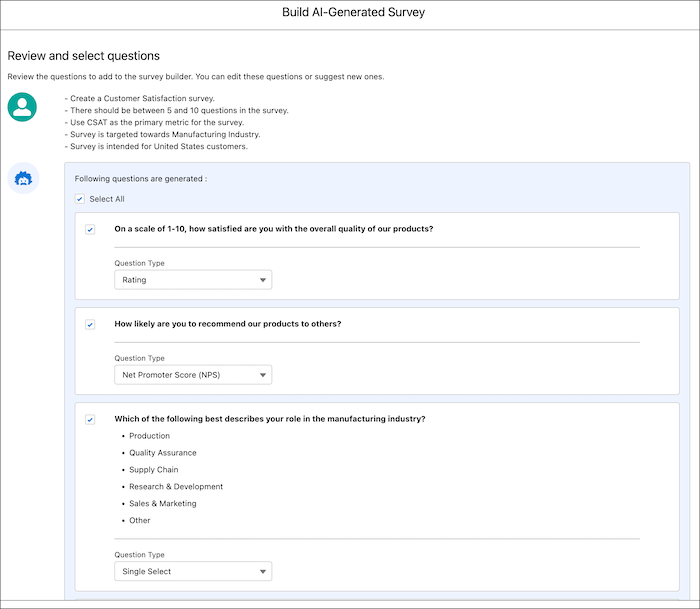
          8. Select the questions that you want in the survey, and then click Add to Survey. You can select individual questions or all questions simultaneously. You can also change the question type for each question.
          9. To create new questions, click Create New Questions.
          10. Finish creating the survey in the Survey Builder.
          Survey questions generated using generative AI.
           
          Loading
          Salesforce Help | Article