
You are here:
Track Satisfaction Across a Customer's Lifecycle
Understand how participants feel about your company, product, or service throughout their customer journey by tracking satisfaction metrics with Customer Lifecycle Maps.
| Available in: both Salesforce Classic and Lightning Experience |
| Available in: Enterprise, Unlimited, and Developer Editions |
| Available with the Feedback Management - Growth license |
Use Customer Lifecycle Maps to define stages of participants' engagement with your company or products, and associate NPS or customer satisfaction scores with each stage. Create multiple maps to track different types of participant experiences.

Note You can see visualizations of satisfaction scores with the Customer NPS Lifecycle Map and
Customer Satisfaction Lifestyle Map dashboards in the Customer Lifecycle Analytics app.
Before you create a customer lifecycle map, complete the prerequisites.
- Plan the customer lifecycle stages.
- Create one or more surveys that contain the questions that you want to send to customers at each stage.
- Enable Customer Lifecycle Maps in your org.
- Make sure that you’ve selected an email template for any survey that you're using in a map in the survey's Default Settings.
- From Setup, in the Quick Find box, enter Survey, then select Customer Lifecycle Maps.
- Click New Map.
- Enter a descriptive name and then press Tab to automatically populate the developer name.
- Enter a description and select whether you want to track NPS or CSAT as the customer satisfaction metric.
- Save your changes.
- Click New Stage.
- Enter a descriptive name and then press Tab to automatically populate the Developer Name.
- Optionally, enter a description
- Select the survey and one or more questions to include in the stage. You can select either NPS or rating questions, depending on the map's customer satisfaction metric.
-
To select invitation rules that send the survey, click the action menu for the question and
click Invitation Rules.
Note You can also use the Send Survey Invitation action in Process Builder to automatically send survey invitations during a stage.
- To add another question, click Add Question.
- To delete a question, click the action menu for the question and click Remove Question.
- Save your changes.

Example
A telecommunications company uses Customer Lifecycle Maps to track its customers NPS scores. The company sends different questions to customers at five lifecycle stages.
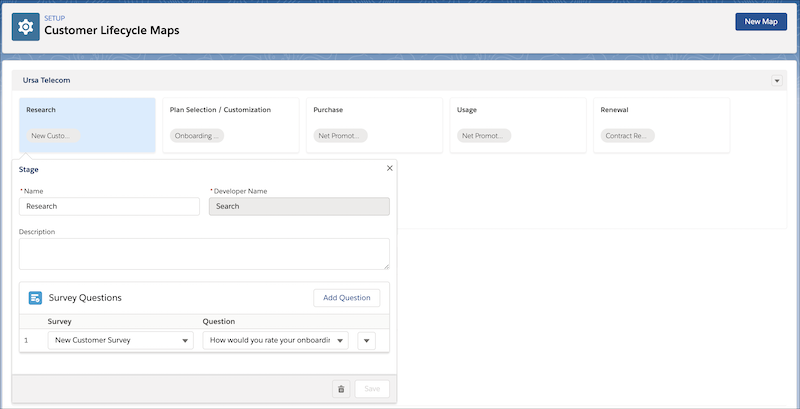
- In the Research stage, the company asks customers to rate their onboarding experience.
- In the Plan Selection / Customization stage, the company asks customers to rate the likelihood that they'd recommend the company to a friend.
- In the Purchase stage, the company asks customers to rate the likelihood that they'd recommend the product or service they purchased to a friend.
- In the Usage stage, the company asks customers to rate the likelihood that they'd recommend the company to a friend.
- In the Renewal stage, the company asks customers to rate their experience in renewing their service.
Did this article solve your issue?
Let us know so we can improve!
