Considerations for Deleting Your Trailblazer Account
Before deleting your Trailblazer account, make
sure that you’re aware of what happens to your profile and history.
Required Editions
Available in: All Editions
Note A Trailblazer account is available to AppExchange,
Commerce Cloud Developer Center, Events, IdeaExchange, Salesforce Help, Salesforce+,
Trailblazer Community, Trailhead users, and Partner Community.
Account deletion means that all your profile data is deleted. Deletion removes your badges,
points, and superbadges from your profile, and they can’t be retrieved.
Posts you wrote remain visible after you delete your account, but they show as posted by an
anonymous alias. If you want your posts removed, delete them before deleting your account.
Deleting your account is permanent and can’t be undone.
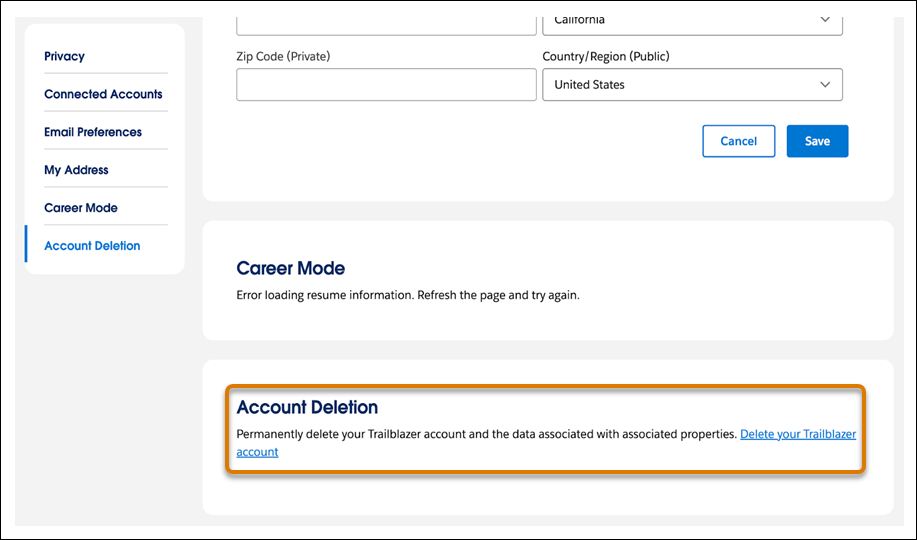
To delete your account, go to the Account Deletion section on your Trailblazer settings
page.
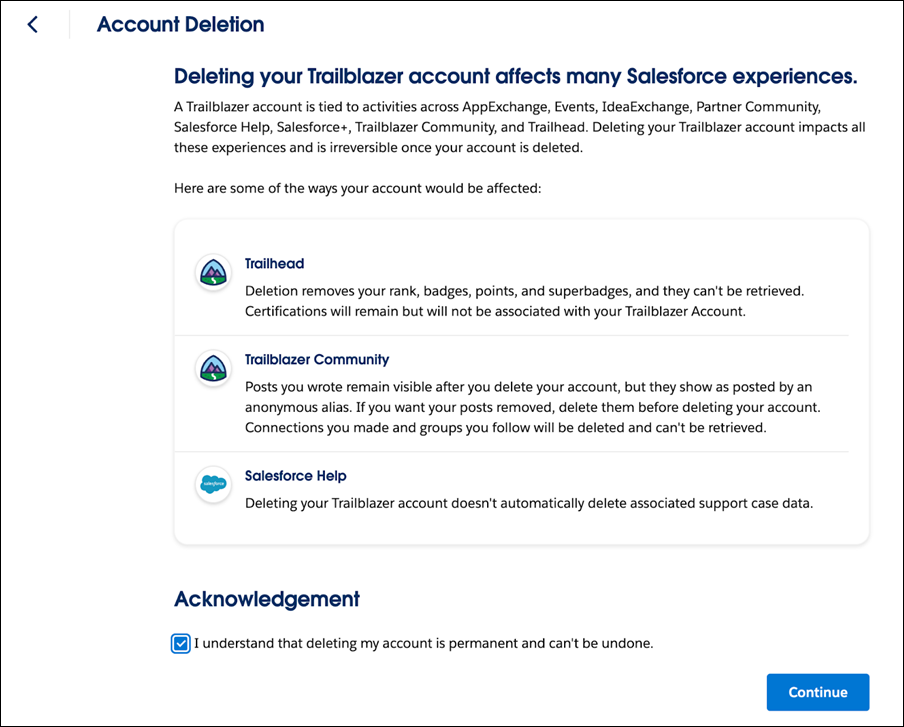
By selecting Delete your Trailblazer account, we inform you of the
connected emails that are affected, and we outline the impacts of deleting your account. To
move forward, acknowledge that account deletion is permanent, and click continue.
Before processing account deletion, we ask you to verify yourself. After you complete
verification, you’re logged out of your Trailblazer account, and we process the account for
deletion.
To request an account deletion if you don’t have access to your account, Submit a Case, then select Trailhead/Certification
Account.
Note Deleting your Trailblazer account doesn’t automatically delete associated support case
data. To hard delete support-related data, let us know you want that when you submit your
ticket.
We use three kinds of cookies on our websites: required, functional, and advertising. You can choose whether functional and advertising cookies apply. Click on the different cookie categories to find out more about each category and to change the default settings.
Privacy Statement
Required Cookies
Always Active
Required cookies are necessary for basic website functionality. Some examples include: session cookies needed to transmit the website, authentication cookies, and security cookies.
Functional Cookies
Functional cookies enhance functions, performance, and services on the website. Some examples include: cookies used to analyze site traffic, cookies used for market research, and cookies used to display advertising that is not directed to a particular individual.
Advertising Cookies
Advertising cookies track activity across websites in order to understand a viewer’s interests, and direct them specific marketing. Some examples include: cookies used for remarketing, or interest-based advertising.