
You are here:
Your Trailblazer Profile
Your Trailblazer profile contains information from different Salesforce-related sites so you have an at-a-glance view of your skills and activity.
Required Editions
| Available in: All Editions |

Your profile is made up of tiles that showcase your areas of expertise. Your Trailblazer profile is your digital Salesforce resume, showing colleagues and employers what you know. Want to share your profile with others? Your profile URL (1) can be copied with one click. But you’re always in control of what others see on your Trailblazer profile. If you don’t want to share your profile publicly, head on over to settings and change your profile from public to private.
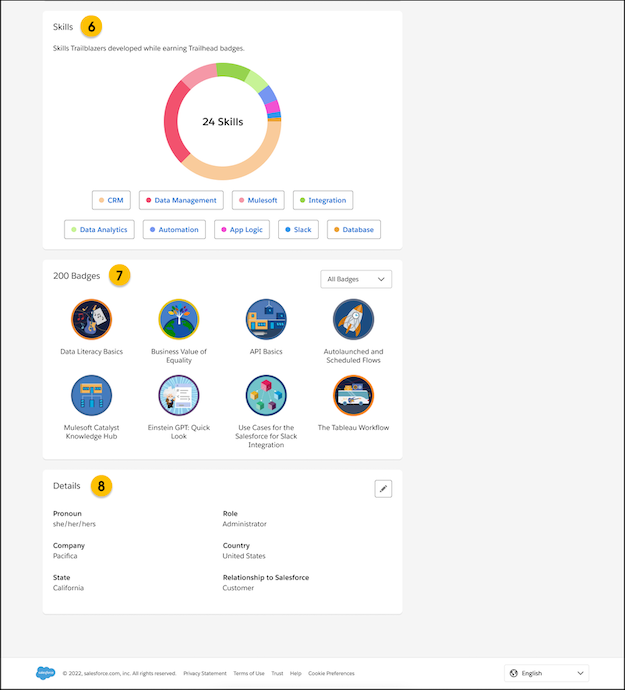
In other tiles, you see the Salesforce certifications that you earned (2), your Trailhead rank (3), the Trailblazer Community connections you made (4), and your Trailblazer Community (5).
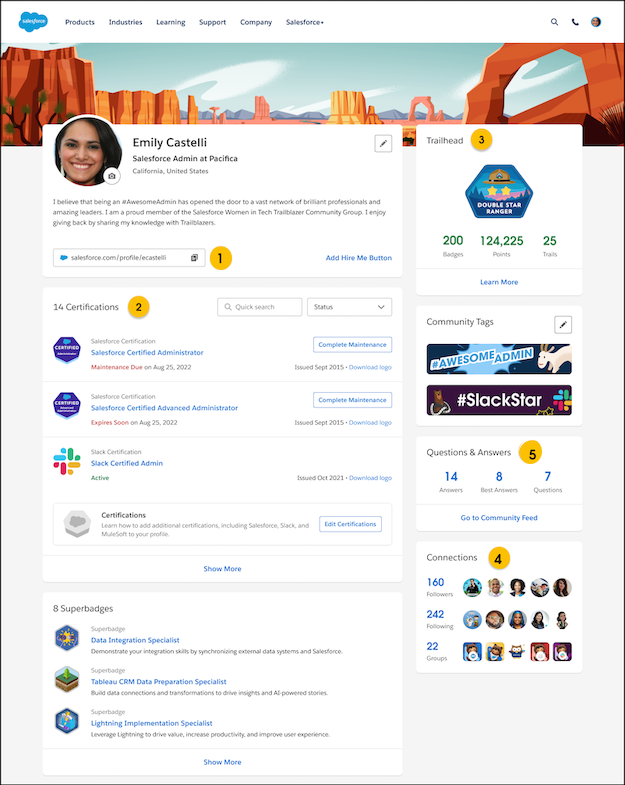
Farther down the page, you see the skills you acquired (6) and the Trailhead badges you collected (7). In your Details tile (8), you can edit personal and professional information like your role, company, and personal pronoun. Add links to social media that you use. And there’s a bio field where you can share more about yourself, your interests, and your goals.
Navigate to Popular Sites from Your Trailblazer Profile
You can use your Trailblazer account to access benefits from across Salesforce using the top-level navigation. Here’s a quick list of how to find popular places:
- To get to Trailhead select Learning from the navigation menu and click Explore Trailhead.
- To get to Trailblazer Community select Support then Communities and click Trailblazer Community.
- To get to AppExchange select Products then click Partner Apps & Experts.
- To get to IdeaExchange select Support then Communities and click Idea Exchange.
- To get to Salesforce Help select Support then click Help & Documentation.
RELATED TOPICS
- Trailblazer Profile URLs
Your Trailblazer profile is your digital Salesforce resume, showing colleagues and employers what you learned. With a personalized profile URL, you can easily share your Trailblazer profile anywhere, with anyone. - Your Privacy and Trailblazer Profile
Your Trailblazer profile has public and private information. Take charge of who sees what using your account settings page. - Certifications on Your Trailblazer Profile
Your Trailblazer profile lets you share your professional achievements, including Salesforce certifications, with the world.
