
Manage Your Salesforce Account
Add products and licenses, manage your contracts and renewals, view and download invoices, access the Go-To-Market app, and get account support right in your org with the Your Account app.
Required Editions
| Available in: Salesforce Classic and Lightning Experience |
| Available in: Starter, Pro Suite, Professional, Enterprise, Performance, and Unlimited Editions |
| User Permissions Needed | |
|---|---|
| To use the Your Account app: | Manage Billing or the Manage Subscriptions in Your Account: Identity User permission set |
With Your Account app, you can:
- Increase your product and license count.
- Manage your quotes and contracts.
- Manage your renewals.
- Review and download invoices.
- Communicate with your account contact.
- View private offers from partners.
- Access the AgentExchange Go-To-Market app
Your Account Home Page
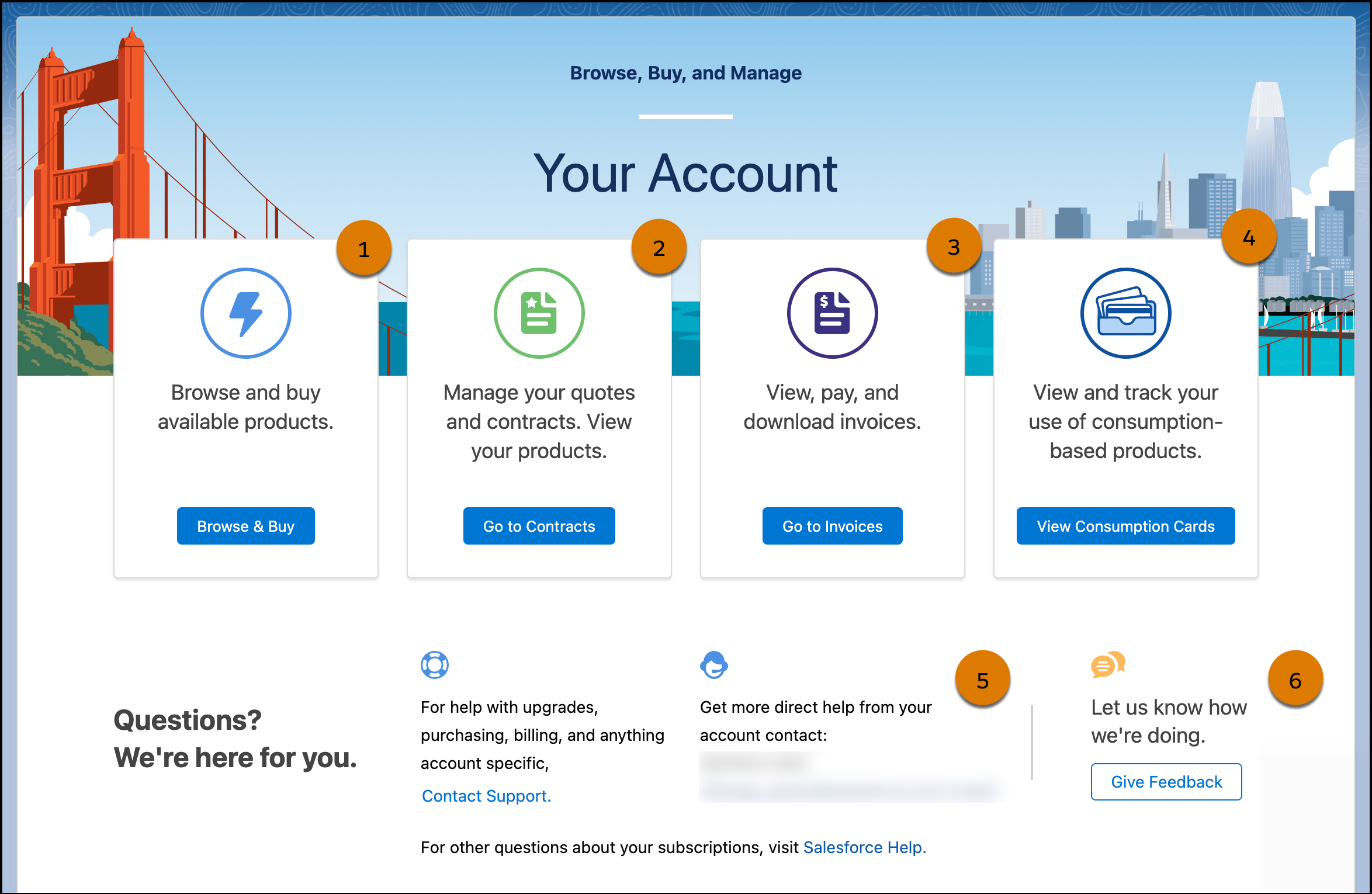
Manage your Salesforce account quickly and easily from within your Salesforce org.
Increase your product and license count in-app (1). Manage your contracts and renewals in-app (2). View, pay, and download invoices (3). Access your Digital Wallet cards and monitor consumption (4). Ask us for help (5). Give us feedback on the Your Account app (6).
See About Digital Wallet.
Know Where to Go
Switch between your most frequent account management tasks with the horizontal navigation menu. After you select Browse & Buy, Go to Contracts, or Go to Invoices, you can browse tabs for Your Account features without having to return to the home page.

The Product Catalog is where you can view and add Salesforce products.

Tab settings within the user profile control whether a tab is visible in its associated app and navigation menu. Custom user profiles may have tab visibility set to hidden or off. Users with these profiles can still access Your Account features from the Your Account home page, but can’t see the tab in the horizontal navigation. However, if the Product Catalog tab is set to hidden or off, users can’t access the feature. To include the Your Account tabs for custom profiles, ensure you enable access to the tabs. See View and Edit Tab Settings in Permission Sets.
- Give Your Billing Users Free Access to the Your Account App
Use Identity licenses to give your users access to the Your Account app if they don't need full access to Salesforce. The editions that support the Your Account app include 100 free Identity licenses that can be assigned as needed by the admin. Save your Salesforce licenses for the members of your team who need them. - Turn on the Your Account App
Use the Your Account app to add products and licenses, manage your contracts and renewals, view invoices, and get account support right in Salesforce. Manage your subscription to Your Account using the Manage Subscription setting. - Launch the Your Account App
Open the Your Account app from one of these areas depending on your edition. - Give Tab Access in Your Account
The Your Account app allows you to switch between your most frequent account management tasks by using a tabbed horizontal navigation menu. Tab settings determine the visibility of tabs in apps and navigation menus. If user profiles or permission sets don’t have tab visibility enabled, they can’t view the Your Account, Product Catalog, Your Contracts, and Your Invoices tabs. To make sure your team can use Your Account, give them permission to view tabs in their related user profile or permission set. - Add Products and Licenses with the Your Account App
Purchase new products and licenses for your Salesforce org using the Your Account app. Products are pieces of Salesforce functionality, such as Sales Cloud, Sales Dialer, or extra file storage. - Manage Your Contracts with the Your Account App
See all your contracts in one place and request updates to your Salesforce org with the Your Account app. The keys to the ignition that keep your org running are just a few clicks away. - Manage Renewals
When your annual contract reaches 90 days before its renewal date, it’s indicated on the Contracts and contract details pages. You can confirm the renewal, request changes, or choose not to renew. We can’t accommodate cancellation requests until it’s time to renew. - View and Download Invoices
In the Your Account app, you can review and download invoices and credit memos. - Manage Your Quotes with the Your Account App
You can manage quotes and complete your purchase using the Pending Quotes tab on the Salesforce Contract page. Review and sign, approve, and place your order using Your Account. - Access Your Completed Quotes with the Your Account App
You can review and download your completed quotes using the Completed Quotes tab available on the updated Contract Details page in Your Account. - Update Billing Contact Access to the Your Account App
Make sure that the billing contact on each Salesforce contract has access to the Your Account app by granting access from the Contract page or through Setup. When you give billing contacts access to Your Account, users get the permissions they must have to manage their billing and contracts. - Get Support with the Your Account App
Ask product questions, manage billing, get technical support, and send us feedback, all from the Your Account app. Find these contact options on the app’s home page.
