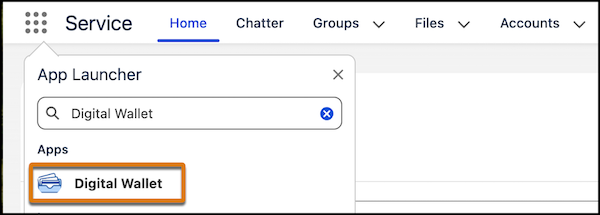
You can access Digital Wallet from the Digital Wallet app or the Your Account app.
The Digital Wallet app contains one or more tabs, which provide access to Digital Wallet
features. Which tabs appear is determined by the purchasing model for your Salesforce
products and if you're granted access to view the tab.
Required Editions
Available in: Lightning Experience
Available in: Enterprise and Unlimited
Editions
User
Permissions Needed
To access the License Utilization tab:
View License Utilization
To access the Consumption Cards tab:
View Consumption
To use the Your Account app:
Manage Billing or the Your Account App admin user permission
set
Note Data
360 governance features are enabled by default for new orgs, but you must create
policies to grant data access. Create an Allow All policy if granular control isn’t
needed. In existing orgs, Data 360 includes a day zero Allow All policy out of the
box to preserve access based on current permission sets and data space mappings.
Review Data Governance Considerations to learn
about data spaces, permission sets, and access policies.
From App Launcher,
find and select Digital Wallet.
If you don't see the Digital Wallet app or one or more of its tabs, you likely don't have the
proper permissions, or the tab isn't visible for the profile to which you're
assigned. See Digital Wallet Permissions for more
information, or contact your Salesforce admin for assistance.
Digital Wallet tracks sandbox usage, but you must be in a
production environment to access Digital Wallet.
We use three kinds of cookies on our websites: required, functional, and advertising. You can choose whether functional and advertising cookies apply. Click on the different cookie categories to find out more about each category and to change the default settings.
Privacy Statement
Required Cookies
Always Active
Required cookies are necessary for basic website functionality. Some examples include: session cookies needed to transmit the website, authentication cookies, and security cookies.
Functional Cookies
Functional cookies enhance functions, performance, and services on the website. Some examples include: cookies used to analyze site traffic, cookies used for market research, and cookies used to display advertising that is not directed to a particular individual.
Advertising Cookies
Advertising cookies track activity across websites in order to understand a viewer’s interests, and direct them specific marketing. Some examples include: cookies used for remarketing, or interest-based advertising.