
You are here:
Manage and Report on Business-Specific Custom Tags
Track and optimize your consumption through your specific business lens. Custom consumption tags empower you to gain deeper, business-specific insights by creating and managing your own tags to track consumption based on unique categories, such as department and cost center.
What Are Custom Consumption Tags?
Consumption tags provide additional metadata alongside billing usage to enable further slicing and dicing of data for more advanced insights. Consumption tags can be standard, which Salesforce manages, and custom, which customers define.
With consumption tags, you can build reports that provide deep, business-specific insights for your consumption-based products with the goals of:
- Understand what drives your current usage.
- Identifying optimization opportunities.
- Facilitating internal chargebacks and cost attribution.
- Providing granular historical usage information as the basis for better budgeting and forecasting.
A custom tag consists of a tag group and a tag (value). The tag group represents a group of related tags, such as department, cost center, or project, just to name a few. A tag is a specific value (identifier) within a tag group. For example, for the tag group, Department, you’d likely have several tags, such as Sales, Marketing, Finance, and Engineering.
What Cost Do I Incur with Custom Tags?
Consumption tagging is a no-cost feature when using its basic functionalities for creating custom tags, and viewing the predefined reports.
When using Digital Wallet, these functionalities don’t incur cost:
- Querying the Digital Wallet Consumption Insights data model object (DMO) and data lake objects (DLOs), including the TenantEnrichedUsageEvent DLO that supports custom tagging and reporting.
- Creating custom tags.
- Viewing Digital Wallet pre-built reports and dashboards, and using the base semantic data model (SDM) and extended SDM.
- Building your own reports using the Digital Wallet DLOs.
These scenarios aren’t cost-excluded:
- Building and querying your own DLOs, data model objects (DMOs), or SDMs that combine Digital Wallet data with other non-cost-excluded data objects.
- Modifying existing Digital Wallet objects can drive additional costs.
Benefits and Key Use Cases
Consumption tags provide additional metadata alongside billing usage to enable further slicing and dicing of data for more advanced insights. They provide these key benefits.
| Benefit | Key Use Cases |
|---|---|
| Granular (enhanced) usage visibility | Gain a deeper, more detailed understanding of where and how consumption is occurring across your organization. |
| Accurate usage allocation | Precisely assign consumption costs to specific teams, projects, departments, or business units. |
| Better budgeting and forecasting | Use historical, tagged data to create more accurate budgets and forecast future consumption with greater confidence. |
| Identifying optimization opportunities: | Pinpoint high-cost areas or inefficient processes, so you can optimize resource usage and reduce waste. |
| Advanced reporting and analysis | Build powerful, customized Data 360 or Tableau Next reports and dashboards that align with your unique business structure and key performance indicators (KPIs). |
| Facilitating chargebacks | Simplify the process of internal chargebacks by having a clear, auditable trail of consumption allocated to different cost centers. |
Define Your Tagging Strategy
Before you begin, formulate your tagging goals. Focus your strategy on addressing core business questions. Here are some examples to get you started.
| Goal | Description | What Questions Are You Trying to Answer? |
|---|---|---|
| Cost attribution and chargebacks | The primary use case is creating internal chargeback models and accurately attributing consumption to specific internal groups. | Which department used the most credits last month? How many credits did the Sales team use for Google Ads in California last quarter?" |
| ROI and optimization | Determine usage cost per business use case to measure return on investment (ROI) and identify optimization opportunities. | The Service Team recently launched a new project. How did this project affect credit usage? |
After you understand what information you want to capture, you can determine your tag groups and their associated tags. You can then determine to which resources you want to apply the tags to track the associated consumption data.
Assign Permissions
If you’re a Salesforce admin, you have full access to manage and create consumption tags. Assign one of the Consumption Tags system permissions to non-admin users based on their roles in your organization.
You can assign these system permissions using your preferred method. However, if you don’t want to assign the permission to every user with the same profile, you can create a permission set for each Custom Tagging permission. Permission sets provide more flexibility and control over who you’re providing access to.
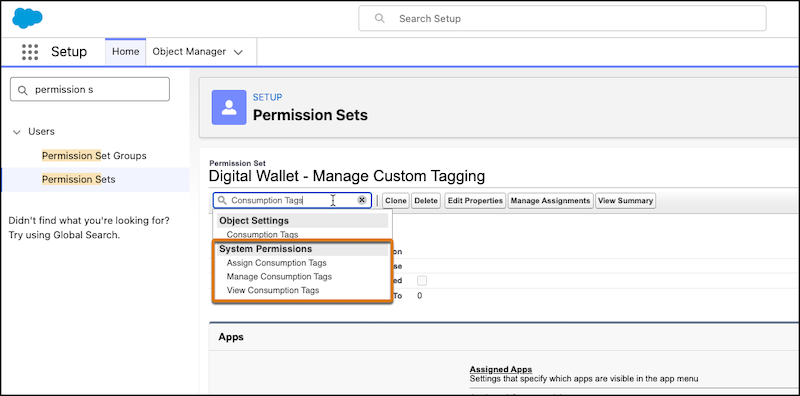
See Salesforce Help: Digital Wallet Permissions for details.
Install the Consumption Tagging App
The Consumption Tagging app contains the required metadata and objects (DLOs and SDMs) for consumption tags and the Tableau Next assets for the Consumption Analytics dashboard. You can create and manage custom tags without installing the app. However, the app is required to create Data 360 reports or Tableau Next visualizations based on your custom tags. See Salesforce Help: Install the Consumption Tagging App.
We recommend that you don’t delete, remove, or edit the Consumption Insights Extended Semantic Data Model (SDM).
Supported Usage Types
Supported Data 360 usage types for custom tagging:
| Data 360 Usage Type | Usage Type API Name | Resource Usage Source | Resource Type |
|---|---|---|---|
| Batch Activations | DataCloud_BatchActivationProcessed | Activations on segments | MarketSegmentActivationDef |
| Batch Calculated Insights | DataCloud_BatchCI | Calculated Insights | MktCalcInsightObjectDef |
| Batch Data Pipeline | DataCloud_BatchDataPipeline | Data ingestion via batch connectors | DataStreamDefinition |
| Batch Data Transforms | DataCloud_BatchDataTransform | Data Transforms | MktDataTransformSetup |
| Batch Profile Unification | DataCloud_BatchProfileUnification | Identity Resolution | IdentityResolutionDefinition |
| Data Share Rows Shared (Data Out) | DataCloud_DataShareRowsShared | Data Shares | ExtDataShareDefinition |
| Inferences | DataCloud_Inference | This category can be used by predictive AI | MktMLAIModel |
| Segmentation | DataCloud_Segments | Segments | MarketSegmentDefinition |
| Activation DMO - Streaming | DataCloud_StreamingActivations | Activations on Data Model Objects | MarketSegmentActivationDef |
| Streaming Actions (including lookups) | DataCloud_StreamingActions | Data Actions | DataActionDefinition |
| Streaming Calculated Insights | DataCloud_StreamingCI | Calculated Insights | MktCalcInsightObjectDef |
| Streaming Data Pipeline | DataCloud_StreamingDataPipeline | Data ingestion via streaming connectors | DataStreamDefinition |
| Streaming Data Transforms | DataCloud_StreamingDataTransform | Data Transforms | MktDataTransformSetup |
| Sub-second Real-Time API (not Events) | DataCloud_RealTimeEventsAndAPI | Provided for real-time API calls. Not provided for processing real-time events. | DataGraphDefinition |
Supported Agentforce Actions and Agents for custom tagging:
| Billing Category | Resource Type |
|---|---|
| Action: Standard Actions | GenAiFunctionDefinition |
| Action: Custom Actions | GenAiFunctionDefinition |
| Agentforce Agents | BotDefinition |
Unsupported Usage Types
Unsupported Data 360 usage types for custom tagging:
| Data 360 Usage Type | Usage Type API Name | Resource Usage Source |
|---|---|---|
| Data Federation or Data Sharing Rows Accessed | DataCloud_DataFedOrSharingRowsAccessed | Data Federation |
| Data Queries | DataCloud_DataQueries | Any feature that queries Data 360 data |
| Storage Beyond Allocation | DataCloud_Storage | Data 360 storage |
| Sub-second Real-Time Profiles & Entities | DataCloud_RealTimeProfiles | Data Graphs |
Unsupported Agentforce usage types for custom tagging:
- Voice Actions (Standard and Custom)
- Starter Prompts
- Basic Prompts
- Standard Prompts
- Advance Prompts
- Configure and Manage Custom Consumption Tags
After you determine your tagging strategy, you’re ready to begin creating custom tags and assigning them to resources. - How Usage Events Are Tagged
When a resource that you’ve tagged is running and generating usage, the resulting usage events are automatically stamped in the background with the custom tags that you applied to that resource, approximately every 24 hours. - Objects Used for Custom Consumption Tags
Digital Wallet creates and populates these objects. Some of these objects are installed as part of Digital Wallet, while others are installed as part of the Consumption Tagging app. You can access these objects in Data 360 in the Data Lake Objects, Data Model Objects, and Semantic Layer tabs. - Build a Data 360 Report Based on Your Custom Tags
After you have your tags defined and have assigned them to resources, you’re ready to build a report. For example, if you create a tag group called Department and assign the tag Marketing to a data stream, a new calculated field called Department is created in the extended semantic data model (SDM). You can then start building reports using this field, such as to see consumption by Department.
