
You are here:
Match Prompt ID to Prompt Name to Interpret Report Data
After you build a report for tracking Generative AI (GenAI) consumption by prompt, the reports lists the prompts using the prompt ID or API name. The API name usually mirrors the actual prompt name; however, the internal prompt ID isn’t descriptive enough to identify which prompt. But we’ll show you how to map the prompt ID with the prompt name.
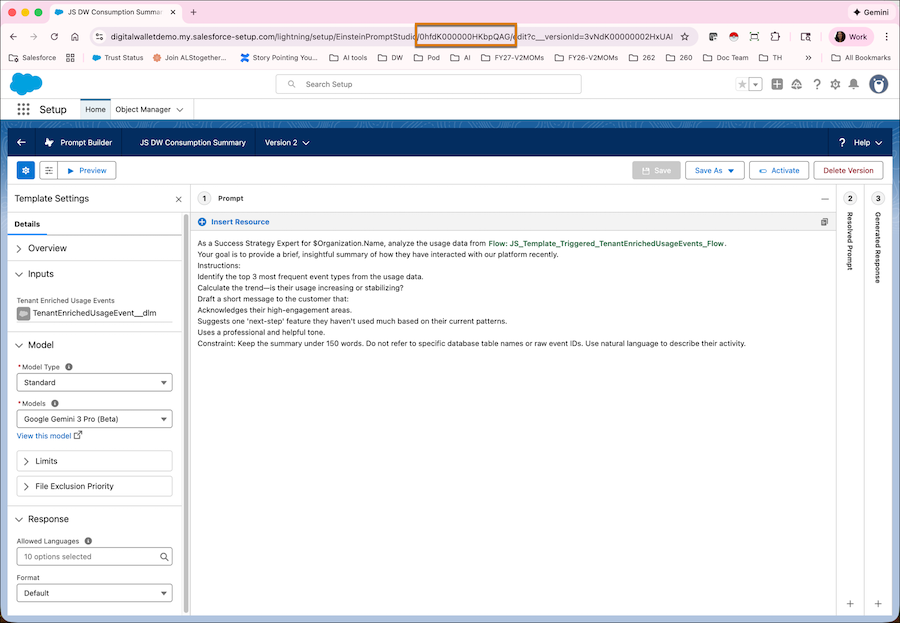
The Prompt ID is the unique 18-character ID found in the billing data. To quickly look up the corresponding prompt name and details in Prompt Builder, you’ll substitute the prompt ID in any prompt template with a prompt ID from your usage report.
- From Setup, find and select Prompt Builder.
-
Open any existing prompt template detail page where the Template Type is Flex.
Notice the prompt ID in the page URL.
- In the report, copy the prompt ID you want to map.
-
Paste this prompt ID in the prompt template URL.
Now you can see the prompt template detail page that corresponds with the prompt ID in your usage report.
- Repeat to map additional prompt IDs.
