
You are here:
View License Utilization in Digital Wallet
License Utilization is your one-stop hub for viewing your footprint across the entire Salesforce product portfolio. License Utilization provides a clear, unified picture of the products you’ve purchased and their corresponding seat-based licenses. It provides accurate, real-time data, in a single, trusted place. All license data, including metrics, percentages, and totals, pertain to the org where you’re viewing the license utilization information.
Required Editions
| Available in: Lightning Experience |
| Available in: Enterprise and Unlimited Editions |
| User Permissions Needed | |
|---|---|
| To view the Digital Wallet License Utilization tab: | View License Utilization |
The license information that you see updates in real-time and reflects what’s currently provisioned to this org. Every time you refresh the page, the license data updates. In rare cases, you can see a discrepancy between the total license provisioned and the total licenses purchases. This discrepancy is likely due to a delay in processing a renewal order. Your Salesforce account executive can answer any questions.
License Utilization Permissions
You have access if you're a Salesforce admin and your org has at least one product sold
directly from Salesforce and provisioned to a force.com tenant. To grant
access to other users, give them the “View License Utilization” user permission in a custom
profile or permission set in Setup.
- For a list of permissions to access other Digital Wallet features, see Salesforce Help: Digital Wallet Permissions.
- For more information about which Salesforce products are considered
force.comtenants, contact your account executive.
Access License Utilization in Digital Wallet
Active production orgs include Digital Wallet and the License Utilization tab. You can’t access the License Utilization tab from a sandbox, trial org, or demo org.
From the App Launcher, find and select Digital Wallet. If you also have consumption-based products and land on the Consumption Cards tab, click the License Utilization tab.
If you don’t see the License Utilization tab, be sure that the tab is visible. This scenario can occur if you have users assigned to a custom profile. See “Tab Visibility for Digital Wallet Tabs” in Salesforce Help: Digital Wallet Permissions for more details.
In the License Utilization tab, you see a breakdown of licenses by product name and the specific licenses associated with it. The product name matches what you see on the order forms and contracts, including the Salesforce Enterprise License Agreement (SELA). With License Utilization, you can easily monitor and manage usage. For each license, you see key metrics, such as total licenses provisioned, how many licenses are assigned, and how many licenses are remaining. You can move past the challenges of gathering fragmented license data. Instead, you can focus on analyzing current trends, proactively managing license usage, optimizing spending, and planning for future needs.
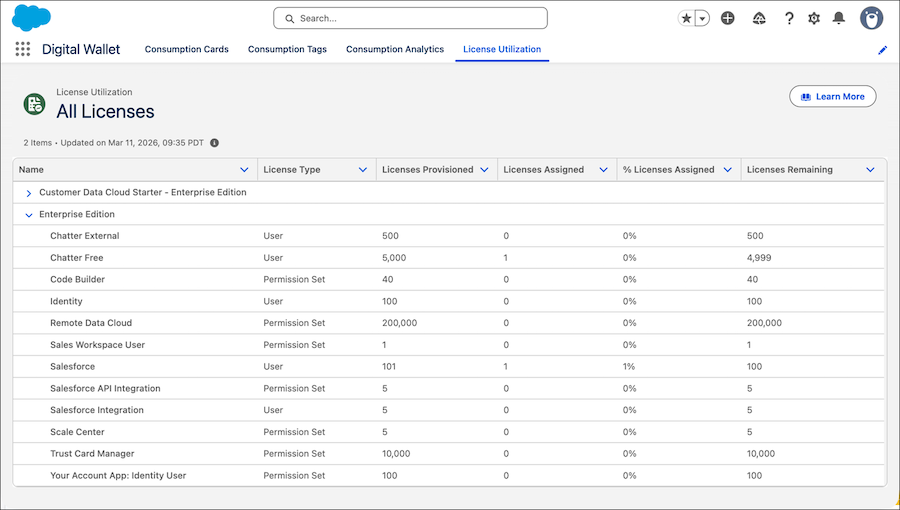
License information is updated in real-time and is aggregated per org. Expand a product node to view the specific license information for it.
For information on the terms used in the License Utilization tab, see Salesforce Help: Digital Wallet Glossary of Terms.
What Products and Licenses Are Supported?
You can view license utilization information in Digital Wallet for all products that are sold
directly from Salesforce and provisioned to the customer's force.com
tenant, including edition and add-on products. We show license information for only user
licenses and permission set licenses. We always show the latest product and license names.
Contact your account executive if you have any questions about product name changes.
We don’t support:
- Products that are sold and provisioned to other tenants, for example, MuleSoft, Tableau, Heroku, ExactTarget, and so on. These products have separate methods for viewing license information.
- Licenses that are purchased from independent software vendor (ISV) partners or third parties.
- Platform licenses and user feature licenses.
If the License Is Obtained Through Multiple Products
It’s common to obtain a single license type through multiple products. We often include Chatter External licenses in multiple products. For example, you receive a license from more than one product (Product A with 500 licenses and Product B with 1,000 licenses). In this case, the License Utilization page doesn’t differentiate how many licenses you obtained for each specific product. It shows the same total number of licenses provisioned (1,500) under both Product A and Product B.
