
You are here:
Digital Wallet Permissions
To access Digital Wallet and its features, users require a combination of user permissions, permission sets, and licenses.
Required Editions
| Available in: Lightning Experience |
| Available in: Enterprise and Unlimited Editions |
Digital Wallet Access for Admins
If you're a Salesforce admin and your org uses Digital Wallet-enabled products, you can automatically access Digital Wallet from the Digital Wallet app or Your Account app. However, you likely require other permissions to access some of our key features. See the “Digital Wallet Permissions Reference” table for details.
Digital Wallet Access for Non-Admin Users
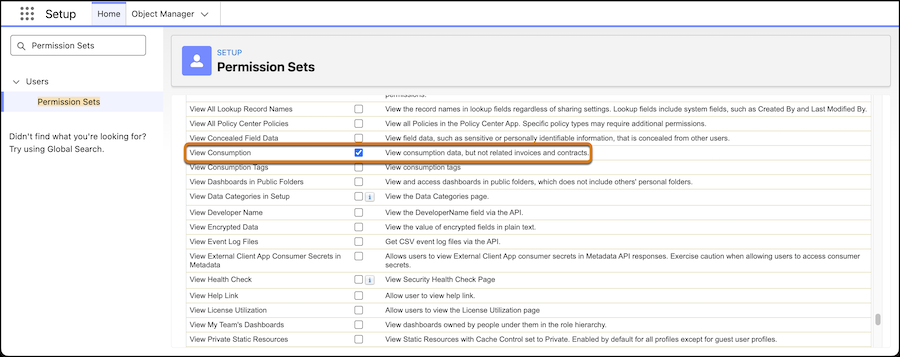
To grant access to non-admin users, give them the “View Consumption” or “View License Utilization” permission in either a permission set or custom profile via the Setup menu. See Manage Your Salesforce Account for information on how to access Digital Wallet for Your Account app users. You'll optionally want to assign additional licenses and permissions sets for some Digital Wallet features. See the “Digital Wallet Permissions Reference” table for details.

In this example, the View Consumption system permission is being added to a custom permission set called “Digital Wallet.”
Digital Wallet Permissions Reference
Here's an overview of permissions required to access Digital Wallet and its supported features. Contact your Salesforce admin if you require assistance.
| Permission, Permission Set, or License | Description |
|---|---|
| View License Utilization permission | Provides access to the Digital Wallet app and the License Utilization tab. Assign to: all Digital Wallet users who require access to view seat-based products and licenses information. |
| View Consumption permission | Provides access to the Digital Wallet app and the Consumption Analytics tab. Assign to: all Digital Wallet users who require access to view usage for consumption-based products. |
| Manage Billing user permission or Your Account App admin user permission set | Provides access to the Your Account app. Assign to: all users of the Your Account app |
| Data Cloud Architect permission set | Provides access to all functionality within Data 360. Assign to: users who administer and manage Data 360. |
| “Access to manage the template framework templates” permission | Allows access to create, update, and manage app templates. Assign to: users who will install the Consumption Tagging app for the Consumption Analytics Tableau Next dashboard. |
| Data Cloud User permission set | Required to view the data in the Data 360 and the Tableau Next dashboards. Assign to: non-admin users |
| Tableau Next Limited Consumer permission set | Allows standard users to access the Consumption Analytics dashboard. Also assign the Tableau Next Business User license. Assign to: non-admin users |
| Tableau Next Business User license | Enables users to view the Consumption Analytics dashboard. Also assign the Tableau Next Limited Consumer permission set. Digital Wallet includes 10 free Tableau Next Business User licenses for your users. If you have questions about whether you have additional licenses from other products, or if you require more licenses, contact your Account Executive. Assign to: users who aren’t assigned a higher Tableau Next license |
| Assign Consumption Tags | Allows users to assign and unassign existing consumption tags to resources. To assign tags, users must have access to the associated resources through a profile or permission set. Assign to: Users who have access to the resources but don’t require the ability to create custom tags. |
| Manage Consumption Tags | Grants users the ability to create, edit, delete, assign, and unassign consumption tags and tag groups. Assign to: Admins or users responsible for defining your organization's tagging strategy |
| View Consumption Tags | Grants users read-only access to view tags, tag groups, and the tag assignments for resources to which they have access. Assign to: Users who want to understand how resources are categorized for reporting but don’t require the ability to manage consumption tags. |
Tab Visibility for Digital Wallet Tabs
When Digital Wallet is installed, we enable visibility to view its associated tabs for standard profiles. If your access was granted using a different method and you can't see the Consumption Cards, License Utilization, Consumption Tags, or Consumption Analytics tab, see Salesforce Help: Tab Settings to fix the issue, or contact your Salesforce admin for assistance.
Access for Your Account Identity Users to View Consumption Cards
You can provide access to Identity Users to view Digital Wallet consumption cards by assigning Your Account app user permissions. The Your Account app is where users can go to manage your contracts and renewals, view and download invoices, and purchase additional usage for Digital Wallet cards.
Admins and other Salesforce users with the Manage Billing permission have access to the Your Account app. For other users, you can assign them the Identity license to provide access to Digital Wallet consumption cards without providing full access to the Salesforce org. Identity users must be assigned both the “Your Account App: Identity User” permission set license and the “Manage Subscription in Your Account: Identity Users” user permission. See Salesforce Help: Give Your Billing Users Free Access to the Your Account App for step-by-step instructions.
